Welcome to the Inedo Forums! Check out the Forums Guide for help getting started.
If you are experiencing any issues with the forum software, please visit the Contact Form on our website and let us know!
Problem with setting up LDAP in ProGet
-
Hi there,
I followed the documentation here:
https://docs.inedo.com/docs/installation/security-ldap-active-directory/various-ldap-openldap
Unfortunately, I have not been able to get the connection working so far.
The LDAP test dialog looks like this:
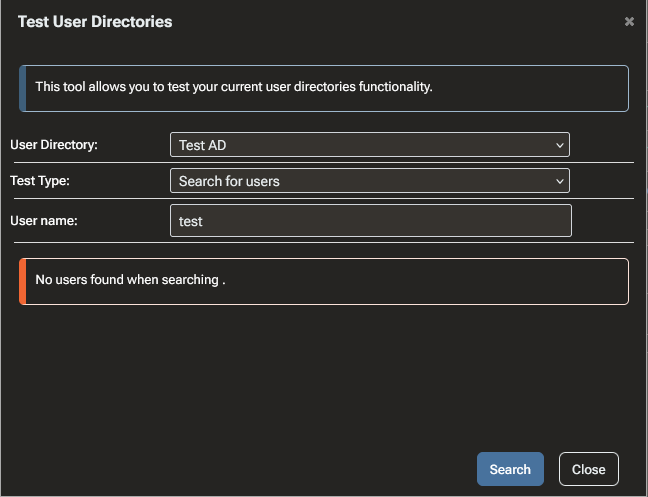
From what I can tell, it seems to fail somewhere around this code path:
The container logs only show the following:
2026-05-18T14:20:14.414550674Z Begin LDAP Get Search Results
2026-05-18T14:20:14.448461026Z LdapReferralException
2026-05-18T14:20:14.448488541Z LdapReferralException
2026-05-18T14:20:14.448603052Z LdapReferralException
2026-05-18T14:20:14.448612606Z End LDAP Get Search Results
The main problem is that the logs do not contain the actual exception message or stack trace. They only show
LdapReferralException, so it is difficult to understand what exactly is going wrong or how to fix the LDAP configuration.I have a few questions:
- Where should ProGet container logs be written?
The container has a mounted volume at:
/var/proget/logsHowever, this directory is empty. Is this expected behavior for the container image, or should ProGet write log files there?
-
How can I increase the log level?
I found this forum thread:https://forums.inedo.com/topic/3060/defining-log-level/4?_=1779106499495
But I was not able to get more detailed LDAP error output.
-
Why is the Administration Logs page empty?
I also checked:
https://some-proget-url/administration/logsbut that page is empty as well. Should LDAP test errors appear there, or are they only written to container stdout/stderr?
-
How can I troubleshoot the LDAP/AD connection further?
Since the current output only showsLdapReferralException, I’m not sure whether this is caused by:- LDAP referrals not being followed,
- an incorrect base DN,
- domain controller behavior,
- missing bind permissions,
- TLS/LDAPS issues,
- or something else.
Is there a recommended way to get the full LDAP exception message and stack trace from ProGet?
-
How should ProGet logs be forwarded to Grafana/Loki?
Since ProGet would be a central part of our infrastructure, we would like to monitor it properly, including:- application errors,
- authentication/authorization failures,
- LDAP/AD issues,
- package publishing/deletion events,
- audit-relevant events,
- alerting on failures.
What is the recommended approach for forwarding ProGet logs from the container to a central logging system such as Grafana Loki? Should this be done via container stdout, mounted log files, a logging driver, or another supported mechanism?
Thanks in advance for any help or pointers.
- Where should ProGet container logs be written?
-
Regarding How should ProGet logs be forwarded to Grafana/Loki? one way would be to forward the docker logs to Loki. But the layout of the log lines is not consistent. It looks like there are different loggers writing the stdout in different formats.
-
Hi @pg_user_8607 ,
Unfortunately, the only information we receive from the underlying library is
LdapReferralException, so there's nothing else we can log. My understand is that the server is limiting the information and you ought to see more information from the LDAP/AD server's query logs (they are like HTTP access logs). That's the absolute best place to look.In our experience, a referral typically means the domain name is incorrect (e.g. user@domain.com instead of user@domain.local), but it could be any of the things you mentioned to. Unfortunately, LDAP/AD configuration can be a pain in rare cases (which it sounds like you are), and there's just no way around that.
As for monitoring, here is what we recommend:
- periodic monitoring of the
/healthendpoint (every 5 minutes) - (optional) HTTP access logs (retain for 7 days)
There's nothing required beyond that. Those "container logs" (i.e. proget console output) that you see are primarily intended for us (product engineers) to troubleshoot problems and there's not much value in trying to use/storing them.
For a tool like ProGet, trying to do extract/monitor detailed metrics is counter productive and leads to information overload. Many "errors" are not problems are a total waste of everyone's time to troubleshoot.
For auditing, ProGet maintains internal audit logs (you can query them from the database if you really want to "export" them), or you can use webhooks if you want to publish events. But again, we don't think that's productive; they just become a "secondary log" that no one looks because it's harder to query than ProGet database.
For authentication-related information, a combination of HTTP log monitoring (403 errors) and LDAP/AD server is the best thing to check.
Cheers,
Steve
- periodic monitoring of the