Maybe https://github.com/Inedo/inedox-inedocore/pull/183 fixed your problem too. From what you describe your symptoms were the same as mine :)
P
pg_user_8607
@pg_user_8607
2
Reputation
17
Posts
3
Profile views
0
Followers
0
Following
Best posts made by pg_user_8607
-
RE: Unable to login with Active Directory with Proget 2026.1posted in Support
-
RE: Install Issues - Docker Compose + Postgresposted in Support
Thanks for the fixes and the additional information shared here. I think those are very helpful for other people!
I'm using a very similar Compose setup, and I'd like to add another aspect that hasn't been mentioned yet: the "one process per container" principle. While the ProGet + InedoDB Setup is very easy for beginners i think splitting it up is the best way for more complex setups :).
In my experience, it also simplifies monitoring, logging, and troubleshooting. When something goes wrong, it's much easier to identify the affected service and trace issues without having to disentangle multiple processes running inside the same container.
Latest posts made by pg_user_8607
-
RE: Install Issues - Docker Compose + Postgresposted in Support
Thanks for the fixes and the additional information shared here. I think those are very helpful for other people!
I'm using a very similar Compose setup, and I'd like to add another aspect that hasn't been mentioned yet: the "one process per container" principle. While the ProGet + InedoDB Setup is very easy for beginners i think splitting it up is the best way for more complex setups :).
In my experience, it also simplifies monitoring, logging, and troubleshooting. When something goes wrong, it's much easier to identify the affected service and trace issues without having to disentangle multiple processes running inside the same container.
-
User gets 500 error if you delete a logged in userposted in Support
Hey there,
I noticed what looks like an unhandled edge case around deleted users with active sessions.
I started a fresh instance using:
podman run -d --name=proget --restart=unless-stopped -p 80:80 proget.inedo.com/productimages/inedo/proget:latestThen I:
- Created a user
test:test - Logged in as
test:testin an incognito browser session - Deleted the user from the original admin session
- Refreshed the page in the incognito session
Instead of being redirected to the login page, I get an HTTP 500 error.
I would have expected the session to be invalidated and the user to be redirected back to the login page since the account no longer exists.
- Created a user
-
RE: Unable to login with Active Directory with Proget 2026.1posted in Support
Maybe https://github.com/Inedo/inedox-inedocore/pull/183 fixed your problem too. From what you describe your symptoms were the same as mine :)
-
RE: Container image size calculation does not always workposted in Support
Thank you very much for the detailed answer!
-
Container image size calculation does not always workposted in Support
Hey there,
i noticed on my instance that the container image size calculation does not always work. I pushed a ~20GB Windows container image and the layer sizes look good. But the size column on the overview (/containers) page just shows 0 bytes.
The problem is also visible on the ProGet 1000 instance. So maybe you can check / debug it there:

inedo/buildmaster:25 => 0 bytes
but on https://proget1000.inedo.com/containers/tags/ProductImages/inedo/buildmaster/25.0.12/layers the sizes look good
Is this intentional? Maybe somehow related to a :25 or :lastest tag which resolved to some other version?
-
SCA page throws an exception for anonymous usersposted in Support
Hi there,
i'm getting a 500 error page when calling the SCA page as anonymous user.
Configuration:
- Web.HideHomePageFromAnonymousUser = true
- Some feeds are intentionally accessible to anonymous users
The home page behaves as expected and redirects anonymous users to the login page.
However, some URLs are still directly accessible anonymously (as expected), for example:
Accessing the SCA page from there anonymously causes an application error:
An error occurred in the web application: Object reference not set to an instance of an object.

URL: http://proget-test.some-corp-com/sca
Referrer: (not set)
User: (unknown)
User Agent: Mozilla/5.0 (Windows NT 10.0; Win64; x64) AppleWebKit/537.36 (KHTML, like Gecko) Chrome/148.0.0.0 Safari/537.36 Edg/148.0.0.0
IP Address: XX.XXX.XX.XX
Stack trace:    at Inedo.ProGet.WebApplication.Pages.Sca.ScaOverviewPage.Inedo.ProGet.WebApplication.IPrivilegesValidator.ValidatePrivileges() in C:\Users\builds\AppData\Local\Temp\InedoAgent\BuildMaster\192.168.44.60\Temp\_E655333\Src\src\ProGet\WebApplication\Pages\Sca\ScaOverviewPage.cs:line 185
   at Inedo.ProGet.WebApplication.ProGetHttpModule.ValidatePrivileges(AhHttpApplication app, IHttpAsyncHandler handler) in C:\Users\builds\AppData\Local\Temp\InedoAgent\BuildMaster\192.168.44.60\Temp\_E655333\Src\src\ProGet\WebApplication\ProGetHttpModule.cs:line 434
   at Inedo.ProGet.WebApplication.ProGetHttpModule.PostMapRequestHandlerAsync(AhHttpApplication app) in C:\Users\builds\AppData\Local\Temp\InedoAgent\BuildMaster\192.168.44.60\Temp\_E655333\Src\src\ProGet\WebApplication\ProGetHttpModule.cs:line 406
   at Inedo.Web.AhWebMiddleware.InvokeAsync(HttpContext context)

::Web Error on 06/01/2026 15:51:49::
Version info:
Connection String: Web UI Version: 2026.2 (Build 16) Database Schema Version: 26.0.2.16 SQL Server Version: PostgreSQL 17.7 on x86_64-pc-linux-musl, compiled by gcc (Alpine 15.2.0) 15.2.0, 64-bit db_owner: True Database Name: proget Database Collation: C (UTF8) Database Recovery Model: Default (1) Database Read Committed Snapshot: True Database Auto Update Stats: True -
RE: Problem with setting up LDAP in ProGetposted in Support
Regarding How should ProGet logs be forwarded to Grafana/Loki? one way would be to forward the docker logs to Loki. But the layout of the log lines is not consistent. It looks like there are different loggers writing the stdout in different formats.
-
Problem with setting up LDAP in ProGetposted in Support
Hi there,
I followed the documentation here:
https://docs.inedo.com/docs/installation/security-ldap-active-directory/various-ldap-openldap
Unfortunately, I have not been able to get the connection working so far.
The LDAP test dialog looks like this:
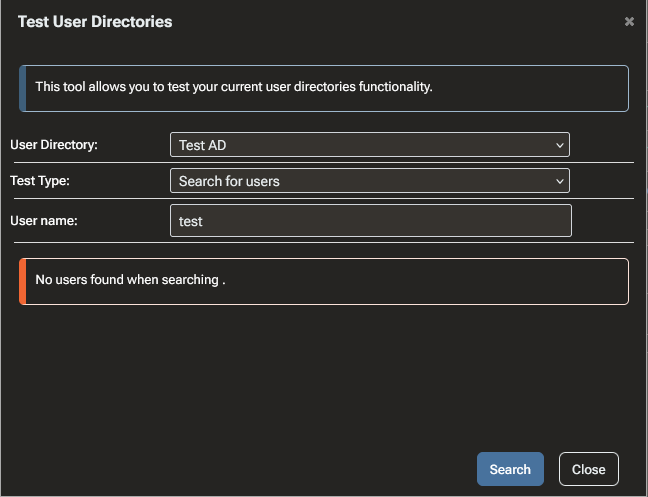
From what I can tell, it seems to fail somewhere around this code path:
The container logs only show the following:
2026-05-18T14:20:14.414550674Z Begin LDAP Get Search Results
2026-05-18T14:20:14.448461026Z LdapReferralException
2026-05-18T14:20:14.448488541Z LdapReferralException
2026-05-18T14:20:14.448603052Z LdapReferralException
2026-05-18T14:20:14.448612606Z End LDAP Get Search Results
The main problem is that the logs do not contain the actual exception message or stack trace. They only show
LdapReferralException, so it is difficult to understand what exactly is going wrong or how to fix the LDAP configuration.I have a few questions:
- Where should ProGet container logs be written?
The container has a mounted volume at:
/var/proget/logsHowever, this directory is empty. Is this expected behavior for the container image, or should ProGet write log files there?
-
How can I increase the log level?
I found this forum thread:https://forums.inedo.com/topic/3060/defining-log-level/4?_=1779106499495
But I was not able to get more detailed LDAP error output.
-
Why is the Administration Logs page empty?
I also checked:
https://some-proget-url/administration/logsbut that page is empty as well. Should LDAP test errors appear there, or are they only written to container stdout/stderr?
-
How can I troubleshoot the LDAP/AD connection further?
Since the current output only showsLdapReferralException, I’m not sure whether this is caused by:- LDAP referrals not being followed,
- an incorrect base DN,
- domain controller behavior,
- missing bind permissions,
- TLS/LDAPS issues,
- or something else.
Is there a recommended way to get the full LDAP exception message and stack trace from ProGet?
-
How should ProGet logs be forwarded to Grafana/Loki?
Since ProGet would be a central part of our infrastructure, we would like to monitor it properly, including:- application errors,
- authentication/authorization failures,
- LDAP/AD issues,
- package publishing/deletion events,
- audit-relevant events,
- alerting on failures.
What is the recommended approach for forwarding ProGet logs from the container to a central logging system such as Grafana Loki? Should this be done via container stdout, mounted log files, a logging driver, or another supported mechanism?
Thanks in advance for any help or pointers.
- Where should ProGet container logs be written?
-
RE: ProGet configuration as code (IaC)?posted in Support
I love the idea here
Here is another handy way which reuses the existing pgutil / Inedo.ProGet tooling:
Program.cs:#!/usr/bin/dotnet run #:sdk Microsoft.NET.Sdk #:package Inedo.ProGet@2.1.3 #:property JsonSerializerIsReflectionEnabledByDefault=true using Inedo.ProGet; Console.WriteLine($"Starting ProGet bootstrap"); var client = new ProGetClient("http://localhost:8090", "test123"); var groups = client.ListUserGroups(); foreach (var group in DesiredState.Groups) { if (await groups.AllAsync(g => g.Name.Equals(group.Name)) != null) { await client.UpdateUserGroupAsync(group); } else { await client.CreateUserGroupAsync(group); } } var users = client.ListUsersAsync(); foreach (var user in DesiredState.Users) { if (await users.FirstOrDefaultAsync(u => u.Name.Equals(user.Name)) != null) { await client.UpdateUserAsync(user); } else { await client.CreateUserAsync(user); } } var connectors = client.ListConnectorsAsync(); foreach (var connector in DesiredState.Connectors) { if (await connectors.FirstOrDefaultAsync(c => c.Name.Equals(connector.Name)) != null) { await client.UpdateConnectorAsync(connector.Name, connector); } else { await client.CreateConnectorAsync(connector); } } var feeds = client.ListFeedsAsync(); foreach (var feed in DesiredState.Feeds) { if (await feeds.FirstOrDefaultAsync(f => f.Name!.Equals(feed.Name))) { await client.UpdateFeedAsync(feed.Name!, feed); } else { await client.CreateFeedAsync(feed.Name!, feed.FeedType!); await client.UpdateFeedAsync(feed.Name!, feed); } } var settings = client.ListSettingsAsync(); foreach (var setting in DesiredState.Settings) { await client.SetSettingAsync(setting.Name, setting.Value); } Console.WriteLine("ProGet bootstrap completed successfully."); public static class DesiredState { public static IReadOnlyList<SecurityUser> Users { get; } = [ new SecurityUser { Name = "svc-ci", DisplayName = "CI Service Account", Email = "svc-ci@example.com", Password = "svc-ci", Groups = ["proget-admins"], }, ]; public static IReadOnlyList<SecurityGroup> Groups { get; } = [ new SecurityGroup { Name = "proget-admins", }, ]; public static IReadOnlyList<ProGetConnector> Connectors { get; } = [ new ProGetConnector { Name = "nuget-org", FeedType = "nuget", Url = "https://api.nuget.org/v3/index.json", Timeout = 30, MetadataCacheEnabled = true, }, ]; public static IReadOnlyList<ProGetFeed> Feeds { get; } = [ new ProGetFeed { Name = "nuget-internal", FeedType = "NuGet", Description = "Internal NuGet packages with nuget.org connector", Active = true, UseApiV3 = true, Connectors = ["nuget-org"], RetentionRulesEnabled = true, VulnerabilitiesEnabled = true, PackageStatisticsEnabled = true, }, ]; public static IReadOnlyList<SettingsInfo> Settings { get; } = [ new SettingsInfo { Name = "Web.BaseUrl", Value = "http://localhost:8090", Description = "Full root URL for this installation of ProGet. This should start with http:// or https://", ValueType = SettingsInfoValueType.Text, }, ]; }You can run it with
dotnet run Program.csor Visual Studio Code. It is easy to debug and extend.