Welcome to the Inedo Forums! Check out the Forums Guide for help getting started.
If you are experiencing any issues with the forum software, please visit the Contact Form on our website and let us know!
Documentation for enabling https does not work: eventId 1000
-
I have followed the directions here: https://docs.inedo.com/docs/installation/windows/web/https-support
When adding the https cert in ProGet web UI, it only gave me one command to run on the command line:
netsh http add urlacl url=https://*:443/ user="MYDOMAIN\PROGET-SERVER$"I thought this was strange because the docs say to use NetworkService, not the machine account name for the netsh binding.
Then when I clicked OK, suddently I get ERR_CONNECTION_CLOSED in the web browser even after opening with the url https://PROGET-SERVER-URL
Windows event viewer shows event id 1000
Category: Microsoft.AspNetCore.Server.Kestrel EventId: 0 Overriding address(es) 'http://*:8624, https://*:443'. Binding to endpoints defined via IConfiguration and/or UseKestrel() instead.I tried following the docs further and adding this command, but the server still does not start
netsh http add sslcert hostnameport=proget-hostname.mydomain.com:443 certhash=VALID_HASH certstorename=My appid="{VALID_GUID}"When I attemp to keep following the documentation and bind NetworkService, it fails because the machine account bound through the command the web UI had me run has already bound:
netsh http add urlacl url=https://*:443/ user="NETWORK SERVICE"

Url reservation add failed, Error: 183
Cannot create a file when that file already exists.
Here is the relevant data that was added to proget.config
<WebServer Enabled="true" Urls="http://*:8624;https://*:443" Subject="proget-url.mydomain.com" Store="My" Location="LocalMachine" AllowInvalid="True" UseHttpsRedirection="True" /> -
Hi @michael-day_7391,
The docs say to use
NETWORK SERVICEbecause that is the default account ProGet users when it's installed. You need to use the username of the account that the ProGet service is running as. If your ProGet service is running asMYDOMAIN\PROGET-SERVER$", then your netsh command should use that. If it is usingNETWORK SERVICE, then you should be useNETWORK SERVICE. If you want to switch to a different username, then you need to first remove the urlacl by running the following, then re-add it with the correct name.netsh http delete urlacl url==https://*:443/The event viewer error Windows event viewer shows event id 1000, can be ignored. That is a default message that shows because we configure the URL binding in code.
The
netsh http add sslcertcommand should only be used when you are using a haostname binding, since you are unsign *:443, you should not need this.While you are working through this issue, I would change
UseHttpsRedirection="True"toUseHttpsRedirection="False"in your config so you can still access the site over HTTP until you get this figured out. TheERR_CONNECTION_CLOSEDmessage typically indicates an issue with the certificate binding. The most common issue that can cause this is when the permissions are incorrect on your certificate.- Open the Certificate Manager using Window's MMC
- Navigate to Certificates (Local Computer) -> YOUR_STORE (ex: Personal) -> Certificates
- Right click on the certificate and select All Tasks -> Manage Private Keys
- And give read access to your service account
See more in our Troubleshooting guide.
Can you verify the permissions on the certificate?
Thanks,
Rich -
Thanks, re-adding the acl with the user set to NETWORKSERVICE worked.
Maybe it's just me, but if the web UI knows the server is running as NETWORKSERVICE, shouldn't the command it gives you in the web UI at the end of the setup process use the NETWORKSERVICE, and not give you the incorrect command using the computer account name?
I did assume that the instructions it gave me were valid, and that assumption turned out to be false.
-
Hi @michael-day_7391,
What version of Windows Server are you running?
When generating that command, ProGet will call
Environment.UserNameto determine the username the service is running as. I'm guessing this is returning the computer account instead of NETWORK SERVICE. I have crated a ticket, PG-3219, to review it, but I would like to test it on the same version of Windows Server as you.Thanks,
Rich -
@rhessinger Windows server 2019. I took a screenshot at the end of the installation as proof it was giving the wrong command, and yes, that is the machine account in the image.
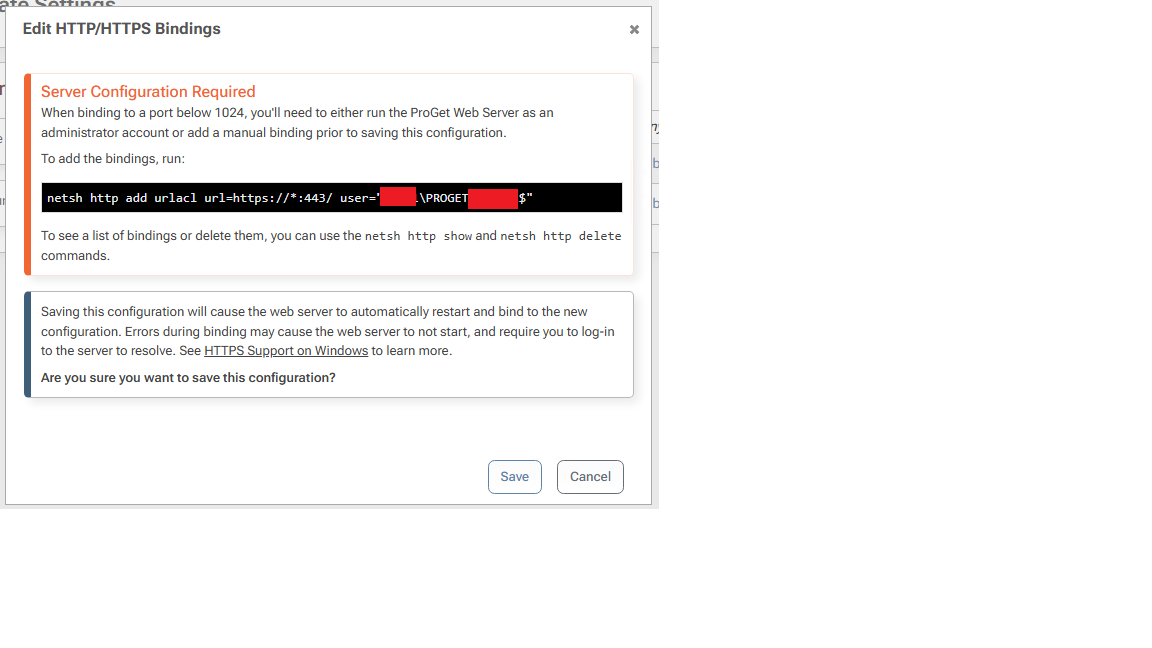
-
Hi @michael-day_7391,
Thanks for sending this over! We'll get this resolved within the next couple of maintenance releases of ProGet.
Thanks,
Rich

Hello! It looks like you're interested in this conversation, but you don't have an account yet.
Getting fed up of having to scroll through the same posts each visit? When you register for an account, you'll always come back to exactly where you were before, and choose to be notified of new replies (either via email, or push notification). You'll also be able to save bookmarks and upvote posts to show your appreciation to other community members.
With your input, this post could be even better 💗
Register Login