@rhessinger Windows server 2019. I took a screenshot at the end of the installation as proof it was giving the wrong command, and yes, that is the machine account in the image.
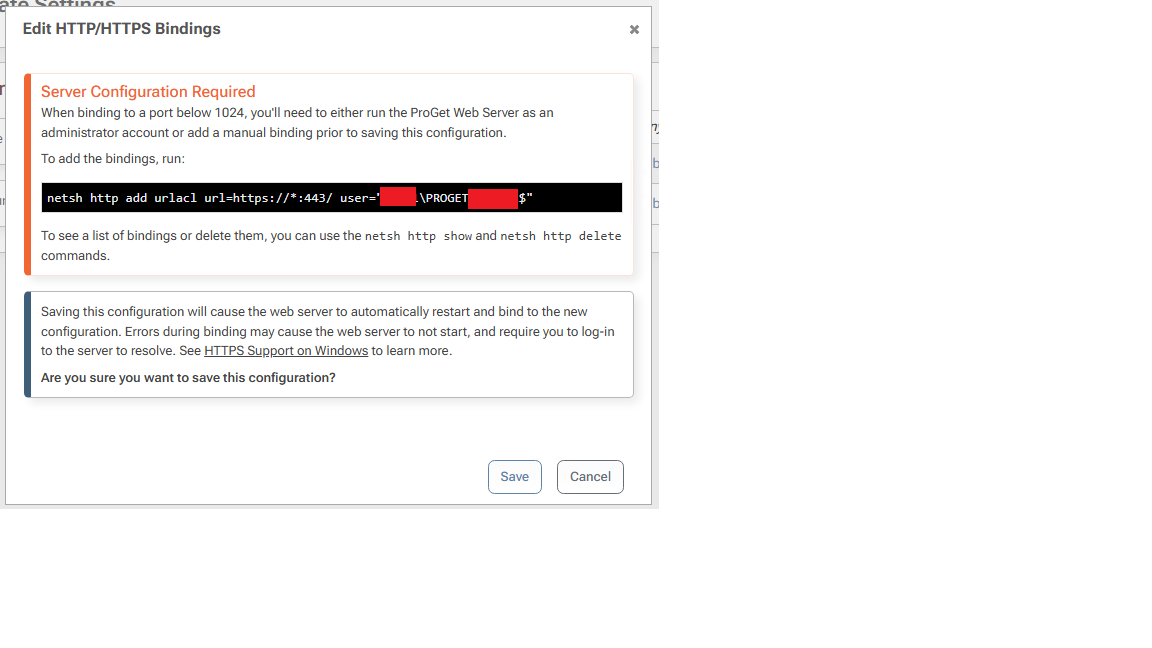
@rhessinger Windows server 2019. I took a screenshot at the end of the installation as proof it was giving the wrong command, and yes, that is the machine account in the image.
Thanks, re-adding the acl with the user set to NETWORKSERVICE worked.
Maybe it's just me, but if the web UI knows the server is running as NETWORKSERVICE, shouldn't the command it gives you in the web UI at the end of the setup process use the NETWORKSERVICE, and not give you the incorrect command using the computer account name?
I did assume that the instructions it gave me were valid, and that assumption turned out to be false.
I have followed the directions here: https://docs.inedo.com/docs/installation/windows/web/https-support
When adding the https cert in ProGet web UI, it only gave me one command to run on the command line:
netsh http add urlacl url=https://*:443/ user="MYDOMAIN\PROGET-SERVER$"
I thought this was strange because the docs say to use NetworkService, not the machine account name for the netsh binding.
Then when I clicked OK, suddently I get ERR_CONNECTION_CLOSED in the web browser even after opening with the url https://PROGET-SERVER-URL
Windows event viewer shows event id 1000
Category: Microsoft.AspNetCore.Server.Kestrel EventId: 0 Overriding address(es) 'http://*:8624, https://*:443'. Binding to endpoints defined via IConfiguration and/or UseKestrel() instead.
I tried following the docs further and adding this command, but the server still does not start
netsh http add sslcert hostnameport=proget-hostname.mydomain.com:443 certhash=VALID_HASH certstorename=My appid="{VALID_GUID}"
When I attemp to keep following the documentation and bind NetworkService, it fails because the machine account bound through the command the web UI had me run has already bound:
netsh http add urlacl url=https://*:443/ user="NETWORK SERVICE"

Url reservation add failed, Error: 183
Cannot create a file when that file already exists.
Here is the relevant data that was added to proget.config
<WebServer Enabled="true" Urls="http://*:8624;https://*:443" Subject="proget-url.mydomain.com" Store="My" Location="LocalMachine" AllowInvalid="True" UseHttpsRedirection="True" />
Thanks. I've installed certificates on our domain controllers, and now I can connect properly with LDAPS and login via my domain account.
So attempting imports from Artifactory here are the results:
Docker import : succeeded (using administrator username and password). It downloaded all the images into ProGet. Strangely enough, when I look at the Artifactory logs, it appears ProGet did not download as administrator, it downloaded as anonymous!
"2026-02-03T17:16:39.409Z|42aa2e4a419b3fedad8559b05a1a241d|10.2.2.2|anonymous|GET|/api/docker/docker-local/v2/redis/blobs/sha256%3A95e910c2a21348907d21bb294dc886ab3160fd44dedfbc8aa872641185e6285e|200|-1|1002978|7|ProGet/25.0.19.14 (Microsoft Windows NT 10.0.17763.0)"
RPM Import: failed (using administrator username and password). Artifactory returns 403. Looking at artifactory log, it appears that ProGet is sending 'anonymous' instead of the credentials I gave it as evidenced by this artifactory log:
"2026-02-03T17:24:55.659Z|e671ac4eeb05b7cb3a8b87684e1e2e15|10.2.2.2|anonymous|GET|/api/storage/node-exporter|403|-1|55|4|ProGet/25.0.19.14 (Microsoft Windows NT 10.0.17763.0)"
Helm Import: failed (using administrator username and password). The import screen did not show the helm repo in Artifactory. The list was empty, so import could not even be attempted.
I have solved the SSL issue by allowing firewall access to CRLs, however, now the import is failing because it can't find the artifactory local repository.
In artifactory, I have a local repo called "cozy-proxy" of type HelmOCI.
In Proget I have created a new feed of type Helm. I am connecting with the "Import packages from Artifactory" option, and using my full administrator credentials with username/password authentication.
When I get to the dropdown list that asks which artifactory local repository to import, the dropdown list is blank, and if I type "cozy-proxy" it doesn't find it.
@atripp said in Error importing from Artifactory: The SSL connection could not be established, see inner exception.:
Invoke-WebRequest
I was able to determine that the cause of the problem is that Windows, in an offline environment is unable to check certificate revocation, even when the root cert is added to the trusted root certification authorities store via GPO. Windows doesn't include LetsEncrypt certs in their trust by default.
Apparently, Chrome, RPM, docker, and Linux all automatically include LetsEncrypt certs, which is why the native docker clients, rpm clients, and chrome browser all connect without cert errors.
I have tried your suggestion, but It's not working. I've added a standard connector to the artifactory server, but I do not get any helpful errors in the log.
Unfortunately, the docker connector does not allow image browsing, so you have to type the image in the search path. It's not obvious what path I should check.
Connector: https://docker.artifactory.mydomain.com/
Artifactory lists file URL as https://docker.artifactory.mydomain.com/artifactory/docker-local/beats/filebeat/9.2.4/
I have tried the following searches which all fail:
artifactory/docker-local/beats/filebeat/9.2.4/
artifactory/docker-local/beats/filebeat:9.2.4
docker-local/beats/filebeat/9.2.4/
docker-local/beats/filebeat:9.2.4/
beats/filebeat/9.2.4/
beats/filebeat:9.2.4
filebeat/9.2.4/
filebeat:9.2.4
None of these searches log an errors in ProGet, so I still cannot tell why the SSL is failing...
Connector Note: Unfortunately, one or more connectors do not support third-party searching of their container registry, so you won't see any results from it, as you may expect. However, if you enter the exact repository name as the search term, it will display in the results.
No Images were found that matched "beats/filebeat:9.2.4".
Thanks, that worked!
We've had problems with this repo before as directory browsing isn't allowed due to the fact it's hosted on S3, so it breaks some software if you just put in the folder path. I guess ProGet is properly just appending the usual location of the repodata file instead of requiring the ability to browse the root folder.
I have setup a docker feed, and am attempting to use the import images option. When I choose artifactory, and enter the url and credentials, and click "Select Feed" I get the following error:
The SSL connection could not be established, see inner exception.
I'm not sure what inner exception I'm supposed to be seeing.
I cannot find any logs in the Administration section under the diagnostic center or the additional logs and events sections related to this error. It does not get logged at all, other than in the popup window, and the stack trace that I've seen in other posts on this forum about the error is missing.
The certificate on the artifactory server is valid, and issued by LetsEncrypt, and is trusted by the operating system. I can open the artifactory url I'm using in the web browser on the Proget Windows Server 2019 server and I do not see any certificate errors.
We actually don't have LDAPS enabled on our servers, so that would not work either. I'll go get some certs installed and enable LDAPS though, since ProGet doesn't seem to support the strong authentication (StarTLS) for regular LDAP.