Welcome to the Inedo Forums! Check out the Forums Guide for help getting started.
If you are experiencing any issues with the forum software, please visit the Contact Form on our website and let us know!
Connector for accessing Jfrog pypi feed
-
Hello,
I'm trying to setup a pypi feed, with a connector which connects to a jfrog pypi repo.
When querying for a package, I'm getting 406 http error. I suppect the problem is the Accept Headers.
Is possible to log all calls that are made by ProGet to visualize the problem ? Do you advice any solution without changing something on jfrog repo ?
Best Regards,
Pedro -
Hi @pmsensi ,
You'd need to run through a proxy like Fiddler or ProxyMan, which can capture the outbound / inbound traffic. Or if you provide us with a URL/API key we might be able to play around and attach a debugger. You could always create a free trial or something and set it up that way.
First thing that comes to mind is that your endpoint is incorrect and you may need to "play around" with the URL. Typically it's like this:
- endpoint is
https://server.corp/path/my-pypi - index file is
https://server.corp/path/my-pypi/simple - ProGet automatically appends
/simpleunless you specify otherwise on Advanced
The "Simple " endpoint is just a list of HTML like
<a href="...">. That's what ProGet/connectors/pypi follow.Thanks,
Steve
- endpoint is
-
Hi @stevedennis ,
thank you for fast reply. After checking the result with a proxy, is cleaer that the problem is the Accept Header.
As you can see in the pictures, proget is sending a value which jfrog do not accept.
Proget call, which results in a HTTP 406:
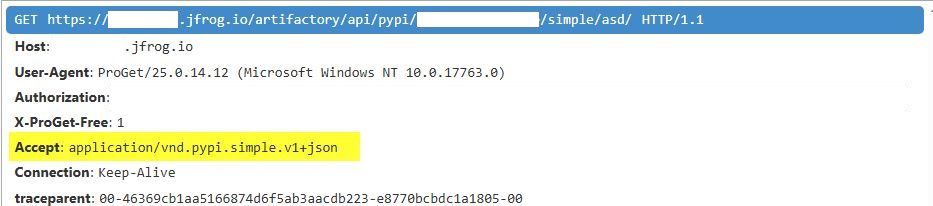
Chrome/Postman call, which results in HTTP 200:
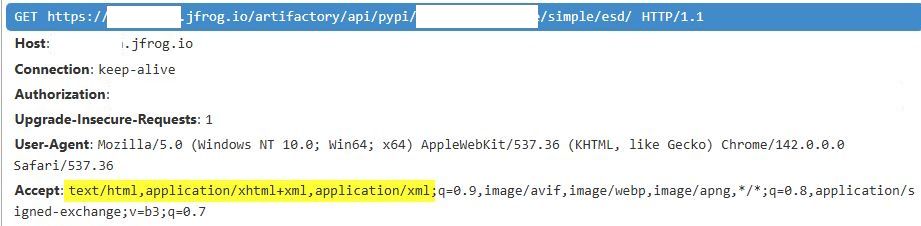
Is possible to somehow, manipulate this value in the configuration ? or somewhere else ?
Best regards,
Pedro Magno -
Hi @pmsensi,
Nice find. So we can't make it a configurable value, but we can try finding something that works with pipy.org, which is the main requirement.
According to the example posted in their docs, this might be what a Simple API might look like:
# Construct our list of acceptable content types, we want to prefer
# that we get a v1 response serialized using JSON, however we also
# can support a v1 response serialized using HTML. For compatibility
# we also request text/html, but we prefer it least of all since we
# don't know if it's actually a Simple API response, or just some
# random HTML page that we've gotten due to a misconfiguration.
CONTENT_TYPES = [
    "application/vnd.pypi.simple.v1+json",
    "application/vnd.pypi.simple.v1+html;q=0.2",
    "text/html;q=0.01",  # For legacy compatibility
]
ACCEPT = ", ".join(CONTENT_TYPES)
So I guess, could you try that header?
application/vnd.pypi.simple.v1+json, application/vnd.pypi.simple.v1+html;q=0.2, text/html;q=0.01Thanks,
Alana -
@atripp said in Connector for accessing Jfrog pypi feed:
application/vnd.pypi.simple.v1+json, application/vnd.pypi.simple.v1+html;q=0.2, text/html;q=0.01
Hello @atripp ,
yes, with that header, is working :)
-
Hi @pmsensi
Are you able to easily test a pre-release container? I wasn't sure if you're on Linux/Docker, but I just made a code change (PG-3164) that should show up soon as
inedo/proget:25.0.16-ci.1Let me know if you're able to try that -- if you're on Windows, I can push a package for the Ineod Hub to download as well.
Thanks,
Alana
-
-
@pmsensi sure thing!
2025.16-rc.1should be available now.Here's how to download it:
https://docs.inedo.com/docs/installation/windows/inedo-hub/howto-install-prerelease-product-versions -
@atripp now is working :)
Thank you!


Hello! It looks like you're interested in this conversation, but you don't have an account yet.
Getting fed up of having to scroll through the same posts each visit? When you register for an account, you'll always come back to exactly where you were before, and choose to be notified of new replies (either via email, or push notification). You'll also be able to save bookmarks and upvote posts to show your appreciation to other community members.
With your input, this post could be even better 💗
Register Login