Welcome to the Inedo Forums! Check out the Forums Guide for help getting started.
If you are experiencing any issues with the forum software, please visit the Contact Form on our website and let us know!
inedoxpack error: No extensions were found...
-
Hello!
I've got the problem with inedoxpack error:
No extensions were found in C:\Users\Administrator\AppData\Local\Temp\inedoxpack\9ceaae0893bc46e8b9ec31c0108cea18I tried as global so and local installation.
The command was executed in powershell v5.1.17763.592 (Windows Server 2019 Standard)Can anyone help me with it?
-
-
I used next command line:
PS C:\Projects\BuildMasterTestExt\BuildMasterTestExt> dotnet inedoxpack pack --build
Executing dotnet publish for BuildMasterTestExt.csproj (net9.0)...
No extensions were found in C:\Users\Administrator\AppData\Local\Temp\inedoxpack\1ea02a181d38472a8e7df22454cef502But earlier I tried the variants as in documentation:
PS C:\Projects\BuildMasterTestExt\BuildMasterTestExt> dotnet inedoxpack pack --build Release
Unhandled exception. System.IO.DirectoryNotFoundException: Could not find a part of the path 'C:\Projects\BuildMasterTestExt\BuildMasterTestExt\Release'.
at System.IO.Enumeration.FileSystemEnumerator1.CreateDirectoryHandle(String path, Boolean ignoreNotFound) at System.IO.Enumeration.FileSystemEnumerator1.Init()
at System.IO.Enumeration.FileSystemEnumerable`1..ctor(String directory, FindTransform transform, EnumerationOptions options, Boolean isNormalized)
at System.IO.Enumeration.FileSystemEnumerableFactory.UserFiles(String directory, String expression, EnumerationOptions options)
at System.IO.Directory.InternalEnumeratePaths(String path, String searchPattern, SearchTarget searchTarget, EnumerationOptions options)
at Inedo.ExtensionPackager.Program.PackAsync(InputArgs inputArgs) in C:\ProgramData\BuildMaster\Temp\Service_E436979\Inedo.ExtensionPackager\Program.cs:line 67
at Inedo.ExtensionPackager.Program.PackAsync(InputArgs inputArgs) in C:\ProgramData\BuildMaster\Temp\Service_E436979\Inedo.ExtensionPackager\Program.cs:line 232
at Inedo.ExtensionPackager.Program.Main(String[] args) in C:\ProgramData\BuildMaster\Temp\Service_E436979\Inedo.ExtensionPackager\Program.cs:line 25
at Inedo.ExtensionPackager.Program.<Main>(String[] args)
2.Then this two:
PS C:\Projects\BuildMasterTestExt\BuildMasterTestExt> dotnet inedoxpack pack --build .\bin\Release
No .csproj files were found in C:\Projects\BuildMasterTestExt\BuildMasterTestExt.\bin\Release and --build was specified.
PS C:\Projects\BuildMasterTestExt\BuildMasterTestExt> dotnet inedoxpack pack --build bin\Release
No .csproj files were found in C:\Projects\BuildMasterTestExt\BuildMasterTestExt\bin\Release and --build was specified. -
Hi @yakobseval_2238,
I see two problems:
- The extension should target
net8.0, notnet9.0 - You need an = after build, so the command should be
dotnet inedoxpack pack --build=Release
If you correct both of those it should work, but let us know if you still have problems after that.
- The extension should target
-
Hi, gdivis!!
I followed your advices and it's works, thank you a lot!But i think there is necessary to change the doc little bit:
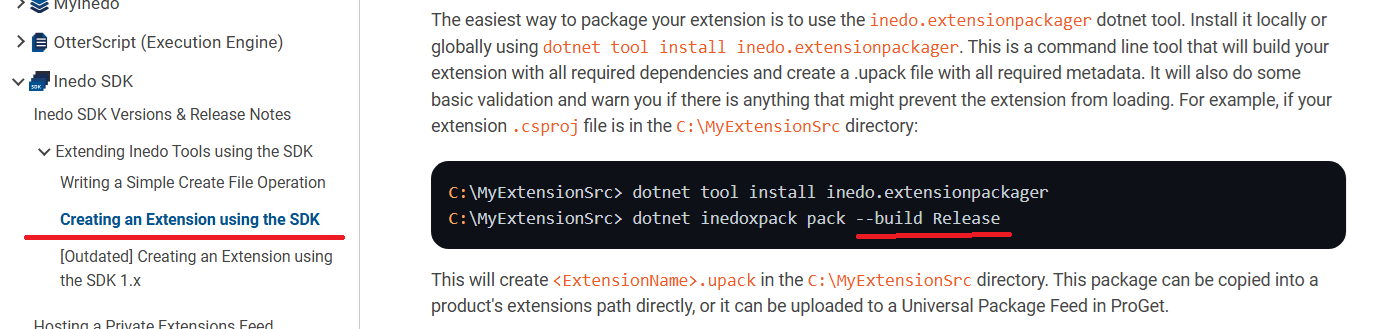
Anyway, thank you one more time!
-
@yakobseval_2238 thanks for letting us know, I just updated it!


Hello! It looks like you're interested in this conversation, but you don't have an account yet.
Getting fed up of having to scroll through the same posts each visit? When you register for an account, you'll always come back to exactly where you were before, and choose to be notified of new replies (either via email, or push notification). You'll also be able to save bookmarks and upvote posts to show your appreciation to other community members.
With your input, this post could be even better 💗
Register Login