Inedo Community Forums Forums
    • Recent
    • Tags
    • Popular
    • Login

    Welcome to the Inedo Forums! Check out the Forums Guide for help getting started.

    If you are experiencing any issues with the forum software, please visit the Contact Form on our website and let us know!

    [BM / OT] Renaming "user/password" or "private key" credentials breaks Linux config

    Scheduled Pinned Locked Moved Support
    13 Posts 4 Posters 46 Views
    Loading More Posts
    • Oldest to Newest
    • Newest to Oldest
    • Most Votes
    Reply
    • Reply as topic
    Log in to reply
    This topic has been deleted. Only users with topic management privileges can see it.
    • P Offline
      philippe.camelio_3885
      last edited by philippe.camelio_3885

      Hello

      I had to rename few existing credentials for linux server ( type user/password or private key) on Otter and Buildmaster.
      It breaks the server config and I had to reconfigure the servers (which are using the modified credential).

      After editing and saving server configs, pb is gone.
      (Mass edition for server in Buildmaster is missing 😧 )

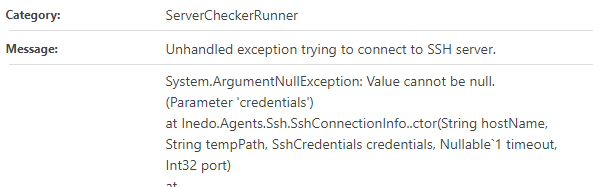
      Buildmaster Error msg:

      521830b6-926f-4df7-ac91-b96d0b7e563f-image.png

      Otter error message:
      1c92c8d0-faf6-46c6-a41b-25ec44286823-image.png

      Best regards
      PhilippeC.

      atrippA 1 Reply Last reply Reply Quote 0
      • atrippA Offline
        atripp inedo-engineer @philippe.camelio_3885
        last edited by

        Hi @philippe-camelio_3885 ,

        This is by design, as a common use case is to delete/create a credential with the same name. The design pattern is based around things like Windows Services, and the fact that renaming a username will not update all Windows services, etc.

        However, it's really inconvenient, and it'd be nice if there was a " would you like to also rename things in scripts/resources/servers/etc". But there's not, and it's something on our "to consider" list for an upcoming version.

        It's easy enough to work-around though - and as an FYI, in BuildMaster, you can just export the infrastructure, then reimport it after search/replacing the credential name in the JSON file.

        Cheers,
        Alana

        P 1 Reply Last reply Reply Quote 0
        • P Offline
          philippe.camelio_3885 @atripp
          last edited by philippe.camelio_3885

          Hi @atripp
          Thanks for the reply and the tricks.
          I thought that credential name was just a label so I changed it. Bad idea 🙄
          Best regards
          PhilippeC.

          P 1 Reply Last reply Reply Quote 0
          • P Offline
            philippe.camelio_3885 @philippe.camelio_3885
            last edited by philippe.camelio_3885

            Hi @atripp
            As you suggested, I export the json, and when I try to import it.
            I have errors:

            Validation failed: Error converting value "[{"Nom": "Carbon","Version": "2.15.1"},{"Nom": "ActiveDirectoryDsc","Version": "6.2.0"},{"Nom": "ComputerManagementDsc","Version": "9.0.0"},{"Nom": "NetworkingDsc","Version": "9.0.0"}]" to type 'Inedo.Otter.Infrastructure.VariableValueJsonModel'. Path 'roles[2].variables.PSModules', line 2678, position 367.
            

            The json line is

                  "variables": {
                    "PSModules": "[{\u0022Nom\u0022: \u0022Carbon\u0022,\u0022Version\u0022: \u00222.15.1\u0022},{\u0022Nom\u0022: \u0022ActiveDirectoryDsc\u0022,\u0022Version\u0022: \u00226.2.0\u0022},{\u0022Nom\u0022: \u0022ComputerManagementDsc\u0022,\u0022Version\u0022: \u00229.0.0\u0022},{\u0022Nom\u0022: \u0022NetworkingDsc\u0022,\u0022Version\u0022: \u00229.0.0\u0022}]"
                  }
            

            Screenshot of the variable
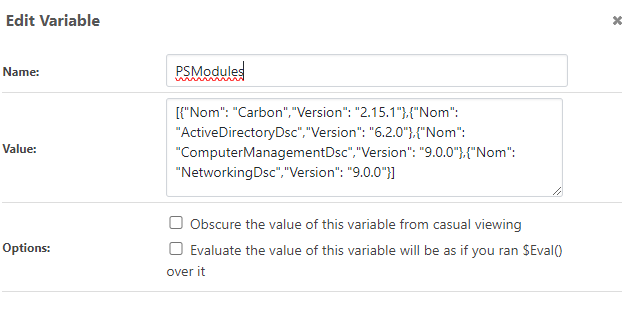
            471c74f8-587f-42e8-84bf-3bfc041931b0-image.png

            The problem is present for all list type variables I have

            Any thoughts ?

            stevedennisS 1 Reply Last reply Reply Quote 0
            • stevedennisS Offline
              stevedennis inedo-engineer @philippe.camelio_3885
              last edited by

              Hi @philippe-camelio_3885 ,

              Looks like this is a bug when severs have list-type configuration variables; we'll get this fixed in an upcoming maintenance release via BM-3944

              Otherwise I can't think of a work-around that would be any simpler then editing the impacted servers.

              Thank you,
              Steve

              P 1 Reply Last reply Reply Quote 0
              • P Offline
                philippe.camelio_3885 @stevedennis
                last edited by

                @stevedennis said in [BM / OT] Renaming "user/password" or "private key" credentials breaks Linux config:

                I can't think of a work-around that would be any simpler then editing the impacted servers.

                Thank you.
                Do you plan also for OTTER ?

                Best regards
                PhilippeC.

                stevedennisS 1 Reply Last reply Reply Quote 0
                • stevedennisS Offline
                  stevedennis inedo-engineer @philippe.camelio_3885
                  last edited by

                  @philippe-camelio_3885 I just cloned the issue for Otter (OT-509), so should be an easy fix. Maybe this will hlep w/ data sync issues as well!

                  P 1 Reply Last reply Reply Quote 0
                  • P Offline
                    philippe.camelio_3885 @stevedennis
                    last edited by

                    @stevedennis
                    Yes 😊

                    1 Reply Last reply Reply Quote 0
                    • gdivisG Offline
                      gdivis inedo-engineer
                      last edited by

                      Hi @philippe-camelio_3885,

                      I've tried to reproduce this and I think the issue is that your variable is using JSON array notation instead of otterscript. So, it should be:

                      @(%(Nom:"Carbon",Version:"2.15.1"),...
                      

                      It seems to work for me when I format it that way. Does this help?

                      P 2 Replies Last reply Reply Quote 0
                      • P Offline
                        philippe.camelio_3885 @gdivis
                        last edited by

                        Hi @gdivis
                        Thanks for this.
                        I will try this syntax.

                        Best regards

                        1 Reply Last reply Reply Quote 0
                        • P Offline
                          philippe.camelio_3885 @gdivis
                          last edited by

                          @gdivis

                          I made a test case,
                          I can use such variable format instead the json, but the export / import still buggy
                          Variable :
                          @(%(Nom:"Carbon",Version:"2.15.1"))

                          Export the variable

                          {
                            "roles": [
                              {
                                "name": "role-test",
                                "variables": {
                                  "PowerShellModules": "@(%(Nom: Carbon, Version: 2.15.1))"
                                }
                              }
                            ]
                          }
                          

                          Try to import:
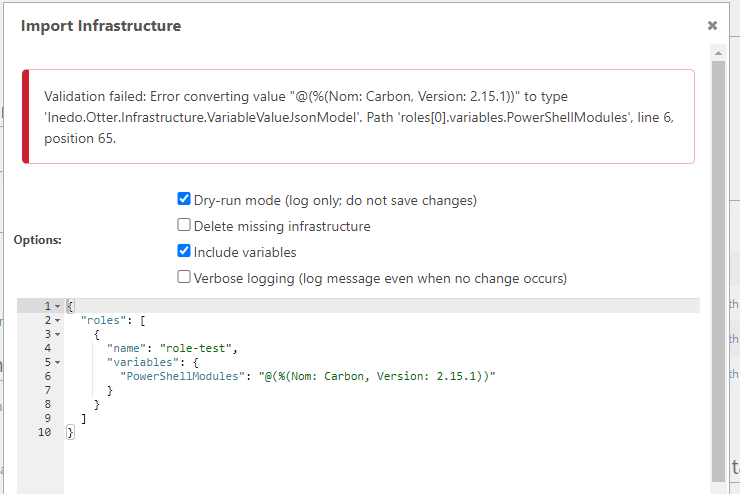
                          81089926-6f83-4ef9-98b7-723cd028545e-image.png

                          atrippA 1 Reply Last reply Reply Quote 0
                          • atrippA Offline
                            atripp inedo-engineer @philippe.camelio_3885
                            last edited by

                            @philippe-camelio_3885 thanks! We were looking at BuildMaster. It looks like the issue is in Otter after all. We'll get it fixed via OT-509 soon!

                            P 1 Reply Last reply Reply Quote 0
                            • P Offline
                              philippe.camelio_3885 @atripp
                              last edited by

                              @atripp
                              I thought the fix was for Otter ! 😂

                              1 Reply Last reply Reply Quote 0

                              Hello! It looks like you're interested in this conversation, but you don't have an account yet.

                              Getting fed up of having to scroll through the same posts each visit? When you register for an account, you'll always come back to exactly where you were before, and choose to be notified of new replies (either via email, or push notification). You'll also be able to save bookmarks and upvote posts to show your appreciation to other community members.

                              With your input, this post could be even better 💗

                              Register Login
                              • 1 / 1
                              • First post
                                Last post
                              Inedo Website Home • Support Home • Code of Conduct • Forums Guide • Documentation