Welcome to the Inedo Forums! Check out the Forums Guide for help getting started.
If you are experiencing any issues with the forum software, please visit the Contact Form on our website and let us know!
Create System API key via API
-
Hello,
is there a way how to create API key (key type = System with all permissions) via API or somehow automatically ?
I found following native API:
ApiKeys_CreateOrUpdateApiKey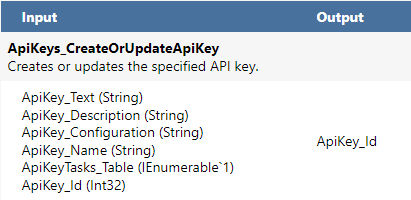
but when I tried to use this code (powershell):
$conf = '<Inedo.ProGet.ApiKeys.ApiKey Assembly="ProGetCoreEx"><Properties AllowPackagePromotionApi="False" AllowRepackagingApi="False" AllowFeedManagementApi="False" AllowWebhooksApi="True"
AllowConnectorHealthApi="True" AllowFeedsApi="True" AllowDockerBlobReaderApi="False" AllowSbomApi="True" AllowSbomUpload="True" UseApiKeyTasks="False" AllowNativeApi="True"
DoNotLogRequest="True" DoNotLogResponse="True" /></Inedo.ProGet.ApiKeys.ApiKey>'
$URL = "http://<myservername>/api/json/ApiKeys_CreateOrUpdateApiKey"
$body = @{
ApiKey_Text = "<my new API key>";
ApiKey_Configuration = $conf;
ApiKey_Name = "TestKeyName";
#ApiKey_Id = "2";
ApiKey_Description = "Description API Key"
}
Invoke-RestMethod -Method Post -Uri $URL -Body ($body | ConvertTo-Json) -ContentType "application/json"I got following error

so it seems I need some API key to create another API key.
The purpose of this is to fully automate installation and configuration of Proget and avoid manual configuration of API key in Proget GUI.
Once API key is created I would like to use that API for configuration of Feeds and Connectors.
Thank you for your response.Kind regards
Ivan Magdolen -
Hi @ivan-magdolen_6846,
It looks like you're on the right track with finding the XML for that key.
Since you're automating the installation, and already have DBO access to the ProGet database, I would suggest just directly adding it to the database using that stored procedure. You can also add/edit some values (like license key) if you want to the
Configurationtable.Alternatively I guess you could try
Admin:Adminas the API key, since that account will be created by default. I'm not sure if it will work with the native API however.Best,
Alana

Hello! It looks like you're interested in this conversation, but you don't have an account yet.
Getting fed up of having to scroll through the same posts each visit? When you register for an account, you'll always come back to exactly where you were before, and choose to be notified of new replies (either via email, or push notification). You'll also be able to save bookmarks and upvote posts to show your appreciation to other community members.
With your input, this post could be even better 💗
Register Login