Welcome to the Inedo Forums! Check out the Forums Guide for help getting started.
If you are experiencing any issues with the forum software, please visit the Contact Form on our website and let us know!
Proget: some metadata sent with Jenkins uploadProgetPackage plugin not applied
-
Hi!
I'm using the Jenkins
uploadProgetPackageplugin, and it looks like it's recently been updated to allow pushing some new fields:metadata,description, andtitle. (or I never noticed it before)I've tried adding them to my pipeline step, and I am only seeing the
descriptionfield populated with what I've sent.I only see the
titledata in the "old" UI, I can't find it in the new UI.I don't see any metadata that I've sent up.
the code:
uploadProgetPackage artifacts: map.artifact,
      excludes:    map.exclude,
      feedName:    map.feedName,
      groupName:   map.groupName,
      packageName: newPackageName,
      version:     map.version,
      description: 'some text',
      title: 'a title',
      metadata: 'key1=value1'
thanks for any help!
-
Hi @mcascone ,
I'm not super-familiar with the Jenkins plugin, but it's possible we're just not displaying those fields in the ProGet UI. It sounds like at least some are in the "old" UI.
Are these fields showing up in the manifest
upack.jsonmetadata file?Thanks,
Nanci -
ah yes, i thought of that but didn't get around to checking... they are there:
{ "group": "myGroup", "name": "PipelineTest", "version": "4.3.1-PLATDEV-11339-promotion-flow-test-7", "title": "i am the title", "description": "i am the description", "key1": "value1" } -
@mcascone thanks for checking, looks like this is missing on the display end. And just to confirm, what version of ProGet is this? v5.3 or v6?
-
We're still on
Version 5.3.17 (Build 19). -
Hi @mcascone,
It looks like this isn't being displayed in ProGet's UI, so we'll fix this via PG-2038
cheers,
Alana -
Hi there!
I just updated our instance to 6.0.12, and this change appears to have been made. Thanks!
...however, now a lot of the packages show "place title here" in the package listing, which is causing a lot of confusion:
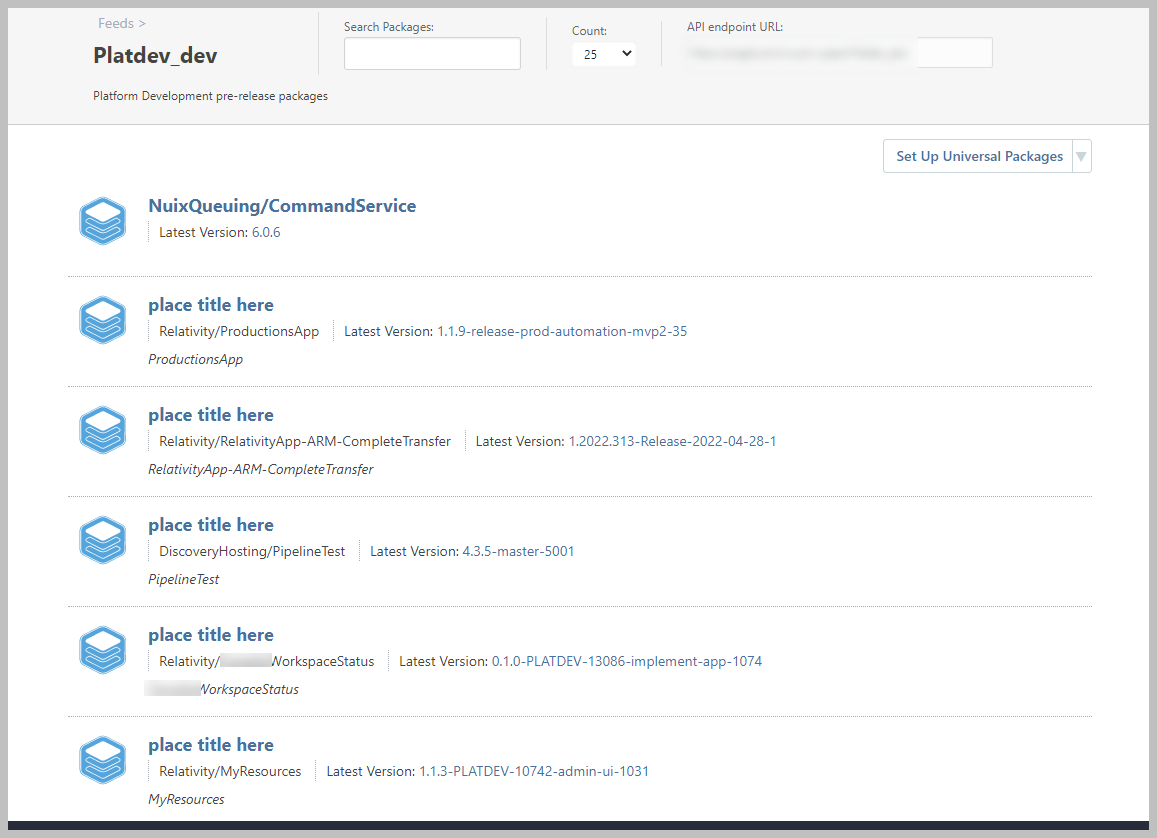
I will have to update the jenkins pipeline that sends the title metadata to send the package name, so this stops happening.
Is there any way to fix the existing data? I don't seem to be able to alter any of the metadata in the UI - which is by design, I'm sure, but in this case it's a bit of an issue.
thanks
max -
Hi @mcascone,
To do this, you'd want to download the latest version of the package, edit it in a zip file, then reupload it. A little tedios but fastest way I think
Cheers,
Alana -
Thanks, yeah, that seems to work.
I changed my pipeline code to not send any
titlemetadata to ProGet, which returned that field in the UI to its original behavior.I also found that rebuilding an existing package, and sent to ProGet with the updated pipeline, has the same effect.



Hello! It looks like you're interested in this conversation, but you don't have an account yet.
Getting fed up of having to scroll through the same posts each visit? When you register for an account, you'll always come back to exactly where you were before, and choose to be notified of new replies (either via email, or push notification). You'll also be able to save bookmarks and upvote posts to show your appreciation to other community members.
With your input, this post could be even better 💗
Register Login