Welcome to the Inedo Forums! Check out the Forums Guide for help getting started.
If you are experiencing any issues with the forum software, please visit the Contact Form on our website and let us know!
I have to wait an hour before proget feeds let me download new packages we add to a feed. is this normal?
-
Hello!
I currently run proget 5.3.28 (build 16). We run builds on our build server to update the nuget packages on our feed by method of a drop folder. Build operations go like this:
1 Restore solution
2 copy every .nuget file to a shared drive on the proget server
3 waitI've watched the server run through it's processes, and it looks like it vacuums up all of those nuget files really quickly. I check the nuget page on the server, see the new package updated, then go try to run my other build that needed this new package. More often than not, the build fails because it can't find the new package version, citing the url for the feed that it cant find it in.
I normally have to wait anywhere from 10 minutes to an hour for a package to be searchable on proget through nuget. I occasionally get really lucky and I can use it right away. This has always been the case for us in the 2 or 3 years we have been using the software.
What factors determine how fast it reindexes packages to make them query-able in the system? I'd like to not have to tell my dev teams that they have to wait an hour for a build to rerun.
If there is a better method to updating the package feed, I'd love to do that instead. Please let me know.
-
Hi @arozanski_1087 ,
Once a package is added to ProGet (either via drop folder, API, web upload, etc.), it should immediately show in the web UI. And it sounds like it does... because you can see the new package in the UI.
However, if the package isn't available through NuGet (which uses the NuGet API), then it means something is using a cached API response.
It could be ProGet. Connectors in ProGet have a feature called Metadata caching, so if you're accessing this feed through a connector, and this feature is enabled on that connector, it would behave exactly how you describe.
It could also be NuGet / VisualStudio, etc. The simplest thing to do would be to just run Fiddler, and capture the communication between NuGet/VS and ProGet. You will see cached responses if this is the case.
It might be a proxy/third-party server. Someone would have had to configure this in your network, and maybe they did to reduce traffic at one point? This should also show up in the Fiddler trace, hopefully, as a cached response.
Thanks,
Alana -
Good Morning @atripp ,
I'll try and experiment in fiddler with this to see if I can learn more about it. We don't have any cached responses that I am aware of internally but I'll investigate some sources that I think might potentially be the cause.
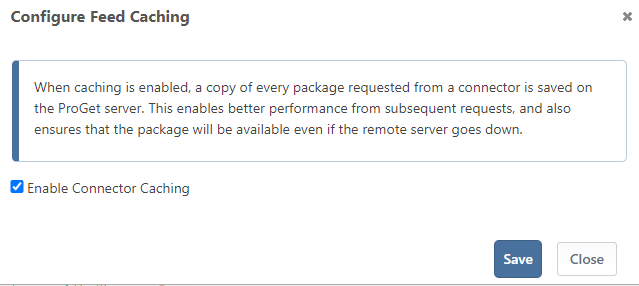
Is this the setting you were referring to called Configure Feed Caching?
-
@arozanski_1087 that's a slightly different caching setting

If you navigate Feeds > Connectors >your conenctor, it will be here:
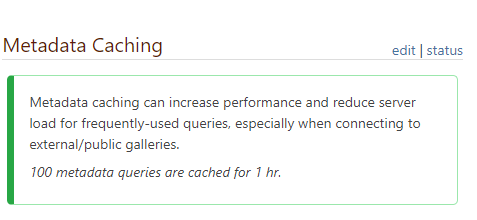
Clicking on 'status" will show you all the cached queries.

Hello! It looks like you're interested in this conversation, but you don't have an account yet.
Getting fed up of having to scroll through the same posts each visit? When you register for an account, you'll always come back to exactly where you were before, and choose to be notified of new replies (either via email, or push notification). You'll also be able to save bookmarks and upvote posts to show your appreciation to other community members.
With your input, this post could be even better 💗
Register Login