Welcome to the Inedo Forums! Check out the Forums Guide for help getting started.
If you are experiencing any issues with the forum software, please visit the Contact Form on our website and let us know!
ProGet installation issue without any logs
-
Hi Rich,
Unfortunately, no. I tried finding an event log entry within different categories (applications, setup, system) before posting here but with no luck.
The OS is Windows Server 2016 with latest patches and updates installed if that matters to you.
-
Hello;
Basically, this is failing very early on during the installation process, during the "package extraction" process.
This would most likely be caused by only one of two things:
- disk is full; the packages are extracted to a temporary directory, so all drives should have at least 1GB just to be totally safe
- anti-virus is quarantining recently written files to disk
It might also be related to temporary file locking, so try rebooting to see if it helps.
Otherwise, check what could be preventing those package files to be extracted; it's typically the quarantine, so check the log files for that.
Please let us know what you find!
FYI; in https://forums.inedo.com/topic/3088/ the user said they disabled Windows Defender and it worked
-
Hello @atripp and @rhessinger,
I completely uninstalled Windows Defender and retried, I get the same error. The disk has plenty of free space.
GlobalLog.txt
[Debug] Initializing extensions in C:\Program Files\Inedo Hub\...
[Debug] Loading InedoCore extension from C:\ProgramData\Inedo\ExtensionCache\b10ce838745ce46065912124f0108d1f0dc86461\package\InedoCore.dll...
[Debug] Loading Windows extension from C:\ProgramData\Inedo\ExtensionCache\e10f1ad813e59ab6f9f4900ddc34f5688643235d\package\Windows.dll...
[Information] Extensions manager initialization complete.
InstallSettings.txt
ConnectionString = Data Source=192.168.4.21\MSSQLSERVER2016;Initial Catalog=ProGet;Persist Security Info=True;User ID=ProGetUser;Password=<redacted>;MultipleActiveResultSets=True;Application Name=ProGet
UseIIS = True
InstallSqlExpress = False
ProductToInstall = ProGet 5.3.28
ProductToUpgrade =
RompExecutionLog.txt
** (unnamed scope) **
 ** (unnamed scope) **
SystemState.txt
HasIIS = True -
-
Hi @rhessinger
No, this server is directly connected to internet without any proxies.
In case that might help, I was able to make an installation using the traditional installer and everything works fine.
I would still like to switch to the new installer though, since that will make my updates run smoother.
-
Hi @coskun_0070,
Glad that the traditional installer worked for you. I agree using the Inedo Hub is the preferred option since the traditional installer will be removed in the future.
Could you try to generate an offline installer using the InedoHub? That should at least tell us if it is a problem with the hub connecting to the internet or if it is a problem extracting the files locally. Also does your server have any sort of third party firewall it is connecting through? If so, it might be worthwhile to verify the connections are not getting blocked as well.
Thanks,
Rich -
Hi @rhessinger
Thank you for your reply.
I tried several scenarios. Offline installer was one of them. The offline installer has been created successfully. However, the installer itself threw the same error (no details of the error apart from “unnamed scope”). Does that eliminate the connection issue since the installer was created successfully?
Regarding firewalls, no, there are no firewalls. It is an almost empty server so there was no need for a firewall until I install ProGet.
The biggest problem I see here is the installer not giving any diagnostics information. Empty error message doesn’t help much, neither to you nor to me :/
-
Hi @coskun_0070,
Yeah, that rules out an internet connection. We actually have a decent amount of logging during the process, but for whatever reason, this error is happening before we really start anything on the install process. As Alana stated, this is most likely happening during the initial package extraction. I'm going to talk with our installer team and see if we can add better error logging in those early stages of the install process. That should help with this process in the future.
Thanks,
Rich -
Hi @rhessinger
I would be fine with running an internal debug release in case that would help the installer team diagnose the issue by collecting some logs - kindly hoping that it just logs the exception thrown while the installer is doing its thing and nothing else. Just let me know in case it is needed.
Thanks for your replies.
-
@coskun_0070 unfortunately there's no other code we can add

It's very clear to us where the problem is occurring; the package files (zip files) are extracted to a folder. No error occurs during the extraction. And then a moment later, the files are not there.
Can you use a tool like ProcMon to see all that's happening behind the scenes? You may have something else interfering with the files after extraction
https://docs.microsoft.com/en-us/sysinternals/downloads/procmon
-
Hi @atripp
Would connecting to my computer using TeamViewer or something similar that I can see what you are doing and then connecting to the mentioned server via RDP help you?
You connect to my computer using TeamViewer > my computer connects to the server via RDP > you do whatever you want to diagnose the issue so future installers are fail safe when the exact thing happens.
I’m interested in this not only because my issue would be resolved but also because it is a very standard server with none to a few custom software installed (chrome and stuff like that) and if I’m having this issue, other users might as well.
Just let me know how it works for you or else I’ll see what I can do with procmon for you. If procmon is the way you would like to go, please kindly let me know which folders or which files I should watch and I’ll try to send you the procmon log.
Thanks for your reply.
-
@coskun_0070 unfortunately (or fortunately) we only have one user who's experiencing this (you), and we can't invest the one-on-one time to help further.
Can you try the ProcMon route? If you monitor events from the InedoHub process, you'll see files downloaded from proget.inedo.com to a temp folder, and then extracted. If you can monitor what happens to those extracted files, it'll will give a you a clue as to what's deleting those files.
-
Hi @atripp
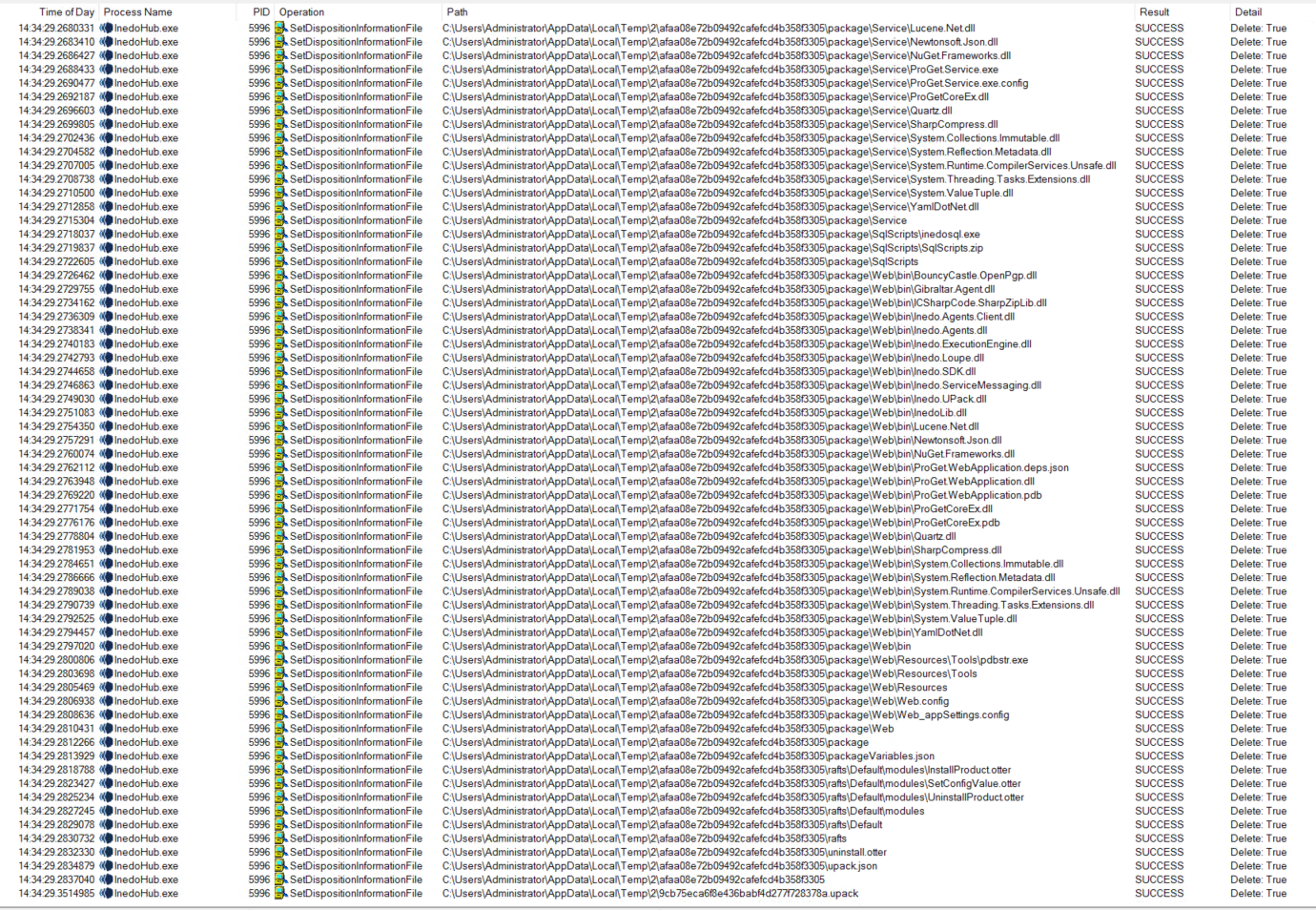
So you are asking me to find the process that deletes the downloaded/extracted files within the Temp directory, right?
If I understood you correctly and that is the case, the files are being deleted by InedoHub.exe
-
@coskun_0070
 that's really strange.
Unfortunately, I don't know what we can do from here. I know it's frustrating to hear that, but you're currently the only one experiencing this, and it's only on your server...
Perhaps it's failing while accessing the local package registry? It's a guess...
-
@atripp said in ProGet installation issue without any logs:
Unfortunately, I don't know what we can do from here.
Better logging hopefully :)
Thank you for your assistance anyway.
-
Hi @atripp and @rhessinger
I have got some news.
I just freshly installed a Windows Server 2019 instance, tried the installer and got the same error.
Brand new server, brand new OS, brand new SQL Server instance (both 2019) and the result is the same.
However, I figured that if I use the integrated SQL Express instance, I can install ProGet successfully.
It seems that I am doing something wrong while configuring the database instance. Can you help me figure out what I am doing wrong?
The steps I take to configure the database is:
-
Create an empty database (ProGet)
-
Create a new SQL login (ProGetUser), set user mapping as "db_owner" for the database created in step one so that the user has rights to create and manage schemas, etc.
-
Start installation of ProGet
-
Select "Specify instance..." and set the connection string as
Server=192.168.4.21\MSSQLSERVER2019;Database=ProGet;User Id=ProGetUser;Password=P@ssw0rdPlease note that the SQL server instance is installed on another server within the same network.
-
Set "Database Name" option as "ProGet" (it was also specified in the previous step and they match)
-
Start the installation
The SQL login is set as db_owner so it should not have trouble accessing the ProGet database (it successfully validates the configuration before starting the installation).
Am I missing something while configuring the database or its security? Can it be because the SQL server is installed on another server and the network service cannot reach the database directly? And if so, probably not, shouldn’t it just use the username and password I provided within the connection string? Am I doing something wrong while trying to create the database myself and asking ProGet connect to it instead of allowing it to create the database? If I have to allow ProGet to create its own database on my SQL instance, how should I really specify the connection string that I mentioned in 4th step above?
-
-
Hi @atripp and @rhessinger
In addition to my last post, it seems that it is not a permission issue. I decided to use the
sauser out of curiosity and it doesn't work.sauser should have all the permissions the installer needs.Do you think this is a bug within the installer that blocks installations when a remote SQL server instance is used?
Note that the same SQL instance works fine when I use the traditional installer.
-
@coskun_0070 glad you were able to narrow this down some more
There's shouldn't be a problem using remote SQL Server instances with the Inedo Hub, and this is definitely a scenario we test and support. If you were to put in a bogus connection string, it should make an error during the "Validating Configuration..." step.
My new guess is that something is blocking the connection later down the line, which is causing the unexpected edge case? I don't know...
-
@atripp if it was a connection issue, I would expect the traditional installer to complain as well. The firewall is configured properly, even disabled during the installation.
Have you tested the remote SQL scenario outside of a domain environment, which I believe completely eliminates the possibility to use Windows Authentication and somehow something within the installer insists on using Windows Authentication? Like the service running under Network Service account.
What makes me think that the problem might be related to account is the following statement from your manual installation documents.
Since most installations will use Integrated Authentication, a database server login for the ProGet user identity is required.
osql -E -S <db-server> -Q "CREATE LOGIN [domain\ProGetServiceUser] FROM WINDOWS"Note that built-in accounts may be used, such as NT AUTHORITY\NETWORK SERVICE or NT AUTHORITY\LOCAL SYSTEM, though an actual domain account is recommended.
I wish your docs had detailed instructions. It is the 7th day I am simply trying to install an app :/
Don't get me wrong, I am not complaining, it is free and I appreciate your support but I would just expect at least good error messages so that I can fix the issue and move on.Installing an app in an ideal environment where anything else works shouldn't be so hard. I even installed fresh servers because you said I am the only one having this issue because yes I could have something else blocking the installation but it looks not.
Imagine that an ASP.NET rMVP cannot install an ASP.NET app on freshly installed servers where Windows Defender and Firewall are both disabled :) And everything else works on these servers, I mean, other ASP.NET apps. They have no trouble connecting to the SQL server, etc.
Unfortunately I am almost giving up.
I appreciate and respect the support and assistance you provide though.
-
Hi @atripp
I believe my assumptions are correct.
I installed management studio to check what is going on inside
.\INEDOand realize that, no matter what kind of connection string I provide, you try to addNETWORK SERVICEas a user to the database, I might be wrong, just a rough assumption I can make is that you do so because the PROGET service is running as NETWORK SERVICE.I believe, even if the service is running as NS, it should respect the connection string we provide during installation and shouldn't try creating additional logins and users for those logins.
Since NETWORK SERVICE can easily access
C:\ProgramData\Inedo\SharedConfig\ProGet.config, why do you really need to work with NS login on SQL? Obviously that is causing problems.


Hello! It looks like you're interested in this conversation, but you don't have an account yet.
Getting fed up of having to scroll through the same posts each visit? When you register for an account, you'll always come back to exactly where you were before, and choose to be notified of new replies (either via email, or push notification). You'll also be able to save bookmarks and upvote posts to show your appreciation to other community members.
With your input, this post could be even better 💗
Register Login