Welcome to the Inedo Forums! Check out the Forums Guide for help getting started.
If you are experiencing any issues with the forum software, please visit the Contact Form on our website and let us know!
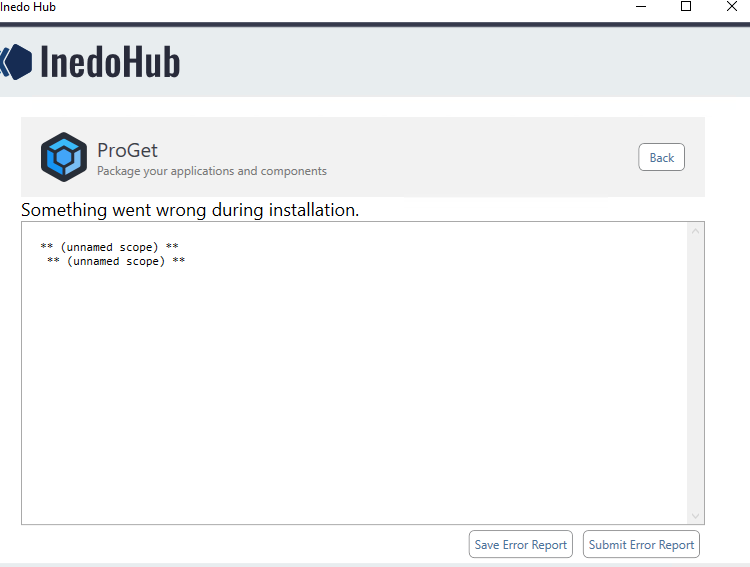
unnamed scope. When try to upgrade ProGet from 5.0.12 to 5.3.15 with Inedo Hub.
-
Please, help resolve the issue with upgrade Proget from 5.0.12 to 5.3.15 version. Run Inedo Hub but after some time got error. Tried to uninstall Proget and Inedo Hub (use this man https://docs.inedo.com/docs/desktophub/troubleshooting), but the same error.
-
Hi,
Could you click the "Submit Error Report" button when this happens? If you'd prefer to look at the file that gets set to us first, you can use "Save Error Report" instead. The error report is a zip file that should have more information than this empty log in it.
Thanks!
-
Yes, of course.
GlobalLog.txt: is empty.
InstallSettings.txt:ConnectionString = Data Source=ksrv-53;Initial Catalog=testproget;User ID=proget;Password=<redacted> UseIIS = True InstallSqlExpress = False ProductToInstall = ProGet 5.3.15 ProductToUpgrade =RompExecutionLog.txt:
** (unnamed scope) ** ** (unnamed scope) **SystemState.txt:
HasIIS = TrueAlso try to update to version 5.0.13, everything updated fine, then try to update to version 5.1.3 and got the same error.
-
That's strange. We'll do some experimentation with trying to perform that upgrade in a test environment and let you know what we discover.
-
Hello;
Unfortunately, we've had only one other user report this issue, and we didn't hear how they solved it.
Basically, this is failing very early on during the installation process, during the "package extraction" process.
This would most likely be caused by only one of two things:
- disk is full; the packages are extracted to a temporary directory, so all drives should have at least 1GB just to be totally safe
- anti-virus is quarantining recently written files to disk
It might also be related to temporary file locking, so try rebooting to see if it helps.
Otherwise, check what could be preventing those package files to be extracted; it's typically the quarantine, so check the log files for that.
Please let us know what you find!
-
Thanks, removed windows defender, run proget installer and application updated successfully.
-
@vadim-k_6062 good to know that fixed it! We will add a message to the InedoHub then to help users if they come up with this -- https://inedo.myjetbrains.com/youtrack/issue/DH-42


Hello! It looks like you're interested in this conversation, but you don't have an account yet.
Getting fed up of having to scroll through the same posts each visit? When you register for an account, you'll always come back to exactly where you were before, and choose to be notified of new replies (either via email, or push notification). You'll also be able to save bookmarks and upvote posts to show your appreciation to other community members.
With your input, this post could be even better 💗
Register Login