Welcome to the Inedo Forums! Check out the Forums Guide for help getting started.
If you are experiencing any issues with the forum software, please visit the Contact Form on our website and let us know!
Bulk copy from npmjs registry
-
I am looking for a scripted way to bulk import npm packages from the npm official registry to a proget private feed. Unfortunately, I have not find any documentation to do this, but I have seen the user interface offers the possibility to add a package using the option "Pull from External Registry", which is basically what I need.
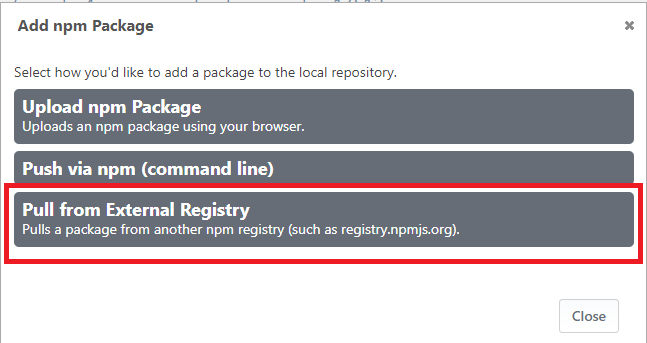
I really would like to avoid going to an UI automation (puppeter for example) to upload the packages thought the UI. So, is there access to any short of API endpoint to performs the same functionality than the ""Pull from External Registry" option ?
-
Hello; please review the Drop Path and Bulk Package Importing docs for how to configure this on your feed.
Then, you can just download the packages you want to that drop path.
-
@atripp said in Bulk copy from npmjs registry:
Hello; please review the Drop Path and Bulk Package Importing docs for how to configure this on your feed.
Then, you can just download the packages you want to that drop path.
First and foremost, thank you so much for your reply, pretty much on point of what I needed. I have a follow up question regarding the package: which files I should put in the folder? the ones that are located on the node_modules are valid? or do I need to do any sort or processing?
Thanks you so much for your input!
-
I'm not so familiar with what the
node_modulesfolder is... but ProGet will be looking for zip (tar/gz) files, and then will open, inspect, import, and delete those files one-by-one . -
@atripp Thanks for the clarification, you have me pointed to the tooling and steps I will need to perform the bulk import. I will have to try, but I think I have enough information to script this task.

Hello! It looks like you're interested in this conversation, but you don't have an account yet.
Getting fed up of having to scroll through the same posts each visit? When you register for an account, you'll always come back to exactly where you were before, and choose to be notified of new replies (either via email, or push notification). You'll also be able to save bookmarks and upvote posts to show your appreciation to other community members.
With your input, this post could be even better 💗
Register Login