Welcome to the Inedo Forums! Check out the Forums Guide for help getting started.
If you are experiencing any issues with the forum software, please visit the Contact Form on our website and let us know!
ProGet: UI 403 errors
-
I already reported a number of these here and most of them are fixed, so thank you for that.
Occurs in: 2024.2 (Build 2)
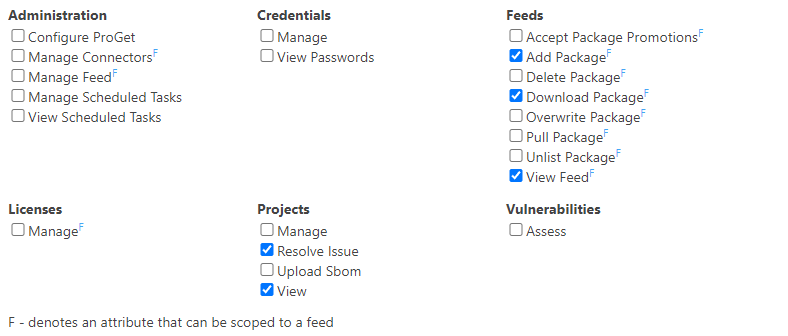
Again using this permission set:
-
Bulk edit on
/packagespage
This one was probably just overlooked from my previous report, on the container page it seems already to be fixed.
The bulk edit menu is always visible, clicking on it shows a menu with delete or promote option. Selecting Delete selected results in no action at all, which is misleading.
=> The "bulk edit" link should be hidden for users that do not have delete or promote permissions in any feed. -
Notifiers Configure on
/scapage
The "Configure Notifiers" link leads to 403 page.
=> The whole panel should probably be hidden when a user has no notifier permissions -
Menu on
/projectspage
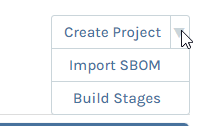
All three menu points are not clickable.
=> Whole menu should probably be hidden -
"manage license types & rules" link on
/licensespage
Link just does nothing
=> Hide -
Clicking on a license name on
/licensespage
Leads to 403 popup
=> Right now there is only a "Manage" permissions for licenses, but I see no reason why people without editing permissions should not be able to view licenses details. So a read-only version of the edit popup would be helpful. -
Menu on project page
/projects/project?projectId=5
"Create Build" and "Import SBOM" lead to 403 popups.
=> Hide -
Project build page
/projects2/builds/build?buildId=5
Promote, analyze, add comment, edit build all lead to 403
=> Hide -
Project issues page
/projects/issues?buildId=5
Bulk edit -> Delete leads to 403.
=> Hide from bulk edit
I'm pretty sure I overlooked some of them, since these issues are everywhere.
It would be really great if this check could be added to the test suite, especially for new UIs. They are very easy to spot, basically just be authenticated with a user that does not have any major permissions and then click every link on given page.
At some point I need to start thinking about charging a tester fee.

-
-
Thanks so much @jw! We'll get these fixed in an upcoming maintenance release via PG-2651
Looks like we forgot to add these after applying permissions on top., and the way our security review works, it prioritizes making sure the pages are secure (versus links), so it's easy to miss.
Anyway we'll try to add that to our new feature checklist... easy to forget to do since we check permissions on the page itself, not on where we link to the page.
-
Thank you!
Cheers
-
With version 2024.7 the bulk edit button is once again visible on the packages page, even though users do not have delete or promote permissions in any branch.
From the changelog:
PG-2711 2024.7 FIX: Bulk edit button hidden unless user as Admin_Configure [PG-2651 Regression ]It gives users without permissions the impression that they could delete packages. Then when they actually click it, nothing happens and they contact Admins with support requests about a "broken ProGet". This is very time consuming and annoying.
Could you please fix this properly? As it stands right now it is back to the original behavior with bad usability.
-
-
Sounds like a plan. :)
Thank you, once more.
-
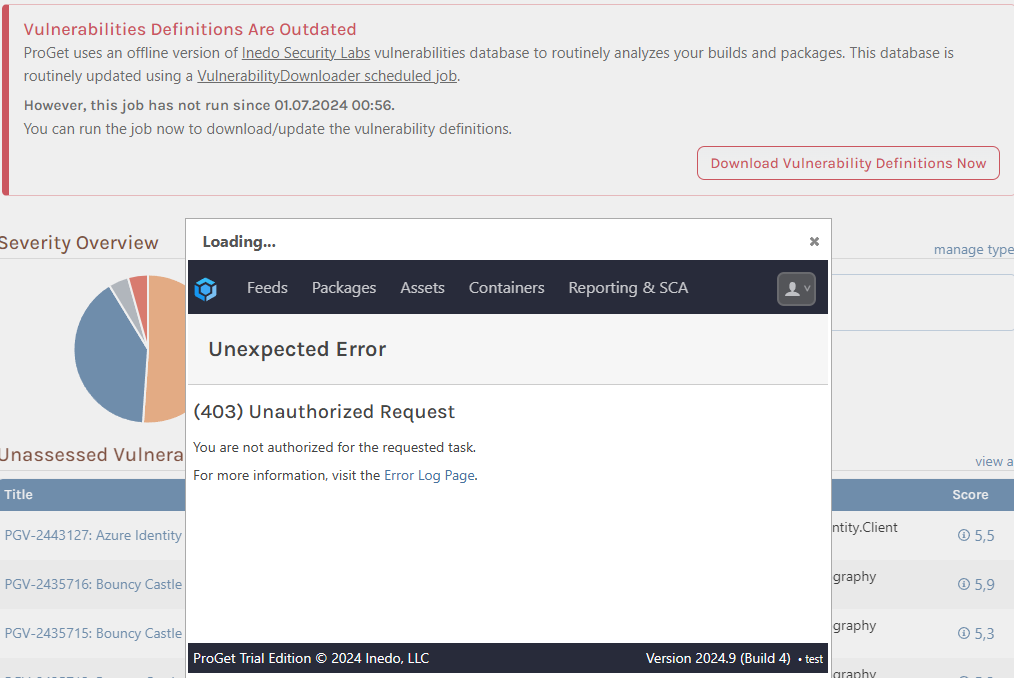
I found another 403 error on the /vulnerabilities page in 2024.9. This should probably not show up during production (this is from my test system), but I thought I'd still report it.
Hitting the button without permissions, results in a 403 popup. I'm not quite sure if non-admins should be able to view this message at all..?
-



Hello! It looks like you're interested in this conversation, but you don't have an account yet.
Getting fed up of having to scroll through the same posts each visit? When you register for an account, you'll always come back to exactly where you were before, and choose to be notified of new replies (either via email, or push notification). You'll also be able to save bookmarks and upvote posts to show your appreciation to other community members.
With your input, this post could be even better 💗
Register Login