Welcome to the Inedo Forums! Check out the Forums Guide for help getting started.
If you are experiencing any issues with the forum software, please visit the Contact Form on our website and let us know!
'Inedo.ProGet.Web.Security.UserNotFoundException' on application startup
-
@atripp Thanks for providing a link to the code, I have managed to download it and create some unit tests against the class in question.
I can not reproduce the issue locally, however, so I need to see if I can understand what is being used by the program at the point of search.
I would like to add this line:
this.LogDebug($"Searching domain using BaseDn: {baseDn}, search string: {searchString.ToString()}, scope: {scope} and username of: {this.Username?.GetDomainQualifiedName(this.Domain)}...");
to before this line
so that I can understand what the program is using in it's search params.
I have also tried configuring Stdout to a file but this does not provide enough information other than what I found in the event log.
It should be noted that the Test User Directories tool is successful with my current configuration:
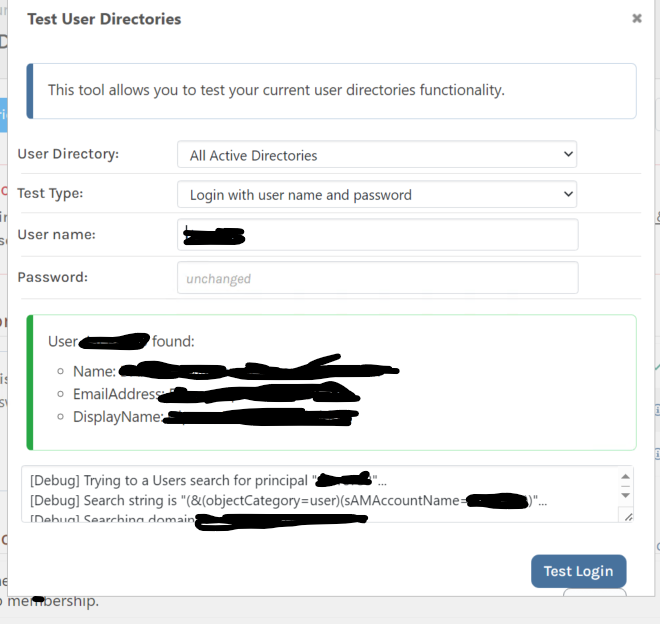
I have also upgraded to the latest version of ProGet.
-
Hi @Darren-Gipson_6156 ,
That's great you were able to find the code to change, at least to help find more information. Since you've got that far, I would recommend just bundling it as a zip file and adding the extension to ProGet to try it out:
https://docs.inedo.com/docs/proget-administration-extensionsLet us know if you run into any issues with that; that will probably amke it easiest to iterate, so you don't have to wait for us to build pre-release extensions .
Thanks,
Alana -
Thanks for the suggestion @atripp, I can see now how to update the version that I am using so that I can debug the issue, however every time I run the command to create the upack file:
dotnet inedoxpack pack . --build ReleaseI get:
Executing dotnet publish for InedoExtension.csproj (net8.0)...
No extensions were found in [redacted]\AppData\Local\Temp\inedoxpack\9071c72b2a204ce4b73abe172916f842
any idea what I have done wrong here?
I am following the guide here
-
Hi @Darren-Gipson_6156,
It looks like we hadn't published the latest version of inedoxpack to nuget.org. I've now published it manually, so if you run
dotnet tool update inedo.extensionpackager, it should update to v1.0.7, which will be able to build the extension.Sorry about that!
-
Thanks @gdivis, I have managed to update the extension as required. I have reviewed the code and it would appear to be finding my username successfully when called from this stack trace:
- Called by: ADUserDirectoryV4.TryGetPrincipal
- Called by: ADUserDirectoryV4.TryGetUser
- Called by: <ProcessRequestInternalAsync>d__0.MoveNext
- Called by: AsyncMethodBuilderCore.Start
- Called by: AsyncTaskMethodBuilder.Start
- Called by: IntegratedAuthHandler.ProcessRequestInternalAsync
However when it is called from here:
 - Called by: ADUserDirectoryV4.TryGetPrincipal
 - Called by: ADUserDirectoryV4.TryGetUser
 - Called by: UserDirectory.TryGetUserAsync
 - Called by: <ProcessRequestInternalAsync>d__0.MoveNext
 - Called by: AsyncMethodBuilderCore.Start
 - Called by: AsyncTaskMethodBuilder.Start
It fails, because it passes through
domain\5cusernameto the LDAP search, even without the 5C in the search parameters, this would have never worked, as the LDAP query returns no results when I test it in PowerShell.How do I disable the second search?
-
Hi @Darren-Gipson_6156,
Thanks for all that information. I'm sorry this is taking so long to figure out, but LDAP/AD and Integrated Windows Authentication are always difficult to track down.
Just a few notes on the query process.
- The NETBIOS mappings in the UI just help to speed up the LDAP query process because it removes the need to query for the NETBIOS mapping from the domain controller. If you leave that blank, it will search for the netbios mapping in the domain directly Line 418. With that said, it will then cache that result so it doesn't have to query each time.
- The
\5cyou are seeing is the LDAP library we use (System.DirectoryServices on Windows and Novell.Directory.Ldap.NETSTandard on Linux) encoding the username in the LDAP query. It shouldn't be searching fordomain\userin that query, so most likely there is a bug in part of that process.
Can you tell me what ProGet installation you are using (InedoHub or Docker) and which web server you are using (IIS or Integrated)?
One last thing, can you test a few things for me? This will help my pinpoint the issue further.
- With Integrated Windows Authentication disabled, can you verify you can login with the following usernames using the Login Page:
- Use
username@domain.com - Use
DOMAIN\username
- Use
- With Integrated Windows Authentication enabled, can you navigate to
http://yourprogetserver/debug/integrated-authand send the results? If you need to distort the usernames, can you please leave format visible?
If you do not feel comfortable posting the results of the debug page, you can email them to support@inedo.com with the subject
[QA-1565] Results.Thanks,
Rich -
Thanks for getting back to me Rich. I have run a number unit tests against the TryGetUser method and I struggle to make it break unless I provide it with invalid parameters. I think the issue is the UserDirectory.TryGetUserAsync method which appears to be running outside of the InedoCore library.
We are using InedoHub, with IIS.
With Integrated Windows Authentication disabled, can you verify you can login with the following usernames using the Login Page:
- Using
username- works - Using
username@domain.com- works - Using
DOMAIN\username- works
I have emailed this to you.
Please let me know if you any further information.
Thanks,
Darren
- Using
-
Hi @Darren-Gipson_6156,
Thank you for getting back to me. I got your email and this is all very helpful! I think I see where the issue is occurring. As you noted, it looks to have to do with how we are converting the integrated authentication user to a user principal in the HTTP context. I'm going to need to dig into this a little bit, but I should have an update by mid-day tomorrow (I'm in the EST timezone). I'll let you know what I find.
While I'm diving into this. Can you try restarting IIS after you enable integrated authentication and try again? I just want to rule out security caching.
Thanks,
Rich -
Hi Rich,
Yes, I have tried several times to recycle and reboot the server, it still gives me the same issue.
Thanks for looking into this.
-
Hi @Darren-Gipson_6156 ,
I think I have finally recreated the issue. Can you please try something for me? Please configure integrated authentication following these steps:
- On the ProGet site in IIS, enable Anonymous authentication
- In ProGet, login as an administrator and navigate to Administration -> Manage Security and enable windows integrated authentication (do not worry about the warning about not seeing a login user).
- On the ProGet site in IIS, disable Anonymous Authentication and enable Windows Authentication
Once you do that, does windows authentication work?
It looks like there was a change in .NET 8.0 that automatically sets the User Principal on the HTTP Context to windows authentication name. By following the steps above, I was able to configure Windows Authentication in IIS to work around this issue.
Thanks,
Rich -
many swear words. I must have been so close to that solution by accident.

Yep that's working now
 thanks very much Rich.
 -
Hi @Darren-Gipson_6156,
No problem! Glad it is working. ProGet 2024.6 will include a fix for this issue, PG-2695. So hopefully this won't happen again!
Thanks,
Rich



Hello! It looks like you're interested in this conversation, but you don't have an account yet.
Getting fed up of having to scroll through the same posts each visit? When you register for an account, you'll always come back to exactly where you were before, and choose to be notified of new replies (either via email, or push notification). You'll also be able to save bookmarks and upvote posts to show your appreciation to other community members.
With your input, this post could be even better 💗
Register Login