Inedo Community Forums Forums
    • Recent
    • Tags
    • Popular
    • Login

    Welcome to the Inedo Forums! Check out the Forums Guide for help getting started.

    If you are experiencing any issues with the forum software, please visit the Contact Form on our website and let us know!

    ProGet NuGet upload user tracking

    Scheduled Pinned Locked Moved Support
    16 Posts 5 Posters 54 Views 1 Watching
    Loading More Posts
    • Oldest to Newest
    • Newest to Oldest
    • Most Votes
    Reply
    • Reply as topic
    Log in to reply
    This topic has been deleted. Only users with topic management privileges can see it.
    • J Offline
      jw
      last edited by

      Hi,

      two issues with user tracking for NuGet uploads

      1. I can't find a way to see which user uploaded the package. Both on the metadata and the history page the upload time is shown, but not who uploaded it.
        Is there a way to show this?

      2. When uploading a NuGet package via ApiKey it seems like ProGet does not identify the user correctly. I've set up a Team notification hook for testing and the user is only shown when uploading via website. When pushing the package via nuget.exe the user is only shown as "Anonymous".
        How can this user recognition be enabled for uploads via API?

      stevedennisS 1 Reply Last reply Reply Quote 0
      • S Offline
        sebastian...
        last edited by

        Have you tried disabling anonymous access?

        J 1 Reply Last reply Reply Quote 0
        • J Offline
          jw @sebastian...
          last edited by

          @sebastian

          My permissions look like this:
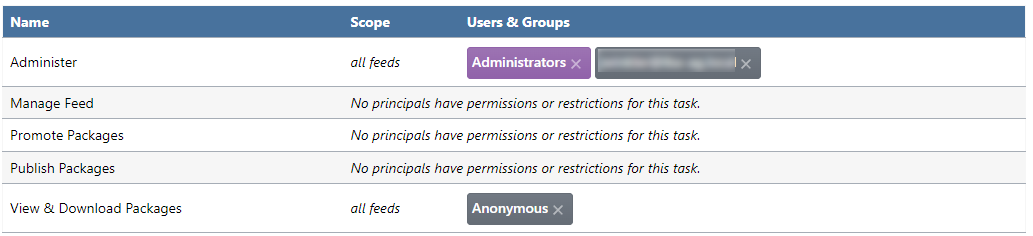
          32282998-76b3-4d61-ba0a-2916ce3fa905-image.png

          I'm pushing with the api key of the greyed out user who has admin rights.

          I also tried removing the Anonymous rights here entirely, but no change as expected, since these are just viewing rights.

          1 Reply Last reply Reply Quote 0
          • S Offline
            sebastian...
            last edited by

            Have you tried setting the log level for that API key to "Everything"? And do you see log entries for that key when uploading NuGet packages?

            1 Reply Last reply Reply Quote 0
            • J Offline
              jw
              last edited by

              I changed the log level to "Everything" but nothing shows up in the logs at all ("There are no API request logs."), pretty odd..

              I'm also fairly certain that the key itself is working properly, because when I comment it out in my nuget.config I get a login prompt from nuget.exe when trying to push.

              1 Reply Last reply Reply Quote 0
              • stevedennisS Offline
                stevedennis inedo-engineer @jw
                last edited by

                Hi @lm ,

                We don't track that information on the package history page at this time; you'll have to find it under Admin > Events.

                It's definitely something we can consider with/after v2023, once we've centralized information about packages in the database. I'll make a note of that!

                Cheers,
                Steve

                1 Reply Last reply Reply Quote 0
                • J Offline
                  jw
                  last edited by

                  I've looked at the Event log, but it is pretty inconvenient, since one has to click through all the events to find out which package the log entry is actually about.

                  It would be nice if my two points from above could make it into v2023.

                  This together with the support for .snupkg would probably allow us to migrate from Nexus.

                  1 Reply Last reply Reply Quote 0
                  • J Offline
                    jw
                    last edited by

                    @stevedennis

                    Is there any news on this subject by any chance?

                    atrippA 1 Reply Last reply Reply Quote 0
                    • atrippA Offline
                      atripp inedo-engineer @jw
                      last edited by

                      Hi @jw ,

                      In ProGet 2023, we are recording a "publish user" when a package is published. I'm not sure how we will show/expose this (probably history page for now), but that's really easy to change once we collect the data.

                      We're really hoping to get to get 2023.0 released later this month :)

                      Cheers,
                      Alana

                      J 1 Reply Last reply Reply Quote 0
                      • J Offline
                        jw @atripp
                        last edited by

                        @atripp

                        Thanks for the update, looking forward to the release.

                        1 Reply Last reply Reply Quote 0
                        • J Offline
                          jw
                          last edited by

                          I've just installed 2023.9 but the upload user is still shown as Anonymous on the history page.

                          Was this issue addressed yet?

                          stevedennisS 1 Reply Last reply Reply Quote 0
                          • stevedennisS Offline
                            stevedennis inedo-engineer @jw
                            last edited by

                            Hi @jw,

                            While we added the published-by column to the database, it seems that it's not being populated properly in all cases; we'll get it fixed by PG-2413 .

                            Cheers,
                            Steve

                            1 Reply Last reply Reply Quote 0
                            • J Offline
                              jw
                              last edited by

                              I pushed the package via nuget.exe with API key.

                              Assuming I'm actually looking at the correct column (ProGet.dbo.FeedPackageVersions.PublishedBy_User_Name), in does indeed say "Anonymous".

                              dean-houstonD 1 Reply Last reply Reply Quote 0
                              • dean-houstonD Offline
                                dean-houston inedo-engineer @jw
                                last edited by

                                @jw that's the correct column! Just the incorrect value being added :(

                                1 Reply Last reply Reply Quote 0
                                • J Offline
                                  jw
                                  last edited by

                                  In 2023.10 the field is populated and the history page shows it correctly. 👍

                                  The $UserName variable for web hooks (tested with Teams integration) still shows Anonymous for the same package though.

                                  stevedennisS 1 Reply Last reply Reply Quote 0
                                  • stevedennisS Offline
                                    stevedennis inedo-engineer @jw
                                    last edited by

                                    Hi @jw ,

                                    Ah, I can see how that would happen; I logged this as PG-2425 and we'll try to get it fixed in the upcoming maintenance release.

                                    Steve

                                    1 Reply Last reply Reply Quote 0

                                    Hello! It looks like you're interested in this conversation, but you don't have an account yet.

                                    Getting fed up of having to scroll through the same posts each visit? When you register for an account, you'll always come back to exactly where you were before, and choose to be notified of new replies (either via email, or push notification). You'll also be able to save bookmarks and upvote posts to show your appreciation to other community members.

                                    With your input, this post could be even better 💗

                                    Register Login
                                    • 1 / 1
                                    • First post
                                      Last post
                                    Inedo Website Home • Support Home • Code of Conduct • Forums Guide • Documentation


