Welcome to the Inedo Forums! Check out the Forums Guide for help getting started.
If you are experiencing any issues with the forum software, please visit the Contact Form on our website and let us know!
How to fix base url in xml file of feed?
-
Hello, I faced issue with installing chocolatey packages via reverse proxy Nginx.
I use this commandchoco install -y testpackage -s="https://dff91dbae543.ngrok.io/188aluw0iaby5mhin1qaotgfwl8qwxzzbr5ayw4in3n0ls2nslzssfdw2hl7zs13/"'
Powershell was returned result
Installing the following packages:
testpackage
testpackage not installed. An error occurred during installation:
 The underlying connection was closed: The connection was closed unexpectedly.
testpackage package files install completed. Performing other installation steps.
The install of testpackage was NOT successful.
testpackage not installed. An error occurred during installation:
 The underlying connection was closed: The connection was closed unexpectedly.
My topology
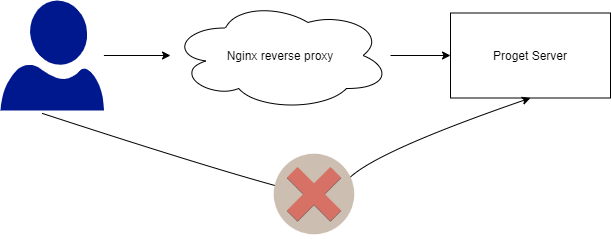
In here, users will connect via reverse proxy to download the chocolatey packages in Proget. Of course, they can't connect directly to proget to download package.
Here's my nginx config
location  /188aluw0iaby5mhin1qaotgfwl8qwxzzbr5ayw4in3n0ls2nslzssfdw2hl7zs13/ {
    limit_except GET {
        deny  all;
    }
    rewrite                     /[^/]+/(.*) /nuget/chocolatey/$1 break;
    proxy_pass                  $choco_url;
    proxy_pass_request_headers  on;
    proxy_set_header            X-Real-IP $remote_addr;
    proxy_set_header            X-Forwarded-For $proxy_add_x_forwarded_for;
    proxy_set_header            X-Forwarded-Proto https;
}
When I checked the request that used for installing packages
https://dff91dbae543.ngrok.io/188aluw0iaby5mhin1qaotgfwl8qwxzzbr5ayw4in3n0ls2nslzssfdw2hl7zs13/Packages()?$filter=(tolower(Id)%20eq%20%27testpackage%27)%20and%20IsLatestVersionThe result is
<?xml version="1.0" encoding="utf-8"?><feed xml:base="http://test-proget.com/nuget/chocolatey/" xmlns:d="http://schemas.microsoft.com/ado/2007/08/dataservices" xmlns:m="http://schemas.microsoft.com/ado/2007/08/dataservices/metadata" xmlns="http://www.w3.org/2005/Atom"><title type="text">Packages</title><id>http://test-proget.com/nuget/chocolatey/Packages()/</id><updated>2020-12-28T07:26:14Z</updated><link rel="self" title="Packages" href="Packages" /><entry><id>http://test-proget.com/nuget/chocolatey/Packages(Id='testpackage',Version='1.2.5')</id><title type="text">testpackage</title><summary type="text">Here is the testing package</summary><updated>2020-11-11T07:58:55Z</updated><author><name>Kien Tran</name></author><link rel="edit-media" title="Package" href="Packages(Id='testpackage',Version='1.2.5')/$value" /><link rel="edit" title="Package" href="Packages(Id='testpackage',Version='1.2.5')" /><category term="NuGet.Server.DataServices.Package" scheme="http://schemas.microsoft.com/ado/2007/08/dataservices/scheme" /><content type="application/zip" src="http://test-proget.com/nuget/chocolatey/package/testpackage/1.2.5" /><m:properties xmlns:d="http://schemas.microsoft.com/ado/2007/08/dataservices" xmlns:m="http://schemas.microsoft.com/ado/2007/08/dataservices/metadata"><d:Version>1.2.5</d:Version><d:Title>testPackage (Install)</d:Title><d:RequireLicenseAcceptance m:type="Edm.Boolean">false</d:RequireLicenseAcceptance><d:Description>Testing package</d:Description><d:ReleaseNotes></d:ReleaseNotes><d:Summary>Here is the testing package</d:Summary><d:ProjectUrl>https://_Software_Location_REMOVE_OR_FILL_OUT_</d:ProjectUrl><d:Icon></d:Icon><d:IconUrl></d:IconUrl><d:LicenseExpression></d:LicenseExpression><d:LicenseUrl></d:LicenseUrl><d:Copyright></d:Copyright><d:Tags>testpackage SPACE_SEPARATED</d:Tags><d:Dependencies></d:Dependencies><d:IsLocalPackage m:type="Edm.Boolean">true</d:IsLocalPackage><d:Created m:type="Edm.DateTime">2020-11-11T07:58:55.7770000Z</d:Created><d:Published m:type="Edm.DateTime">2020-11-11T07:58:55.7770000Z</d:Published><d:PackageSize m:type="Edm.Int64">2865</d:PackageSize><d:PackageHash>ph7XSMBexaAKuvjOlQ3RWuRk5fIV++r3ll8N8TXvMcHDweyh9YqF/DwIUoMFDbcqgdXRMO9/4hvdNxWOUjGDuQ==</d:PackageHash><d:IsLatestVersion m:type="Edm.Boolean">true</d:IsLatestVersion><d:IsAbsoluteLatestVersion m:type="Edm.Boolean">true</d:IsAbsoluteLatestVersion><d:IsProGetHosted m:type="Edm.Boolean">true</d:IsProGetHosted><d:IsPrerelease m:type="Edm.Boolean">false</d:IsPrerelease><d:IsCached m:type="Edm.Boolean">false</d:IsCached><d:NormalizedVersion>1.2.5</d:NormalizedVersion><d:Listed m:type="Edm.Boolean">true</d:Listed><d:PackageHashAlgorithm>SHA512</d:PackageHashAlgorithm><d:HasSymbols m:type="Edm.Boolean">false</d:HasSymbols><d:HasSource m:type="Edm.Boolean">false</d:HasSource><d:DownloadCount m:type="Edm.Int32">14</d:DownloadCount><d:VersionDownloadCount m:type="Edm.Int32">14</d:VersionDownloadCount></m:properties></entry></feed>I think the error come from the src of file xml feeds, it's always return
http://test-proget.com, even while I was downloading package via reverse proxy urlhttps://dff91dbae543.ngrok.io/188aluw0iaby5mhin1qaotgfwl8qwxzzbr5ayw4in3n0ls2nslzssfdw2hl7zs13/.May I know are there any way to change the url of xml file or fix this.
Another information, If my vm have flow to proget server I can download the choco package via reverse proxy, but if my vm can't reach proget it's can't download via reverse proxy. It's means that somethings happened during the installation the chocolatey package
 .
.
I also tried sub_filter but it's not affect. -
Finally I found out the way to fix it. So if you want to setup reverse proxy before proget endpoint chocolatey you can use this way.
location /188aluw0iaby5mhin1qaotgfwl8qwxzzbr5ayw4in3n0ls2nslzssfdw2hl7zs13/ { limit_except GET { deny all; } sub_filter_types 'application/atom+xml'; sub_filter_once off; sub_filter 'https://proget-test.com/nuget/chocolatey/' 'https://$http_host/188aluw0iaby5mhin1qaotgfw.....in3n0ls2nslzssfdw2hl7zs13/'; rewrite /[^/]+/(.*) /nuget/chocolatey/$1 break; proxy_pass https://proget-test.com; proxy_pass_request_headers on; proxy_set_header Accept-Encoding ""; proxy_set_header X-Real-IP $remote_addr; proxy_set_header X-Forwarded-For $proxy_add_x_forwarded_for; proxy_set_header X-Forwarded-Proto https; } -
Hi @Crimrose,
Thanks for posting a follow-up solution for this! I'll keep this in our notes incase this comes up again in the future!
Thanks,
Rich


Hello! It looks like you're interested in this conversation, but you don't have an account yet.
Getting fed up of having to scroll through the same posts each visit? When you register for an account, you'll always come back to exactly where you were before, and choose to be notified of new replies (either via email, or push notification). You'll also be able to save bookmarks and upvote posts to show your appreciation to other community members.
With your input, this post could be even better 💗
Register Login