Welcome to the Inedo Forums! Check out the Forums Guide for help getting started.
If you are experiencing any issues with the forum software, please visit the Contact Form on our website and let us know!
Proget Integrated Auth Mixes Machine Name with User Account
-
Trying to install it, but it causes this error when I load the web portal:
[InvalidCastException: Unable to cast object of type 'System.Byte[]' to type 'System.String'.]
   Inedo.Extensions.UserDirectories.Entry.ExtractGroupNames() +260
   Inedo.Extensions.UserDirectories.ActiveDirectoryUser.IsMemberOfGroup(String groupName) +120
   System.Linq.WhereArrayIterator`1.MoveNext() +71
   System.Linq.Buffer`1..ctor(IEnumerable`1 source) +492
   System.Linq.<GetEnumerator>d__1.MoveNext() +116
   System.Linq.Buffer`1..ctor(IEnumerable`1 source) +281
   System.Linq.Enumerable.ToArray(IEnumerable`1 source) +90
   System.Collections.Concurrent.ConcurrentDictionary`2.GetOrAdd(TKey key, Func`2 valueFactory) +87
   Inedo.ProGet.Web.Security.TaskChecker.FindPrivilege(IUserDirectoryUser user, ScopedTask& scopedTask) +42
   Inedo.Security.UserContext.CanPerformTask(ScopedTask& task) +162
   Inedo.ProGet.WebApplication.Security.WebUserContext.IsAuthorizedForTask(ProGetSecuredTask task, Nullable`1 feedId) +199
   Inedo.ProGet.WebApplication.Pages.RootPage.CreateTopPanel() +1006
   Inedo.ProGet.WebApplication.Pages.<CreateChildControlsAsync>d__2.MoveNext() +871
   System.Runtime.ExceptionServices.ExceptionDispatchInfo.Throw() +31
   System.Runtime.CompilerServices.TaskAwaiter.HandleNonSuccessAndDebuggerNotification(Task task) +60
   Inedo.ProGet.WebApplication.Pages.<InitializeAsync>d__10.MoveNext() +621
   System.Runtime.ExceptionServices.ExceptionDispatchInfo.Throw() +31
   System.Runtime.CompilerServices.TaskAwaiter.HandleNonSuccessAndDebuggerNotification(Task task) +60
   Inedo.Web.PageFree.<ExecutePageLifeCycleAsync>d__46.MoveNext() +234
   System.Runtime.ExceptionServices.ExceptionDispatchInfo.Throw() +31
   System.Runtime.CompilerServices.TaskAwaiter.HandleNonSuccessAndDebuggerNotification(Task task) +60
   Inedo.Web.PageFree.<ProcessRequestAsync>d__45.MoveNext() +240
   System.Runtime.ExceptionServices.ExceptionDispatchInfo.Throw() +31
   System.Runtime.CompilerServices.TaskAwaiter.HandleNonSuccessAndDebuggerNotification(Task task) +60
   System.Web.TaskAsyncHelper.EndTask(IAsyncResult ar) +59
   Inedo.Web.Handlers.AsyncHandlerWrapper.EndProcessRequest(IAsyncResult result) +33
   System.Web.CallHandlerExecutionStep.System.Web.HttpApplication.IExecutionStep.Execute() +648
   System.Web.HttpApplication.ExecuteStepImpl(IExecutionStep step) +213
   System.Web.HttpApplication.ExecuteStep(IExecutionStep step, Boolean& completedSynchronously) +131
I've rolled it back by deleting the .upack file i added to the /Extensions folder and restoring the one I had put in the recycle bin, but I'm still facing this error.
-
Hi @arozanski_1087,
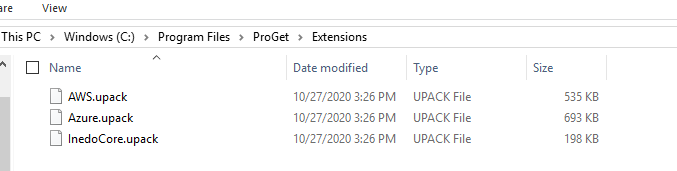
Did you restart IIS or the Integrated Web Server after copying the upack file back? Also, did your upack file have a version number in the name? Or was it just InedoCore.upack? I doubt this, but can you navigate directly to
/administration/extensions? Could you also take a screen shot of the files in theExtensionsfolder?Thanks,
Rich -
Hi @arozanski_1087,
You can also try flipping back to the Built-in User Directory by reseting the base admin account. You won't lose any AD users you have setup, it just simply switches ProGet to use the Built-in directory and resets the Admin password back to Admin.
Thanks,
Rich -
- I restarted both the service and the IIS webserver after I rolled it back. When I found that did not fix the issue I kicked the OS entirely.
- My upack file name that I installed matched what you had me download off of that feed.
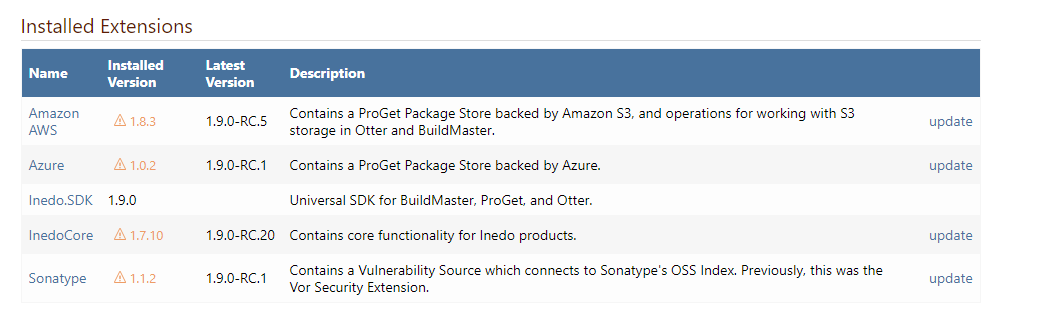
- Extensions Page in the UI:
- Extensions folder on the VM:
-
Hi @arozanski_1087,
Glad a reboot of the OS fixed it. Can you try renaming the downloaded version to
InedoCore.upack. I noticed ProGet gave me some issues installing the extension manually when leaving the version number on there.Thanks,
Rich -
@rhessinger --
I did forget to add: I was able to resolve it all after I reset the admin password and reset the services. Once logged in It prompted me to clear cookies for my name account since I am the only one that's been using it.I have done ask you asked in your last reply. It looks as though renaming the file to just be InedoCore.upack is the solution.
I have since logged back into my instance of Proget and re-enabled LDAP using an administrative service account. From there, it sent be back to the login, where I logged in as myself. In the Permissions page for users and groups, I have added a user in the directory where the users reside, and can confirm that his username does NOT get replaced with his MACHINEACCOUNT$ object. Testing on a few other users seems to indicate that the issue is solved.
Thank you very much for your help.
-
Hi @arozanski_1087,
That's great! I'm sorry it took this long to get this working. Thanks for working with me to figure this out! I'm going to make a change to the documentation right now to include the requirement of naming the extension file. I will also get a full release of this extension out today so it will lock in that version with the ProGet release tomorrow.
Thanks,
Rich

Hello! It looks like you're interested in this conversation, but you don't have an account yet.
Getting fed up of having to scroll through the same posts each visit? When you register for an account, you'll always come back to exactly where you were before, and choose to be notified of new replies (either via email, or push notification). You'll also be able to save bookmarks and upvote posts to show your appreciation to other community members.
With your input, this post could be even better 💗
Register Login