Hi @atripp,
That’s great news - really glad to hear the fix is on the way! I’m excited to test it out once it’s available. Please do let me know when the update is released.
Thanks so much for the help!
Hi @atripp,
That’s great news - really glad to hear the fix is on the way! I’m excited to test it out once it’s available. Please do let me know when the update is released.
Thanks so much for the help!
Hi @rhessinger,
Thanks for taking the time to investigate this and for the detailed update.
Given that the fix likely won’t work, I’ll proceed with the workaround on my side.
Appreciate the help.
Hi @rhessinger ,
Just checking in to see if you had a chance to look into this.
And I’d like to know whether a product fix is planned, or if I should rely on the workaround.
Thanks.
Hi @rhessinger,
I currently do not have an overview on how many images without top-level mediaType.
To have an image in Nexus without top-level mediaType, you can use the oras CLI tool to manipulate the manifest.
For my testing, I used skopeo to copy an OCI image (e.g. alpine/git:v2.52.0) to Nexus.
skopeo copy --dest-creds <user>:<password> --dest-tls-verify=false docker://alpine/git:v2.52.0 docker://registry.nexus.example/docker/alpine/git:v2.52.0
Then I used the oras to:
fetch the manifest
oras manifest fetch --insecure registry.nexus.example/docker/alpine/git:v2.52.0 > manifest.json
Edit the manifest.json, and remove the top-level mediaType
Push the manifest back to the registry
oras manifest push --insecure --media-type application/vnd.oci.image.manifest.v1+json registry.nexus.example/docker/alpine/git:v2.52.0 manifest.json
After that, when inspecting the manifest with docker manifest inspect, the top-level mediaType should be missing from the image. And when trying to do migration in ProGet, it will show that the image is not found.
I hope the information shared above is useful. Thank you.
Hi @rhessinger ,
Unfortunately I do not have an example of Dockerfile to build the image.
However, after further investigation, I noticed that this only happens when the top-level mediaType is missing in the image when I used the docker manifest inspect <image> to check the manifest.
After I updated the manifest with top-level mediaType manually, the ProGet is able to identify the image and migrate it from the Nexus.
Hi @rhessinger ,
Thanks for the support. I am now able to import container images from Nexus.
However, I notice that images with OCI media type are not imported. Is that expected?
Output of execution:
INFO: Importing example:0.0.1...
WARN Docker image "example:0.0.1" not found.
The example:0.0.1 has the following value returned from the https://«NEXUS_HOST_AND_PORT»/service/rest/v1/components?repository=«REPOSITORY_NAME» API:
"contentType" : "application/vnd.oci.image.manifest.v1+json",
Hi ProGet team,
I was reading through the backup documentation and saw this statement:
"For smaller, single-server installations, you may find it easiest to simply take a snapshot of the Virtual Machine the product is running on. As long as all components are hosted on a single virtual machine, this will sufficiently backup the product."
Just wanted to clarify how this works in a restore scenario.
If the VM containing the ProGet docker deployment is backed up or snapshotted and later restored into a different cluster (with different underlying hardware), will ProGet work simply by starting the container services? Or are licenses tied to hardware-specific identifiers (CPU, MAC, etc.) that could cause issues after restoring the VM elsewhere?
Basically trying to confirm whether a full VM restore is enough, or if there are licensing steps needed after moving the VM.
Thank you.
Hi @rhessinger ,
Thanks for your help! I’m fine waiting until the release next Friday.
Hi @rhessinger,
I don’t think the reverse proxy strips the component API. In the configuration of the reverse proxy, we map a URL to a port, so when a client accesses the server using a specific URL, the request is routed to the corresponding listening port.
Thanks.
Hi @rhessinger ,
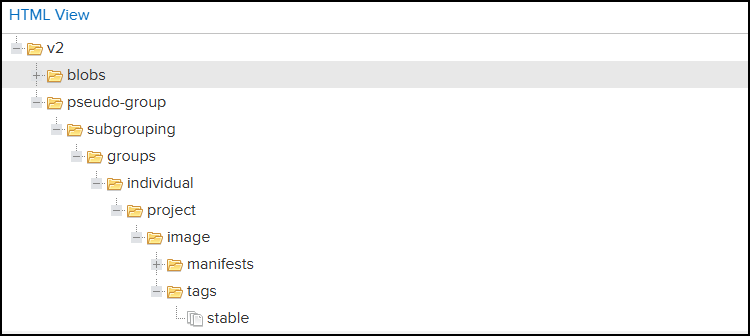
The pseudo-group/subgrouping/groups are just arbitrary name for possible parent groups.
This is a screenshot of the layout when the image are published to Nexus.
Thanks.
Hi @rhessinger,
Thanks for the reply. I am running Nexus 3.76.1.
Here's the response from the API:
{
  "items" : [ {
    "id" : "<obfuscated>",
    "repository" : "docker",
    "format" : "docker",
    "group" : "",
    "name" : "pseudo-group/subgrouping/groups/individual/project/image",
    "version" : "stable",
    "assets" : [ {
      "downloadUrl" : "https://my-nexus-server.foo.bar.com/repository/docker/v2/pseudo-group/subgrouping/groups/individual/project/image/manifests/stable",
      "path" : "/v2/pseudo-group/subgrouping/groups/individual/project/image/manifests/stable",
      "id" : "<obfuscated>",
      "repository" : "docker",
      "format" : "docker",
      "checksum" : {
        "sha256" : "<obfuscated>",
        "sha1" : "<obfuscated>"
      },
      "contentType" : "application/vnd.docker.distribution.manifest.v2+json",
      "lastModified" : "2025-12-02T12:15:33.452+00:00",
      "lastDownloaded" : null,
      "uploader" : "<obfuscated>",
      "uploaderIp" : "<obfuscated>",
      "fileSize" : <obfuscated>,
      "blobCreated" : "2025-12-02T12:15:33.454+00:00",
      "blobStoreName" : null,
      "docker" : { }
    } ]
  } ],
  "continuationToken" : null
}
The Docker API Override URL is set to https://nexus-registry.foo.bar.baz.com/v2/ which is the URL returned by the docker client.
Here's the outputs when running the migration:
info: System.Net.Http.HttpClient.Default.LogicalHandler[100]
      Start processing HTTP request GET https://nexus-registry.foo.bar.baz.com/v2/ouping/groups/individual/project/image/manifests/stable
info: System.Net.Http.HttpClient.Default.ClientHandler[100]
      Sending HTTP request GET https://nexus-registry.foo.bar.baz.com/v2/ouping/groups/individual/project/image/manifests/stable
Hope the info above is helpful. Thanks!
Hi ProGet team,
Thanks for adding support to override the Docker API URL. However, during my testing, it doesn’t seem to work as expected.
For Docker images with long paths, based on the logs, it appears that the requested URL path is truncated. I’m not sure if this is just a visual effect in the logs or if the actual request is being truncated. For example, the URL should be:
https://nexus-registry.example/v2/my-example/subgroup/container/project/subname/image/manifests/stable
but the log shows:
https://nexus-registry.example/v2/group/container/project/subname/image/manifests/stable
and it returns a 404, even though I can access the original URL directly in the browser.
Furthermore, with shorter image paths, e.g.:
https://nexus-registry.example/v2/python/manifests/3.11.2-bullseye
I don’t see the request in the log, and it fails with the following error message:
Error: Unhandled exception: System.ArgumentOutOfRangeException: startIndex cannot be larger than length of string. (Parameter 'startIndex')
   at System.String.ThrowSubstringArgumentOutOfRange(Int32 startIndex, Int32 length)
   at System.String.Substring(Int32 startIndex, Int32 length)
I would appreciate any guidance on this matter.
Thank you for your support!
Hi @rhessinger,
Our Nexus docker repository is configured to use specific port (e.g. port 8080), but this port is not exposed externally. Here's an example response returned by the Nexus endpoint:
{
  "name" : "example",
  "url" : "https://nexus-example/repository/example",
  "online" : true,
...
  "docker" : {
    "v1Enabled" : false,
    "forceBasicAuth" : true,
    "httpPort" : 8080,
    "httpsPort" : null,
    "subdomain" : null
  },
...
  "format" : "docker",
  "type" : "hosted"
}
Instead, we have a proxy server that maps a custom URL (e.g., https://nexus-docker/) to the internal Nexus port.
All Docker operations (push/pull) work correctly through this custom URL.
Could this proxy-based URL mapping affect the Docker migration feature, or is there a way to specify the external (proxy) URL for migration?
Thanks.
Hi ProGet team,
I’m trying to use the Docker migration feature in ProGet to import images from a Sonatype Nexus repository, but it doesn’t seem to be working as expected with the following error.
ERROR: Unhandled exception: System.Net.Http.HttpRequestException: Response status code does not indicate success: 404 (Not Found).
The Nexus docker repository can be found in the selection of the import dialog.
Before I proceed further, I’d like to confirm whether there are any specific requirements or limitations for this migration feature.
In our setup:
Would this configuration affect or break the migration process?
If so, is there a recommended way to handle such setups?
Any clarification or documentation on the expected configuration for Docker migration from Nexus would be greatly appreciated.
Thanks.
Hi @atripp,
Thanks for the reply.
Could you elaborate more on the data deduplication you mentioned?
Additionally, is there any documentation or guide on how to configure or enable this?
Thanks in advance for your help.
Hi ProGet team,
I came across the blog post mentioning that high traffic from around 50 or more users on a single-server ProGet instance can lead to issues such as HTTP request timeouts, unhandled exceptions, and temporary service unavailability.
I’d like to understand more about the performance capacity of a single ProGet instance, particularly when running the official Docker image with the embedded PostgreSQL server.
The documentation lists the recommended container sizes (up to 4 vCPU and 8 GB RAM for “Large”), but I’m wondering:
Any guidance, documentation, or internal benchmarks on this would be greatly appreciated.
Thanks!
Hi @stevedennis,
Thanks for the update! I’m fine with waiting for the official release.
Hi @stevedennis,
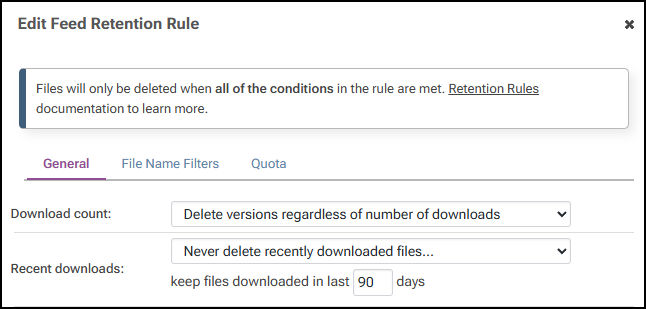
I see, thanks for the explanation. However, based on the logs from running the retention rules in dry-run mode, it shows that foo.zip and bar.zip — which were newly uploaded to the assets directory and haven’t been downloaded yet — are marked for deletion.
Will this actually happen during the real run, or is it just a misleading result from the dry-run output?
Retention Rules Configuration:
Output logs:
Running in dry run mode...
Checking rule 1...
Only delete packages that have not been requested in the last 90 days (since 08/07/2025 14:50:16)
Finding packages that match retention rule 1...
Getting count of matching packages...
2 packages qualify for deletion under this rule.
Deleting matching packages...
Dry run mode is set; nothing will actually be deleted.
Deleting example/foo.zip ...
Deleting example/bar.zip ...
Deleted 2 packages (154347 KB total).
Done checking rule 1.
Hi @stevedennis,
Thanks for the input. I would like to understand more on what the command do. Does the command only reset the Administrator password (as the name suggests), or does it also recreate the Administrator user and reassign the Administer role/privileges if that privileges were removed? I want to be sure whether running it is safe when the privileges were deleted versus only when the password is lost.
Also — a small documentation/case-sensitivity note I ran into: the command shown in the docs appears as proget on Linux (image version 25.0.13), not ProGet.Service. Since Linux is case-sensitive, that difference matters and could confuse people following the instructions. Could the docs be updated or clarified?
Appreciate any details on the exact effects of the reset command. Thanks!
Hi ProGet team,
While configuring the retention rules to manage when files should be deleted, I noticed something that I’d like to confirm.
When using the setting Recent downloads: Never delete recently downloaded files, it appears that the rules are applied to newly created files that haven’t been downloaded yet.
If my understanding is correct, this means a local artifact that was recently created — but has not yet been downloaded — could still be deleted when the retention rules run.
Is this the expected behavior?
And is there a way to ensure that newly created files (e.g., files younger than a certain number of days) are not deleted by the retention rules?
Thanks in advance for any clarification or best practices!
Update:
I was able to restore the Administer role to the Administrator group by editing the database directly.
I’m now curious if there’s a safer way to do this, or a way to prevent accidentally removing critical roles, since currently it can happen without any warning.
Hi ProGet team,
I accidentally removed the Administer rights for the Administrator group, and now it no longer has the permissions to manage the instance.
Environment:
Is there any way to restore the admin rights without reinstalling or resetting the entire system?
Any help or guidance would be greatly appreciated!
Thanks in advance.
Hi ProGet team,
I have a couple of questions regarding the self-connector configuration in ProGet.
https://proget.example.com) or is it acceptable/preferable to use localhost e.g. http://localhost since it connects back to the same instance?I am trying to confirm the best practice for configuration and understand whether there's any unnecessary duplication or storage overhead when using self-connectors.
Thanks in advance for your clarification.
Hi ProGet team,
I’ve encountered an issue when uploading Maven packages to ProGet that use non-standard version strings starting with a character.
Example:
package-alpha-0.1.pomalpha-0.1When I upload this package and then try to access the .pom file directly from the feed, instead of downloading the file as usual, the browser is redirected to a page ending with / (e.g., .../package-alpha-0.1/), rather than returning the file contents.
However, this behavior does not occur when the non-standard version starts with a number.
For example:
0.1_a-l-p-h-a works correctly — the .pom file is downloaded normally.Steps to Reproduce:
alpha-0.1)..pom file directly from the feed URL./ instead of downloading the file.Expected Behavior:
Accessing the .pom file should return the file contents directly, similar to when using a numeric-starting version.
Actual Behavior:
Accessing the .pom file with a version starting with a character causes a redirect, preventing the file from being downloaded.
Questions:
Environment:
Thanks for your help!
Hi @atripp,
Just to confirm — with the naming, the feed will first retrieve content from 10-nuget.org, and only then from 20-abc.net, correct?
Thanks.
Hi ProGet team,
We use multiple connectors to proxy external sources and would like certain packages to be retrieved from preferred sources first.
Does ProGet support ordering or precedence for connectors? If not, are there any recommended workarounds?
Thanks!
Hi ProGet Support Team,
I’m exploring migration options for different package types in ProGet. It’s great that ProGet provides built-in support to import PyPi, NPM, and Maven packages from external sources such as Nexus.
However, I noticed that Container Images and Assets package types do not currently have similar migration support.
I’d like to ask:
Any guidance or suggestions would be greatly appreciated.
Thanks in advance!
Hi @stevedennis, thanks for the reply. According to the documentation, the URL needed to create self-connector can be found on the "Feed Overview" page - however, I'm not sure how to navigate to that page from the UI, and I am also unable to find anything similar to the URL mentioned. Would you be able to point me in the right direction? Thanks.
Does ProGet support creating and managing local groups for users authenticated via LDAP i.e. LDAP-authenticated users, but groups defined and managed locally in the system?
Is it possible to disable import or syncing of LDAP groups when integrating with an LDAP directory?
In Nexus, multiple repositories of the same type can be grouped virtually and exposed through a single endpoint, allowing clients to resolve packages across multiple sources seamlessly.
Does ProGet support grouping multiple feeds into a single endpoint? If not, is there a recommended workaround to achieve similar behavior?
From the UI it seems like the Maven feed only support standard file types such as .jar, .war, and .ear. However for our use case, we need to publish and resolve artifacts that use custom file extensions, such as .zip, .module, etc., while still maintaining the Maven2 layout.
Is there a way to configure the Maven feed to accept and serve artifacts with non-standard extensions?
When trying to resolve a Maven package using Gradle through a Maven feed that’s configured with a third-party registry, e.g. public Maven or internal Maven via a connector, the server responds with a 500 Internal Server Error with message: Value cannot be null. (Parameter 's')
Additional context:
How can we resolve or work around this issue?
System information:
Web UI Version: 2025.5 (Build 16)
Database Schema Version: 25.0.5.16
SQL Server Version: PostgreSQL 17.5 (Debian 17.5-1.pgdg120+1) on x86_64-pc-linux-gnu, compiled by gcc (Debian 12.2.0-14) 12.2.0, 64-bit
db_owner: True
Database Name: proget
Database Collation: C (UTF8)
Database Recovery Model: Default (1)
Database Read Committed Snapshot: True
Database Auto Update Stats: True