Navigation

    Inedo Community Forums

    Forums

    • Login
    • Search
    • Categories
    • Recent
    • Tags
    • Popular
    • Users
    • Groups
    1. Home
    2. jonathan.werder_8656
    3. Posts
    J
    • Profile
    • Following
    • Followers
    • Topics
    • Posts
    • Best
    • Groups

    Posts made by jonathan.werder_8656

    • RE: [ProGet] Currently recommended setup for Azure Deployment using Windows Server VM

      @atripp
      Moin and thanks for the quick response!

      I used that article as there weren't and comparable recommendations for an Azure set-up of ProGet in the documentation and the "Azure-Migration" set-up was different from the regular installation set-up, that's why I assumed that a separate database was recommended for cloud installations.

      Perhaps you should write a separate "Azure" article (that is not about the migration) to specify recommendations or write Azure recommendations into the regular install guide, I think.

      posted in Support
      J
      jonathan.werder_8656
    • [ProGet] Currently recommended setup for Azure Deployment using Windows Server VM

      Moin!

      I was wondering what your current recommendations for an Azure Setup of ProGet using a Windows Server VM are.
      I already read the following article:
      https://docs.inedo.com/docs/proget/installation/proget-migrate-instance-to-azure

      The article recommends "Azure SQL" for the database. Is this still your recommendation for the Azure Setup? If so, what is your reasoning behind it, concerning

      • In the Azure Setup I already did (we are currently in testing of it), it was quite complicated to use a stand-alone database instead of the included InedoDB that also runs on the VM
      • Azure SQL / MSSQL is only supported through "at least ProGet 2026"
      • The main "data" portion of ProGet is not stored in the database, but on disk anyways, so separate data storage is not as useful as it might be for other applications that are only relying on the database

      I am probably missing some arguments for why the recommended setup makes sense ^^
      But since I am currently still in the set-up of our new ProGet instance, I would like to clear out these questions before proceeding.

      posted in Support
      J
      jonathan.werder_8656
    • RE: [ProGet] How do I specify Storage.PackagesRootPath in configuration?

      moin, thanks for the reply!

      pgutil works for the automated use-case.

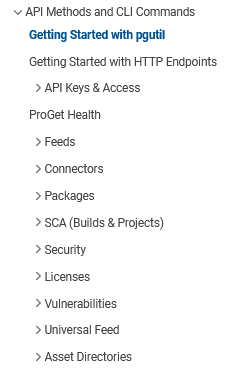
      However, just FYI, the API documentation (which also serves as the pgutil overview) also doesn't show that changing settings is supported, at least not in the same way as other endpoints are documented (it is visible in the commands overview: ):
      https://docs.inedo.com/docs/proget/api
      a7203b1b-b0e8-4351-ac85-1068e220d3c9-image.png

      posted in Support
      J
      jonathan.werder_8656
    • RE: [ProGet] How do I specify Storage.PackagesRootPath in configuration?

      @stevedennis moin and thanks for the reply!

      I know I can set it manually using the Web UI.
      However, I want to set it programatically for an automated install and the ProGet documentation (along with the UI under "Admin > Advanced Settings") specifies that the configuration files can be used for this.

      How do I need to set values in which configuration file in order to set the PackagesRootPath option?

      posted in Support
      J
      jonathan.werder_8656
    • [ProGet] How do I specify Storage.PackagesRootPath in configuration?

      Moin!

      I am currently in the process of trying to automate a ProGet 2025.16 installation on Windows.

      However, I cannot figure out where I need to set the "Storage.PackagesRootPath" value in order for ProGet to load it into configuration
      I have tried using

      • the "C:\ProgramData\Inedo\SharedConfig\ProGet.config" file for

        • service configuration (changing the file and restarting the service
        • installation configuration (changing the file and re-installing)
      • the "C:\Program Files\ProGet\Service\web.config" file for
        - service configuration (changing the file and restarting the service)

      • the "C:\Program Files\ProGet\Service\ProGet.Service.exe.config" file for
        - service configuration (changing the file and restarting the service)

      Also, I have tried using the keys "ProGetConfig.Storage.PackagesRootPath" / "Storage.PackagesRootPath" and "PackagesRootPath"

      Where do I need to specify the path in order for ProGet to recognize it and to use it in its own behaviour? I would really like to avoid having to write into the database manually.

      Did I miss something obvious?
      posted in Support
      J
      jonathan.werder_8656
    • 1 / 1