@stevedennis I understand. Thank you for your fast Reply and explanation.
I see why it can be troublesome and actually go against Proget's core functionality to allow what I was talking about. Thanks!
Regards.
@stevedennis I understand. Thank you for your fast Reply and explanation.
I see why it can be troublesome and actually go against Proget's core functionality to allow what I was talking about. Thanks!
Regards.
@stevedennis I see, Thank you for your fast reply. Regards.
Hello,
This is more like a suggestion.
I would find it really helpful if it was possible to add tags to packages and/or feeds. I looked around Proget for a feature like this but didn't find anything.
Feed Groups are great but it would be really convenient if it were possible to add personalized tags to specific packages and somehow filter through them. For example, I have my feeds grouped by project but It would be really helpful if I could tag different packages inside each feed with Tags that allow me to relate them. In case I wanted to locate all packages related to a specific theme for example, or with a Specific function.
I don't really know if the scope of what I am talking about is really big for what it can provide. It's just a suggestion of a feature I would find really useful.
Thank you for your time!
Kind regards.
Adding to this, I just noticed it also modifies the file's permissions. For example, it removes the "+x" from a .sh file.
Hello.
This is a rather specific issue.
I am using Proget Free edition, version 2025.15.
When Adding a package to a Universal Feed, if you select "Create a Package", when you select a file to add, either by drag and dropping it or by selecting it with the button "or click here to select files" it does load correctly but when you check the package contents the file's name is changed to lowercase.
As you can see in the following images, the file is called "TEST_test.txt".
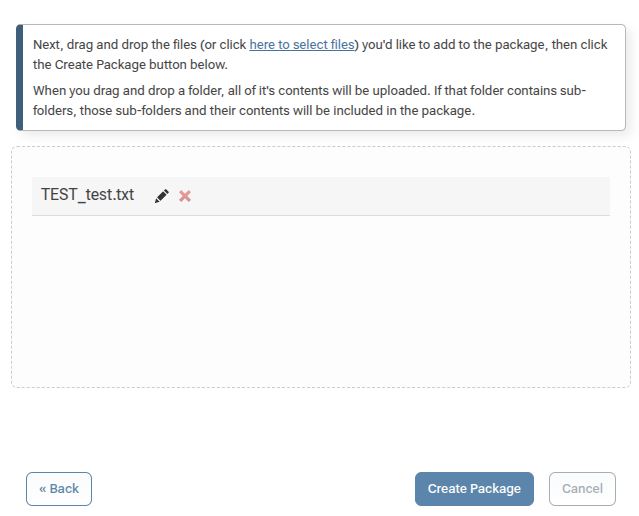
But when I check it's contents in the version's files tab, it's all lowercase:
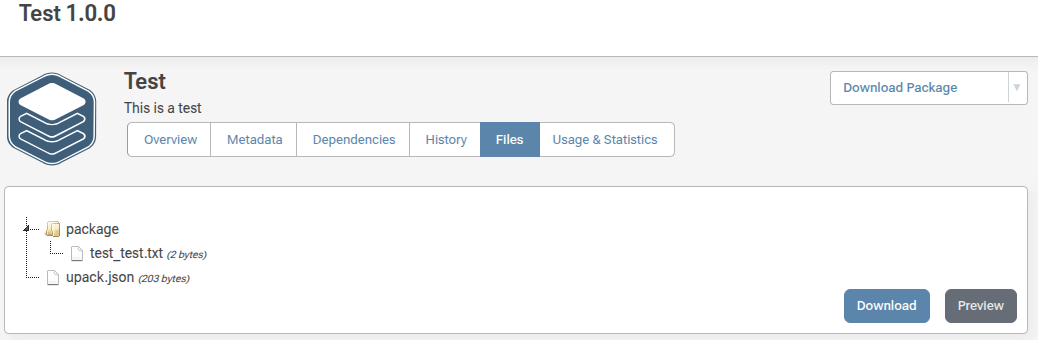
This does not happen when uploading a new package using PGutils nor when uploading an already created .upack file.
I know it's a very specific issue but it's causing trouble in naming standarization for me since some users only use proget via its web interface.
Thanks in advance for your help.
Kind regards.
@dean-houston I just upgraded to the latest version and it worked perfectly now. I can update packages of more than 2 GBs without any problems.
Thanks you so much!
@dean-houston I see... Ok, thank you very much for your support.
Hello Everyone, first of all thank you for your help.
I am running a self hosted instance of ProGet on a Docker container over a Ubuntu machine. It works really well since it's a relatively small instance but I ran into a problem.
I mainly use Universal Package feeds to manage my artifacts but when editing the description of some of them I get the following error:
An error occurred in the web application: Stream was too long.

URL: http://10.1.0.186/universal-packages/edit-package?feedId=20&pUrl=pkg%3Aupack%2FFeederlink_FW%402.4.0
Referrer: http://10.1.0.186/universal-packages/edit-package?feedId=20&pUrl=pkg%3Aupack%2FFeederlink_FW%402.4.0
User: (unknown)
User Agent: Mozilla/5.0 (X11; Linux x86_64) AppleWebKit/537.36 (KHTML, like Gecko) Chrome/135.0.0.0 Safari/537.36
Stack trace:    at System.IO.MemoryStream.Write(Byte[] buffer, Int32 offset, Int32 count)
   at System.IO.Stream.CopyTo(Stream destination, Int32 bufferSize)
   at Inedo.ProGet.WebApplication.Pages.Universal.Packages.EditUniversalPackagePage.<>c__DisplayClass12_0.<<CreateChildControlsAsync>b__1>d.MoveNext() in C:\Users\builds\AppData\Local\Temp\InedoAgent\BuildMaster\192.168.44.60\Temp\_E550814\Src\ProGet.WebApplication\Pages\Universal\Packages\EditUniversalPackagePage.cs:line 189
--- End of stack trace from previous location ---
   at Inedo.Web.PageFree.SimplePageBase.ExecutePageLifeCycleAsync()
   at Inedo.Web.PageFree.SimplePageBase.ProcessRequestAsync(AhHttpContext context)
   at Inedo.Web.AhWebMiddleware.InvokeAsync(HttpContext context)

::Web Error on 04/30/2025 09:36:10::
They are pretty hefty files, this particular package is 2,520 MB. I can edit the description of smaller files without a problem, so I think it has something to do with the size of the file.
Is there any way I can fix this? Maybe the Host machine isn't powerfull enough? (It has a 4 thread CPU with 8 GB of RAM). Or is it a problem in a config parameter in the aplication itself?
Thanks in advance guys. Have a nice day :)
It happens when trying to edit any package in any Universal Package feed, but for example this particular case's upack.json is:
{
  "name": "VHF_FW",
  "version": "2.1.0",
  "description": "",
  "createdDate": "2025-03-12 10:13:49Z",
  "createdUsing": "upack/3.1.4",
  "createdBy": "daniel"
}
Hello,
I am quite new to ProGet so it may be an error on my side, but I would apreciate any help regarding this topic. For context, i am running ProGet 24.0.29 in a docker container in a Ubuntu 24.04 server. No reverse proxy since it is running in my private network.
So the problem is pretty self explanatory, when I try to edit the description of a universal package from the web UI I get the following error:
(500) Server Error
The input does not contain any JSON tokens. Expected the input to start with a valid JSON token, when isFinalBlock is true. LineNumber: 0 | BytePositionInLine: 0.
The description box is obviously not empty and every field in the "Edit package" windows is filled. The error log shows the following:
An error occurred in the web application: The input does not contain any JSON tokens. Expected the input to start with a valid JSON token, when isFinalBlock is true. LineNumber: 0 | BytePositionInLine: 0.

URL: http://10.1.0.186/universal-packages/edit-package?feedId=38&pUrl=pkg%3Aupack%2FTOTEM_SDK%401.3.1
Referrer: http://10.1.0.186/universal-packages/edit-package?feedId=38&pUrl=pkg%3Aupack%2FTOTEM_SDK%401.3.1
User: (unknown)
User Agent: Mozilla/5.0 (X11; Linux x86_64) AppleWebKit/537.36 (KHTML, like Gecko) Chrome/134.0.0.0 Safari/537.36
Stack trace:    at System.Text.Json.ThrowHelper.ThrowJsonReaderException(Utf8JsonReader& json, ExceptionResource resource, Byte nextByte, ReadOnlySpan`1 bytes)
   at System.Text.Json.Utf8JsonReader.Read()
   at System.Text.Json.JsonDocument.Parse(ReadOnlySpan`1 utf8JsonSpan, JsonReaderOptions readerOptions, MetadataDb& database, StackRowStack& stack)
   at System.Text.Json.JsonDocument.ParseUnrented(ReadOnlyMemory`1 utf8Json, JsonReaderOptions readerOptions, JsonTokenType tokenType)
   at System.Text.Json.JsonDocument.ParseValue(ReadOnlyMemory`1 json, JsonDocumentOptions options)
   at System.Text.Json.Nodes.JsonNode.Parse(String json, Nullable`1 nodeOptions, JsonDocumentOptions documentOptions)
   at Inedo.ProGet.WebApplication.Pages.Universal.Packages.EditUniversalPackagePage.<>c__DisplayClass12_0.<<CreateChildControlsAsync>b__1>d.MoveNext() in C:\Users\builds\AppData\Local\Temp\InedoAgent\BuildMaster\192.168.44.60\Temp\_E536092\Src\ProGet.WebApplication\Pages\Universal\Packages\EditUniversalPackagePage.cs:line 163
--- End of stack trace from previous location ---
   at Inedo.Web.PageFree.SimplePageBase.ExecutePageLifeCycleAsync()
   at Inedo.Web.PageFree.SimplePageBase.ProcessRequestAsync(AhHttpContext context)
   at Inedo.Web.AhWebMiddleware.InvokeAsync(HttpContext context)

::Web Error on 03/21/2025 10:00:37::
Does anyone have any theories of what may be happening?
Thanks in advance guys!