Thanks @rhessinger!
Welcome to the Inedo Forums! Check out the Forums Guide for help getting started.
If you are experiencing any issues with the forum software, please visit the Contact Form on our website and let us know!
A
Offline
Posts
-
RE: ProGet: Delete Asset History Files
Hi @rhessinger ,
Thanks for the response, I'm pretty sure the ID of the feed I disabled the version history on was ID
29. I can't find a feed with ID 7, we have a 6 and 8 though!Can you confirm if the history is related to one specific feed, if it is then I can delete the directory - we don't care about it anymore.
Cheers,
Ashley -
ProGet: Delete Asset History Files
Hello,
We had asset feed versioning enabled but have since disabled it. There is a large chunk of disk taken up by the history folder and so we would like to delete the files. How do we go about deleting the versioning history of asset feed?
It has created a new folder in our file system called
F7\._proget_file_history_, but I am assuming this one folder is shared between all asset feeds? I didn't want to go deleting all files from the file system in case they are being used by other versioned assets feeds.Thanks,
Ashley -
RE: ProGet - Yanked package behaviour
Thanks @dean-houston
That all makes sense. If a Vulnerability is identified in a package that has been downloaded, will ProGet remove that from storage?
We are trying to identify what containment actions we need to take in case we identify a high vulnerability package that needs to be removed from our network entirely.
-
ProGet - Yanked package behaviour
Hi,
Could you please explain the behaviour around how ProGet handles yanked packages for public feeds?
Scenarios:
-
The package is yet to be downloaded to ProGet, and the user attempts to download a janked version. I'm sure ProGet will block the download in this case.
-
The package has been downloaded to ProGet, and is then yanked from the remote. Will ProGet update it's feed index to mark it is yanked and also remove any local files that have been previous downloaded?
This is mainly aimed at PyPi - but I guess the same behaviour would apply to other feed types.
Thanks!
-Ashley -
-
RE: ProGet pnpm audit reports no vulnerabilities
Hi,
Thanks for the speedy reply! We investigated your ideas and can confirm that both the npm and pnpm CLIs are calling the newer /bulk endpoint that ProGet implements.
We decided to build a simple mock API that implements the audit endpoint. That we can easily play around with the JSON response to see what is causing the issues.
pnpm
Reproduction steps:
- Setup a simple web server to respond to any POST request with a json payload.
- Test pnpm against the payload from registry.npmjs. Works as expected.
- Stringify the existing ids. No known vulnerabilities found.
Outcome:
It is the the non-numeric IDs that are causing the issue with pnpm. You can see in pnpm source that they have typed the ID field response as a number, I didn't look any further in the source code and just assume that there is some validation/catch to handle non-numeric ids.The lack of a formal schema from GitHub really doesn't make this easy to implement - so no wonder there are issues with other npm clients! It appears the general sentiment is to follow the npm-cli source code for the endpoint schema which it looks like you have done, although it is Javascript and not typed or obvious what each field is meant to contain
 .
.It does however look like the limited unit tests for the audit command are only using numbers for the id field - which may implicitly reference that the field is meant to only contain a number.
To ensure consistency with the public npm registry, would it be possible to change ProGet to use a number for the id field on the audit response? The public npm registry appears to be the only "standard" and so to prevent issues with future npm releases/clients - can I please get your thoughts on this?
Yarn & Bun
We also test Yarn and Bun to see how they behave...
Neither of them appeared to care about the id being a string, however the results were still not consistent.
Bun: Shows 3/3 Vulnerabilities, correct ️
️
Yarn (v2+): Shows 1/3 Vulnerabilities, incorrect ️. I assume this is because 2 out of 3 have
 nullfor the severity field value.Thanks!
Ashley -
ProGet pnpm audit reports no vulnerabilities
Hi,
We are having issues with pnpm not picking up the package vulnerabilities when running
pnpm audit. It always returns no vulnerabilities when pointing at ProGet, but returns correct results when querying the public npm registry.It looks like
npm auditdoes work as expected, so this is specific to whatever pnpm is expecting.Looking at the response from npmjs and ProGet, the only real difference I can see is that ProGet is not always setting
severity, and that there are some encoding issues in thevulnerable_versionsandtitlefields.{ "lodash": [ { "id": 1120370, "url": "https://github.com/advisories/GHSA-xxjr-mmjv-4gpg", "title": "Lodash has Prototype Pollution Vulnerability in `_.unset` and `_.omit` functions", "severity": "moderate", "vulnerable_versions": ">=4.0.0 <=4.17.22", "cwe": ["CWE-1321"], "cvss": { "score": 6.5, "vectorString": "CVSS:3.1/AV:N/AC:L/PR:N/UI:N/S:U/C:N/I:L/A:L" } }, { "id": 1115806, "url": "https://github.com/advisories/GHSA-r5fr-rjxr-66jc", "title": "lodash vulnerable to Code Injection via `_.template` imports key names", "severity": "high", "vulnerable_versions": ">=4.0.0 <=4.17.23", "cwe": ["CWE-94"], "cvss": { "score": 8.1, "vectorString": "CVSS:3.1/AV:N/AC:H/PR:N/UI:N/S:U/C:H/I:H/A:H" } }, { "id": 1115810, "url": "https://github.com/advisories/GHSA-f23m-r3pf-42rh", "title": "lodash vulnerable to Prototype Pollution via array path bypass in `_.unset` and `_.omit`", "severity": "moderate", "vulnerable_versions": "<=4.17.23", "cwe": ["CWE-1321"], "cvss": { "score": 6.5, "vectorString": "CVSS:3.1/AV:N/AC:L/PR:N/UI:N/S:U/C:N/I:L/A:L" } } ] }ProGet:
{
  "lodash": [
    {
      "cvss": {
        "score": 7.9,
        "vectorString": "CVSS:4.0/AV:N/AC:L/AT:N/PR:N/UI:N/VC:N/VI:L/VA:L/SC:H/SI:H/SA:H/E:P"
      },
      "cwe": ["CWE-1321"],
      "id": "PGV-2605591:Contain",
      "severity": "critical",
      "title": "[Contain] PGV-2605591: Lodash has Prototype Pollution Vulnerability in \u0060_.unset\u0060 and \u0060_.omit\u0060 functions",
      "url": "https://PROGET-SERVER/vulnerabilities/vulnerability?vulnerabilityId=PGV-2605591",
      "vulnerable_versions": "\u003E=4.0.0 \u003C4.17.23"
    },
    {
      "cvss": {
        "score": 8.1,
        "vectorString": "CVSS:3.1/AV:N/AC:H/PR:N/UI:N/S:U/C:H/I:H/A:H"
      },
      "cwe": ["CWE-94"],
      "id": "PGV-262413Y:Monitor",
      "severity": null,
      "title": "[Monitor] PGV-262413Y: lodash vulnerable to Code Injection via \u0060_.template\u0060 imports key names",
      "url": "https://PROGET-SERVER/vulnerabilities/vulnerability?vulnerabilityId=PGV-262413Y",
      "vulnerable_versions": "\u003E=4.0.0 \u003C4.18.0"
    },
    {
      "cvss": {
        "score": 6.5,
        "vectorString": "CVSS:3.1/AV:N/AC:L/PR:N/UI:N/S:U/C:N/I:L/A:L"
      },
      "cwe": ["CWE-1321"],
      "id": "PGV-262413X:Monitor",
      "severity": null,
      "title": "[Monitor] PGV-262413X: lodash vulnerable to Prototype Pollution via array path bypass in \u0060_.unset\u0060 and \u0060_.omit\u0060",
      "url": "https://PROGET-SERVER/vulnerabilities/vulnerability?vulnerabilityId=PGV-262413X",
      "vulnerable_versions": "\u003C4.18.0"
    }
  ]
}
ProGet Info
Web UI: 2026.2 (Build 16)
DB Schema: 26.0.2.16
Database Server: Microsoft SQL Server 2022 -
RE: PEP 700 conformance for PyPI feeds
Hi,
We just upgraded to 2026.2 and it looks good, thanks for getting the update out so quick!
-
RE: PEP 700 conformance for PyPI feeds
Hi Alana,
Thanks for investigating! Is the maintenance release this Friday or the week after?
-
RE: PEP 700 conformance for PyPI feeds
Hi @stevedennis
I upgraded our dev server to 2026.1 and we are still having issues with the upload-time property. It appears that ProGet will only add the upload-time property when the package has been pulled to ProGet, i.e. not present for remotes.
2026.1 (Build 14):
Request:$rawBytes = (Invoke-WebRequest http://proget-server/pypi/pypi-public/simple/ty -Headers @{ "Accept" = "application/vnd.pypi.simple.v1+json" }).content [System.Text.Encoding]::UTF8.GetString($rawBytes) | Out-File "c:\test.json"Response:
{
  "meta": { "api-version": "1.1" },
  "name": "ty",
  "versions": [
    "0.0.22",
    "0.0.22",
    "0.0.22",
    "0.0.22",
    "0.0.22",
    "0.0.22",
    "0.0.22",
    "0.0.22",
    "0.0.22",
    "0.0.22",
    "0.0.22",
    "0.0.22",
    "0.0.22",
    "0.0.22",
    "0.0.22",
    "0.0.22",
    "0.0.22",
    "0.0.23",
    "0.0.23",
    "0.0.23",
    "0.0.23",
    "0.0.23",
    "0.0.23",
    "0.0.23",
    "0.0.23",
    "0.0.23",
    "0.0.23",
    "0.0.23",
    "0.0.23",
    "0.0.23",
    "0.0.23",
    "0.0.23",
    "0.0.23",
    "0.0.23",
  ... //Excluded for brevity
    "0.0.39",
    "0.0.39",
    "0.0.39",
    "0.0.39",
    "0.0.39",
    "0.0.39",
    "0.0.39",
    "0.0.39",
    "0.0.39",
    "0.0.39",
    "0.0.39",
    "0.0.39",
    "0.0.39",
    "0.0.39",
    "0.0.39",
    "0.0.39",
    "0.0.39",
    "0.0.39"
  ],
  "files": [
    {
      "filename": "ty-0.0.22.tar.gz",
      "url": "http://proget-server/pypi/pypi-public/download/ty/0.0.22/ty-0.0.22.tar.gz",
      "requires-python": ">=3.8",
      "size": 5333861,
      "upload-time": "2026-05-25T08:36:56.833Z",
      "hashes": {
        "md5": "4771ed89add13f88713a6db3875afc5c",
        "sha1": "1ea16ea77d71ced631d577066855c9ca2bc8d498",
        "sha256": "391fc4d3a543950341b750d7f4aa94866a73e7cdbf3e9e4e4e8cfc8b7bef4f10",
        "sha512": "4e1b256aae7d7ae6f5349cd865e03d13c00f6e64183a8c06e6d22438aef6f771aa84da80bd27c280cb3b378c6887c77e559b25ea6366823dfd2629808af1364c"
      }
    },
    {
      "filename": "ty-0.0.22-py3-none-linux_armv6l.whl",
      "url": "http://proget-server/pypi/pypi-public/download/ty/0.0.22/ty-0.0.22-py3-none-linux_armv6l.whl",
      "requires-python": ">=3.8",
      "size": 10328232,
      "upload-time": "2026-05-25T08:36:26.603Z",
      "core-metadata": {
        "sha256": "91b9b58596f18ff672976d7f04dcab28e9b5ada579303470779c7e2a3be0d131"
      },
      "hashes": {
        "md5": "bcfc8be7ece186f373fa0f1c43d4ba31",
        "sha1": "04bb25267d898b6cb4b2586e14639f85820b2fe9",
        "sha256": "03d37220d81016cb9d2a9c9ec11704d84f2df838f1dbf1296d91ea7fba57f8b5",
        "sha512": "b79e054a90040dc6624f5556dd7444f50a3ad3ffd2d7b64f758a5a69b376e92dc246428599df78d9995c86207bb697eddbf2386898a1f61c50cbee8e71384de8"
      }
    },
... //Excluded for brevity
    {
      "filename": "ty-0.0.23.tar.gz",
      "url": "http://proget-server/pypi/pypi-public/download/ty/0.0.23/ty-0.0.23.tar.gz",
      "requires-python": ">=3.8",
      "size": 5341461,
      "upload-time": "2026-03-13T12:34:23Z",
      "hashes": {
        "md5": "c220bcee84ca26a01a2479388d4ad7af",
        "sha1": "75dd14d7fcbd3f56313886a1b46c23481930bc76",
        "sha256": "5fb05db58f202af366f80ef70f806e48f5237807fe424ec787c9f289e3f3a4ef",
        "sha512": "1dcd3d9a55d0734db1b1335f89db36b3b70d0c77112ad667dc24d556c5e122b6d8b0fced5fc19b99a292bbd98ab0ec0a92aebfe50047e37d627ad3442b2b2ef1"
      }
    },
    {
      "filename": "ty-0.0.23-py3-none-linux_armv6l.whl",
      "url": "http://proget-server/pypi/pypi-public/download/ty/0.0.23/ty-0.0.23-py3-none-linux_armv6l.whl",
      "requires-python": ">=3.8",
      "size": 10329096,
      "upload-time": "2026-03-13T12:34:09Z",
      "core-metadata": {
        "sha256": "6367da298c587b4db7c8709f079114d1dbbc9f748735deefb4179e295b7a1bb2"
      },
      "hashes": {
        "md5": "62bc86fe02c8109ab3a619b2b5196fa2",
        "sha1": "dedbdef7ad32e50890f667cd2e8ae2a64ef28625",
        "sha256": "e810eef1a5f1cfc0731a58af8d2f334906a96835829767aed00026f1334a8dd7",
        "sha512": "b615aaa871792d14c9ad725ed54c9749976da032eaf19e278787094308ab9ca7438c4d3e4ae46132b783d43a8e6fcf4643b0b9b9cf4450e181edb126e13493ec"
      }
    },
... //Excluded for brevity
    {
      "filename": "ty-0.0.39-py3-none-linux_armv6l.whl",
      "url": "http://proget-server/pypi/pypi-public/download/ty/0.0.39/ty-0.0.39-py3-none-linux_armv6l.whl",
      "requires-python": ">=3.8",
      "size": 11360431,
      "hashes": {
        "sha256": "c1bb7ac70f1f7d70cc6655fd96558039e4562b10f489fa49c7ebfd5fcee73ad1"
      }
    },
    {
      "filename": "ty-0.0.39-py3-none-macosx_10_12_x86_64.whl",
      "url": "http://proget-server/pypi/pypi-public/download/ty/0.0.39/ty-0.0.39-py3-none-macosx_10_12_x86_64.whl",
      "requires-python": ">=3.8",
      "size": 11096281,
      "hashes": {
        "sha256": "3435b64c1e59c14c9aa39c20cc018823937cd38d55db853e74d95b8f420569b0"
      }
    },
    {
      "filename": "ty-0.0.39-py3-none-macosx_11_0_arm64.whl",
      "url": "http://proget-server/pypi/pypi-public/download/ty/0.0.39/ty-0.0.39-py3-none-macosx_11_0_arm64.whl",
      "requires-python": ">=3.8",
      "size": 10529674,
      "hashes": {
        "sha256": "5f136377ce46c73677701a9e1ad730bf72f699bcec046e422eb79d0886cac3ab"
      }
    },
    {
      "filename": "ty-0.0.39-py3-none-manylinux_2_17_aarch64.manylinux2014_aarch64.whl",
      "url": "http://proget-server/pypi/pypi-public/download/ty/0.0.39/ty-0.0.39-py3-none-manylinux_2_17_aarch64.manylinux2014_aarch64.whl",
      "requires-python": ">=3.8",
      "size": 11055561,
      "hashes": {
        "sha256": "36b65fb0cc17f03e851d40e210d420be94ab8bc52d041328ad1e45f616036a61"
      }
    },
    {
      "filename": "ty-0.0.39-py3-none-manylinux_2_17_armv7l.manylinux2014_armv7l.whl",
      "url": "http://proget-server/pypi/pypi-public/download/ty/0.0.39/ty-0.0.39-py3-none-manylinux_2_17_armv7l.manylinux2014_armv7l.whl",
      "requires-python": ">=3.8",
      "size": 11127185,
      "hashes": {
        "sha256": "4967967bfadf3860ff84c3fccdbaec8edf8aa20d0d727521084733d853de6657"
      }
    },
    {
      "filename": "ty-0.0.39-py3-none-manylinux_2_17_i686.manylinux2014_i686.whl",
      "url": "http://proget-server/pypi/pypi-public/download/ty/0.0.39/ty-0.0.39-py3-none-manylinux_2_17_i686.manylinux2014_i686.whl",
      "requires-python": ">=3.8",
      "size": 11608459,
      "hashes": {
        "sha256": "9e10ecb1297099ddf9a1f054f8bd921d1863ce85fb819a3c96ed27865a1ba6ed"
      }
    },
    {
      "filename": "ty-0.0.39-py3-none-manylinux_2_17_ppc64le.manylinux2014_ppc64le.whl",
      "url": "http://proget-server/pypi/pypi-public/download/ty/0.0.39/ty-0.0.39-py3-none-manylinux_2_17_ppc64le.manylinux2014_ppc64le.whl",
      "requires-python": ">=3.8",
      "size": 12177101,
      "hashes": {
        "sha256": "9b19cca70e465d71b0510656343883d62372bbe74b7845cae7c0e701d6d5264b"
      }
    },
    {
      "filename": "ty-0.0.39-py3-none-manylinux_2_17_s390x.manylinux2014_s390x.whl",
      "url": "http://proget-server/pypi/pypi-public/download/ty/0.0.39/ty-0.0.39-py3-none-manylinux_2_17_s390x.manylinux2014_s390x.whl",
      "requires-python": ">=3.8",
      "size": 11827815,
      "hashes": {
        "sha256": "56c6704b01b9b3d80ff26b2918423b742516d1e469bef830e9254dcedc9185bf"
      }
    },
    {
      "filename": "ty-0.0.39-py3-none-manylinux_2_17_x86_64.manylinux2014_x86_64.whl",
      "url": "http://proget-server/pypi/pypi-public/download/ty/0.0.39/ty-0.0.39-py3-none-manylinux_2_17_x86_64.manylinux2014_x86_64.whl",
      "requires-python": ">=3.8",
      "size": 11694429,
      "hashes": {
        "sha256": "40b7840ff46764b6a6757f4ade1cd0530fc3e8a0b435ca93e7602360e4cb90b6"
      }
    },
    {
      "filename": "ty-0.0.39-py3-none-manylinux_2_31_riscv64.whl",
      "url": "http://proget-server/pypi/pypi-public/download/ty/0.0.39/ty-0.0.39-py3-none-manylinux_2_31_riscv64.whl",
      "requires-python": ">=3.8",
      "size": 11869846,
      "hashes": {
        "sha256": "1c62a3a87ce26b50819f0dbf03bd95f23f19eeb87bbc7aa732ec64277c77f1aa"
      }
    },
    {
      "filename": "ty-0.0.39-py3-none-musllinux_1_2_aarch64.whl",
      "url": "http://proget-server/pypi/pypi-public/download/ty/0.0.39/ty-0.0.39-py3-none-musllinux_1_2_aarch64.whl",
      "requires-python": ">=3.8",
      "size": 11029763,
      "hashes": {
        "sha256": "f8c34bc81a9c3516e49904e9d8330aac385377cca98390193ea02b903a40fcf0"
      }
    },
    {
      "filename": "ty-0.0.39-py3-none-musllinux_1_2_armv7l.whl",
      "url": "http://proget-server/pypi/pypi-public/download/ty/0.0.39/ty-0.0.39-py3-none-musllinux_1_2_armv7l.whl",
      "requires-python": ">=3.8",
      "size": 11146761,
      "hashes": {
        "sha256": "66f5ab11586a64e79cb692ad685ee5469325c31b5f30bd3554f52f36dbe28cc4"
      }
    },
    {
      "filename": "ty-0.0.39-py3-none-musllinux_1_2_i686.whl",
      "url": "http://proget-server/pypi/pypi-public/download/ty/0.0.39/ty-0.0.39-py3-none-musllinux_1_2_i686.whl",
      "requires-python": ">=3.8",
      "size": 11281843,
      "hashes": {
        "sha256": "e8d89732bcbbcb091f439e556dfc4932f198b118b47d5b85212c60662099670e"
      }
    },
    {
      "filename": "ty-0.0.39-py3-none-musllinux_1_2_x86_64.whl",
      "url": "http://proget-server/pypi/pypi-public/download/ty/0.0.39/ty-0.0.39-py3-none-musllinux_1_2_x86_64.whl",
      "requires-python": ">=3.8",
      "size": 11792477,
      "hashes": {
        "sha256": "eceb6c91dcd05a231119f82abdd9aa337513de23ca6ac990bc44f88791dc1799"
      }
    },
    {
      "filename": "ty-0.0.39-py3-none-win32.whl",
      "url": "http://proget-server/pypi/pypi-public/download/ty/0.0.39/ty-0.0.39-py3-none-win32.whl",
      "requires-python": ">=3.8",
      "size": 10615377,
      "hashes": {
        "sha256": "891c3262314dbc80bf3e872634d23dd216306945daa9a9fcc206ce5ed21ac4c9"
      }
    },
    {
      "filename": "ty-0.0.39-py3-none-win_amd64.whl",
      "url": "http://proget-server/pypi/pypi-public/download/ty/0.0.39/ty-0.0.39-py3-none-win_amd64.whl",
      "requires-python": ">=3.8",
      "size": 11710711,
      "hashes": {
        "sha256": "ba7f2d54452535419e90f6f03ff39282999e87b43c21c00559f6d7ad711a36d5"
      }
    },
    {
      "filename": "ty-0.0.39-py3-none-win_arm64.whl",
      "url": "http://proget-server/pypi/pypi-public/download/ty/0.0.39/ty-0.0.39-py3-none-win_arm64.whl",
      "requires-python": ">=3.8",
      "size": 11081409,
      "hashes": {
        "sha256": "eb4cf0fefbbfedf9a352597bb2431ebdcb7eb3a595c0f825f228e897a0ec285d"
      }
    },
    {
      "filename": "ty-0.0.39.tar.gz",
      "url": "http://proget-server/pypi/pypi-public/download/ty/0.0.39/ty-0.0.39.tar.gz",
      "requires-python": ">=3.8",
      "size": 5702365,
      "hashes": {
        "sha256": "f750277e76a01ecd86185960eca73823c26a53c51103568d56d4d904575159fd"
      }
    }
  ]
}
Note: Only versions 0.0.22 and 0.0.23 have the upload-time property, this is because I manually pulled these version to ProGet.
upload-timeshould always be present prior to pulls so that client package managers like uv withexclude-newer = "7 days"can avoid pulling new packages that will be blocked by ProGet due to non-compliance rules. -
RE: PEP 700 conformance for PyPI feeds
Hi @dean-houston,
Can I confirm that this was fixed in the ProGet 2026 26.0.0 release last week?
PG-3272 Major Release ProGet 2026
 We are experiencing issues with UV attempting to resolve packages that are too new when configured with the "exclude-newer" property, presumably because it's looking for the
upload-timeand notpublishedin the response.For info, we are currently seeing non-PEP 700 compliance on version 2025.27
Thanks,
Ashley -
ProGet Package Download Statistics IP when behind Load Balancer
Hi,
We are running 2x ProGet servers in High Availability behind a load balancer. We are only seeing the load balancer IP on the package download statistics in ProGet.
We have enabled X-Forwarded-For on the load balancer to forward on the Client-IP but this has had not had any impact. Is there another header value we should be sending? Apologies if this is documented somewhere, I couldn't find it!
Thanks,
Ashely -
RE: NPM Incorrect Handling of min-release-age
Thanks @atripp, that makes sense.
I was having another issue with pgutil which turned out to be my fault, however I believe there is a follow on issue to do with the compliance analysis for project builds that have yet to have been pulled to ProGet. More detail on my original post here: https://forums.inedo.com/topic/5733/proget-unable-to-publish-sbom-from-pgutil/4.
@Dan_Woolf suggested continuing the topic here as it's related to non-compliant packages and what I believe to be the recently published rule. Is this something you can take a look at?
Thanks!
-
RE: ProGet Unable to publish SBOM from pgutil
Hi @Dan_Woolf
I had to restart my computer so I lost my PowerShell variables, but I'm going to say you were correct. I ran it again and didn't get the errors - my bad!
This might be for a separate thread, but after providing the correct inputs
, ProGet thinks every build package is noncompliant, but if I click into one of the packages which takes me to the feed, the package is correctly reporting as compliant.Project Build:
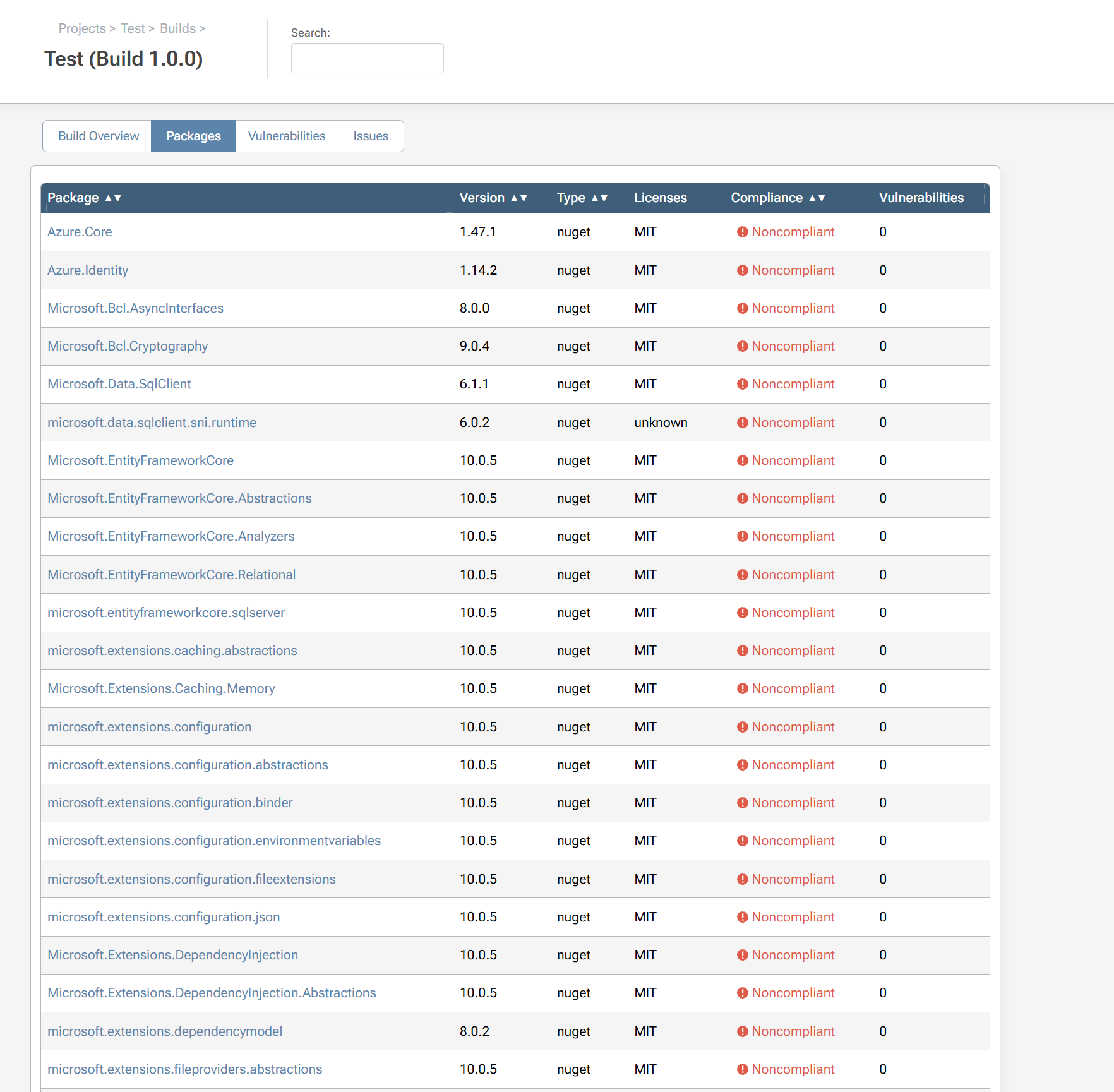
Example Package Feed:
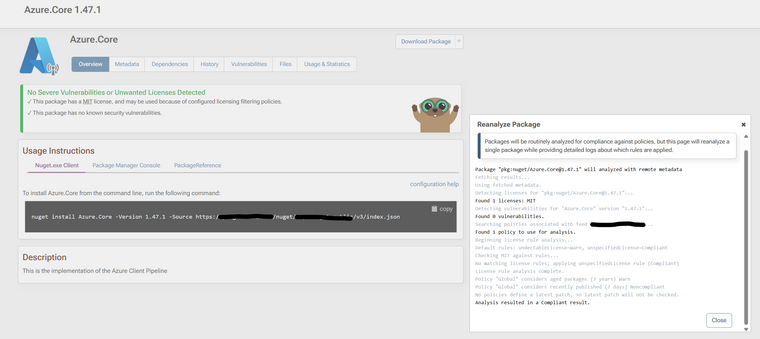
If I analyze my Build again, this is part of the log output (too long to post the entire thing):
Using recently cached (04/05/2026 09:06:59) metadata.
Analyzing compliance for Azure.Core 1.47.1...
Beginning license rule analysis...
Default rules: undectableLicense=Warn, unspecifiedLicense=Compliant
Checking MIT against rules...
No matching license rules; applying unspecifiedLicense rule (Compliant)
License rule analysis complete.
Policy "Global" considers aged packages (3 years) Warn
The package is not cached or local to any feed; cannot determine Publish Date.
Policy "Global" considers recently published (7 days) Noncompliant
The package is not cached or local to any feed; cannot determine Publish Date.
No policies define a latest patch, so latest patch will not be checked.
Analysis resulted in a Noncompliant result.
Azure.Core 1.47.1 is Noncompliant Package is Recently Published
Using recently cached (04/05/2026 08:35:56) metadata.
Analyzing compliance for Azure.Identity 1.14.2...
Beginning license rule analysis...
Default rules: undectableLicense=Warn, unspecifiedLicense=Compliant
Checking MIT against rules...
No matching license rules; applying unspecifiedLicense rule (Compliant)
License rule analysis complete.
Package is deprecated.
Policy "Global" considers deprecation Warn
Policy "Global" considers aged packages (3 years) Warn
The package is not cached or local to any feed; cannot determine Publish Date.
Policy "Global" considers recently published (7 days) Noncompliant
The package is not cached or local to any feed; cannot determine Publish Date.
No policies define a latest patch, so latest patch will not be checked.
Analysis resulted in a Noncompliant result.
Azure.Identity 1.14.2 is Noncompliant Package Status is Deprecated; Package is Recently Published
Using recently cached (04/05/2026 08:35:56) metadata.
Analyzing compliance for Microsoft.Bcl.AsyncInterfaces 8.0.0...
Beginning license rule analysis...
Default rules: undectableLicense=Warn, unspecifiedLicense=Compliant
Checking MIT against rules...
No matching license rules; applying unspecifiedLicense rule (Compliant)
License rule analysis complete.
Policy "Global" considers aged packages (3 years) Warn
The package is not cached or local to any feed; cannot determine Publish Date.
Policy "Global" considers recently published (7 days) Noncompliant
The package is not cached or local to any feed; cannot determine Publish Date.
No policies define a latest patch, so latest patch will not be checked.
Analysis resulted in a Noncompliant result.
Microsoft.Bcl.AsyncInterfaces 8.0.0 is Noncompliant Package is Recently Published
Using recently cached (04/05/2026 08:35:56) metadata.
Analyzing compliance for Microsoft.Bcl.Cryptography 9.0.4...
Beginning license rule analysis...
Default rules: undectableLicense=Warn, unspecifiedLicense=Compliant
Checking MIT against rules...
No matching license rules; applying unspecifiedLicense rule (Compliant)
License rule analysis complete.
Policy "Global" considers aged packages (3 years) Warn
The package is not cached or local to any feed; cannot determine Publish Date.
Policy "Global" considers recently published (7 days) Noncompliant
The package is not cached or local to any feed; cannot determine Publish Date.
No policies define a latest patch, so latest patch will not be checked.
Analysis resulted in a Noncompliant result.
Microsoft.Bcl.Cryptography 9.0.4 is Noncompliant Package is Recently Published
Using recently cached (04/05/2026 08:37:50) metadata.
Analyzing compliance for Microsoft.Data.SqlClient 6.1.1...
Beginning license rule analysis...
Default rules: undectableLicense=Warn, unspecifiedLicense=Compliant
Checking MIT against rules...
No matching license rules; applying unspecifiedLicense rule (Compliant)
License rule analysis complete.
Policy "Global" considers aged packages (3 years) Warn
The package is not cached or local to any feed; cannot determine Publish Date.
Policy "Global" considers recently published (7 days) Noncompliant
The package is not cached or local to any feed; cannot determine Publish Date.
No policies define a latest patch, so latest patch will not be checked.
Analysis resulted in a Noncompliant result.
Microsoft.Data.SqlClient 6.1.1 is Noncompliant Package is Recently Published
Using recently cached (04/05/2026 08:35:57) metadata.
Analyzing compliance for microsoft.data.sqlclient.sni.runtime 6.0.2...
Beginning license rule analysis...
Default rules: undectableLicense=Warn, unspecifiedLicense=Compliant
The package is not cached or local to any feed; without package metadata, license detection is limited.
No licenses detected on package; applying undectableLicense rule (Warn)
License rule analysis complete.
Policy "Global" considers aged packages (3 years) Warn
The package is not cached or local to any feed; cannot determine Publish Date.
Policy "Global" considers recently published (7 days) Noncompliant
The package is not cached or local to any feed; cannot determine Publish Date.
No policies define a latest patch, so latest patch will not be checked.
Analysis resulted in a Noncompliant result.
microsoft.data.sqlclient.sni.runtime 6.0.2 is Noncompliant Package is Recently Published; No license detected
From a brief look at the logs, i'm guessing this is to do with out recently published rule not being calculated for packages that are yet to be cached locally. We are trialling this prior the the build step, so we can't make the assumption that a particular package version will be cached locally in ProGet when running pgutil scan.
Any help is much appreciated.
Thanks,
Ashley -
RE: NPM Incorrect Handling of min-release-age
Hi @atripp,
I upgraded to the latest ProGet version and the package is now complaint if it's older than 7 days but less than 8 days. Unfortunately, it looks like packages that are newer than 7 days (but older than 6) are now compliant. I guess this makes sense if you removed the time component in the comparison.
Examples:
Time now: 2026-05-04T09:53:00 (GMT)
Package published date: 2026-04-27T09:45:00
Outcome compliant
Time now: 2026-05-04T09:53:00 (GMT)
Package published date: 2026-04-27T15:00:00
Outcome compliant (It should be Noncompliant)
Package "pkg:npm/%40hono/node-server@1.19.14" will analyzed with local data Attempting to update local package with remote metadata... Cached metadata from search on 04/05/2026 08:41:11 Detecting licenses for "pkg:npm/%40hono/node-server@1.19.14"... Found 1 licenses: MIT Detecting vulnerabilities for "@hono/node-server" version "1.19.14"... Found 0 vulnerabilities. Searching policies associated with feed "npm-public"... Found 1 policy to use for analysis. Beginning license rule analysis... Default rules: undectableLicense=Warn, unspecifiedLicense=Compliant Checking MIT against rules... No matching license rules; applying unspecifiedLicense rule (Compliant) License rule analysis complete. Policy "Global" considers aged packages (3 years) Warn Policy "Global" considers recently published (7 days) Noncompliant No policies define a latest patch, so latest patch will not be checked. Analysis resulted in a Compliant result.I'm guessing that a for a full fix it needs to compare the time of the package in UTC against UTC time on the server in addition to the date.
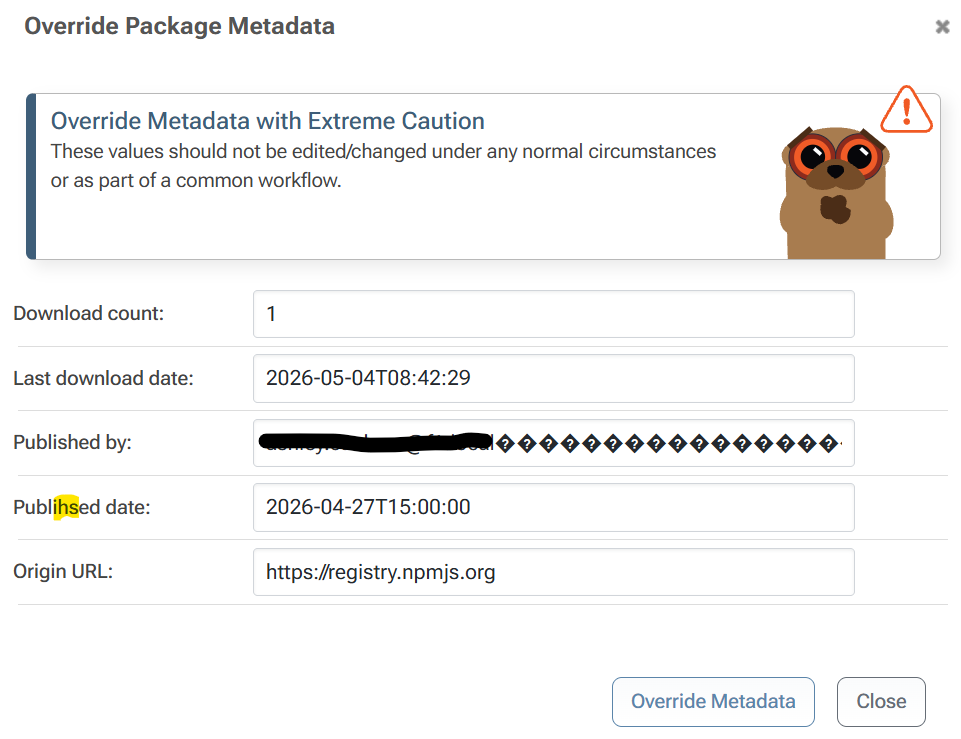
P.S: I only just noticed that there's a typo in Set Package Status for "Publihsed date:"
af87249d-4355-4cd3-8b69-4bd62ef8b731-image.pngThanks for all your effort on this.
Ashley -
ProGet Unable to publish SBOM from pgutil
Hi,
I am trialling the SBOM functionality in ProGet using pgutil builds scan but it errors when trying to publish the SBOM to ProGet.
 pgutil builds scan --source=$Source --api-key=$ApiKey --input=$ProjectPath --project-name=$ProjectName --version=$ReleaseNumber
Scanning for dependencies in .\REDACTED.csproj...
Publishing SBOM to ProGet...
Server responded with InternalServerError (500): 547`16`0`Projects_CreateOrUpdateProject`44`The INSERT statement conflicted with the CHECK constraint "CK__Projects__Project_Name". The conflict occurred in database "REDACTED", table "dbo.Projects", column 'Project_Name'.
Transaction count after EXECUTE indicates a mismatching number of BEGIN and COMMIT statements. Previous count = 1, current count = 0.
Server: ProGet 2025.25 (Build 11)
Database: Microsoft SQL Server 2019
PgUtil: 2.2.7I am able to create a project from the Web UI, but the pgutil error is still present after manually creating the project in ProGet.
-
RE: NPM Incorrect Handling of min-release-age
Hi @atripp,
Thanks for investigating and implementing a fix so quickly! It was always going to be something to do with a developers worst nightmare, time & timezones

I'll update to the maintenance release after it's out and let you know our findings.
-
RE: NPM Incorrect Handling of min-release-age
Hi @atripp,
Perfect thanks! I was able to recreate the behaviour with the metadata override and Reanalyze Package feature.
Server date now: 2026-04-21 14:52BST (13:52 UTC)
Package published date: 2026-04-14T13:00:00
Reanalyze package outcome: Non-compliantThere appears to be an issue uploading images at the moment, but heres the log:
Package "pkg:npm/%40hono/node-server@1.19.14" will analyzed with local data
Attempting to update local package with remote metadata...
Cached metadata from search on 21/04/2026 13:01:56
Detecting licenses for "pkg:npm/%40hono/node-server@1.19.14"...
Found 1 licenses: MIT
Detecting vulnerabilities for "@hono/node-server" version "1.19.14"...
Found 0 vulnerabilities.
Searching policies associated with feed "xxxxxxxxxx"...
Found 1 policy to use for analysis.
Beginning license rule analysis...
Default rules: undectableLicense=Warn, unspecifiedLicense=Compliant
Checking MIT against rules...
No matching license rules; applying unspecifiedLicense rule (Compliant)
License rule analysis complete.
Policy "Global" considers aged packages (3 years) Warn
Policy "Global" considers recently published (7 days) Noncompliant
Publish date of 14/04/2026 is considered recently published.
No policies define a latest patch, so latest patch will not be checked.
Analysis resulted in a Noncompliant result.
and the failing npm install:
npm i -g @hono/node-server@1.19.14 --cache ./c npm error code E400 npm error 400 Bad Request - GET https://xxxxx/npm/npm-public/%40hono/node-server/-/node-server-1.19.14.tgz - Package is Recently Published npm error A complete log of this run can be found in: xxxxx -
RE: NPM Incorrect Handling of min-release-age
Hi @atripp,
I understand that min-release-age and the Recently Published rule refer to two different products, but that version of the package at that time should have been compliant in ProGet, but it wasn't. NPM correctly resolved the right version of the package.
This is obviously quite hard to re-test with the Reanalyze logs because you need a package that's just over the Recently published rule. I don't see a way in the ProGet UI of updating the published date so that I can test it?
We want to block packages from being installed on developer machines in addition to CI pipelines without additional tooling requirements.
Thanks,
Ashley