Welcome to the Inedo Forums! Check out the Forums Guide for help getting started.
If you are experiencing any issues with the forum software, please visit the Contact Form on our website and let us know!
Blocking docker pull of noncompliant/vulnerable container images (ProGet 2026.2 / 2026.14)
-
Hello Inedo team,
We run ProGet Enterprise 2026.2 (26.0.2) in production and tested 2026.14 (26.0.14) in a lab.
Our goal is to block downloads of packages AND container images that have a vulnerability of
PVRS category 3 or above.Package feeds (npm, Maven, PyPI) work as expected: with the policy's "Remediate" and "Contain"
assessments set to Noncompliant and the feed set to "Block noncompliant packages", downloads of
e.g. lodash 4.17.15, log4j-core 2.14.1 and PyYAML 5.3 are refused.Docker feeds do not block:
- Layer Scanning and "Display vulnerability information and enforce vulnerability compliance
rules" are enabled on the Docker feed, and the feed's blocking setting is "Block noncompliant
packages". - Layer scanning correctly inventories the image's OS packages (apk/deb) and identifies
vulnerabilities, e.g. busybox in node:10-alpine with PGV-236207L assessed as "Remediate". - However
docker pullof that image still succeeds (manifest and blobs return 200). - In 2026.2 the feed's Policies & Blocking page says "Policies & Blocking are not usable on
Docker feeds". In 2026.14 the Docker feed's Policies page shows only the risk profile, and the
image's Vulnerabilities tab is empty even though the Packages tab lists vulnerable packages. - The vulnerability blocking HOWTO says "For container feeds such as Docker, you also need to
make sure Layer Scanning is enabled", which suggests blocking should apply to images.
Questions:
- Is blocking pulls of container images based on vulnerabilities/policies supported in any
current version (or planned)? If so, what configuration is required? - If not, what is your recommended approach today (e.g. promoting only compliant images to an
"approved" feed), and is there an API/pgutil command to query an image's vulnerabilities or
compliance so we can gate in CI or with a Kubernetes admission controller? - We manage feeds as code through the Feed Management API. Is there an API or pgutil command to
manage: (a) a feed's download blocking setting and the global blocking setting, (b) policy
vulnerability rules, (c) a package version's status "Always allow downloads",
(d) vulnerability assessments/overrides? The feed API only exposes vulnerabilitiesEnabled. - Blocked package downloads return HTTP 400 with the PGV id in the body, while the docs mention
a 404. Is 400 the intended, stable behaviour?
Thank you,
- Layer Scanning and "Display vulnerability information and enforce vulnerability compliance
-
Hi @ThitLonGiaCay ,
Thanks for the inquiry.
First and foremost, please note that research-backed best practices are to use containment instead of download blocking. Download blocking actually lowers the organizational security posture and has several other negative side-effects.
"Download Blocking" of Container Images
Blocking pulls of container images is not supported. Unlike blocking package downloads, blocking manifest requests have proven to cause serious negative side-effects; we had experimented with it in earlier versions of ProGet and it was a feature we decided not to implement given today's ecosystem.
In addition to being extremely difficult to troubleshoot due to increasingly complex Docker configuration (chained/fat manifests), images are often pulled/re-pulled in production environments. That means some AI-discovered nonexploitable vulnerability that entered the ecosystem can crash a production environment shortly after some random job downloads the latest updates.
As I'm sure you can understand, that's not a support scenario we have any interest in enabling :)
The Better Approach: Container Auditing
You can definitely implement a "blocking workflow" by using
pgutilbefore pulling; our solution for this is documented here: https://docs.inedo.com/docs/proget/api/containers/audit-imageWe also intend to make some additional improvements in ProGet 2027 for container compliance monitoring.
Programmatically/API Settings
Because these settings are rarely configured programmatically (and doing so requires a complex UI), we have not invested in a first-class API to configure policies.
- Global property
Feeds.AllowNoncompliantDownloadscan be set withpgutil settings - Feed-level property can be set via Native API
Feeds_SetFeedProperty - Package status (including "bypassing compliance") can only be set in the UI
Download blocking is not a recommend setting (especially in today's ecosystem), so it's not a priority for us to turn into an API. Package status, likewise, should be overridden only in extreme circumstances and is not something that we want to encourage (or enable) to be part of a ordinary workflow.
Return code on Blocked Packages
400is the intended behavior and I couldn't locate404in the docs. However, when I Google'd it, it looks like AI believes a404is the result, perhaps due to an Atlassian forums post?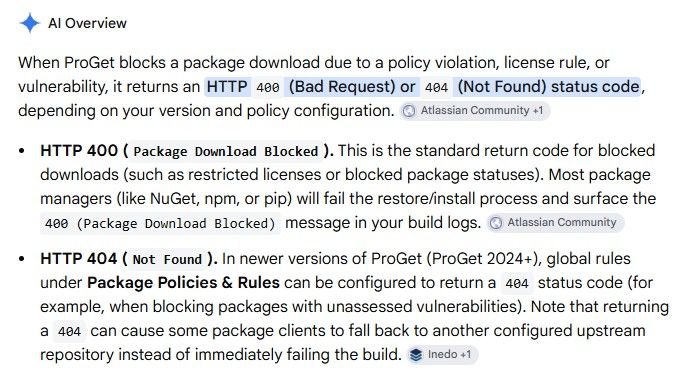
If a 404 is indeed mentioned somewhere in our docs, please let us know where and I'll fix it. That information is incorrect. It's always been a
400error.Thanks,
Alana - Global property

Hello! It looks like you're interested in this conversation, but you don't have an account yet.
Getting fed up of having to scroll through the same posts each visit? When you register for an account, you'll always come back to exactly where you were before, and choose to be notified of new replies (either via email, or push notification). You'll also be able to save bookmarks and upvote posts to show your appreciation to other community members.
With your input, this post could be even better 💗
Register Login