Welcome to the Inedo Forums! Check out the Forums Guide for help getting started.
If you are experiencing any issues with the forum software, please visit the Contact Form on our website and let us know!
OpenLDAP directory: authentication bind uses empty DN instead of resolved user
-
Continuing our Enterprise trial evaluation — this time on the "OpenLDAP/Generic LDAP" user directory type. We stood up a real OpenLDAP server (Docker, osixia/openldap), created a real user, and confirmed that user could bind successfully outside of ProGet (ldapwhoami succeeded). We were never able to get ProGet to authenticate that same user, and traced it to three separate issues, each confirmed against the LDAP server's own connection log:
- Auto-derived search base is wrong when left blank
With the "User Search Base" field empty, ProGet derived a search base by treating our "Host" field's IP address as if it were a dotted domain name:
Host: 172.17.0.1
Derived base: dc=172,dc=17,dc=0,dc=1
Every search failed with LDAP error 32 ("no such object") until we set "User Search Base" explicitly to our real directory root (dc=progetpoc,dc=local).- The %s username placeholder in the "Users:" filter isn't substituted
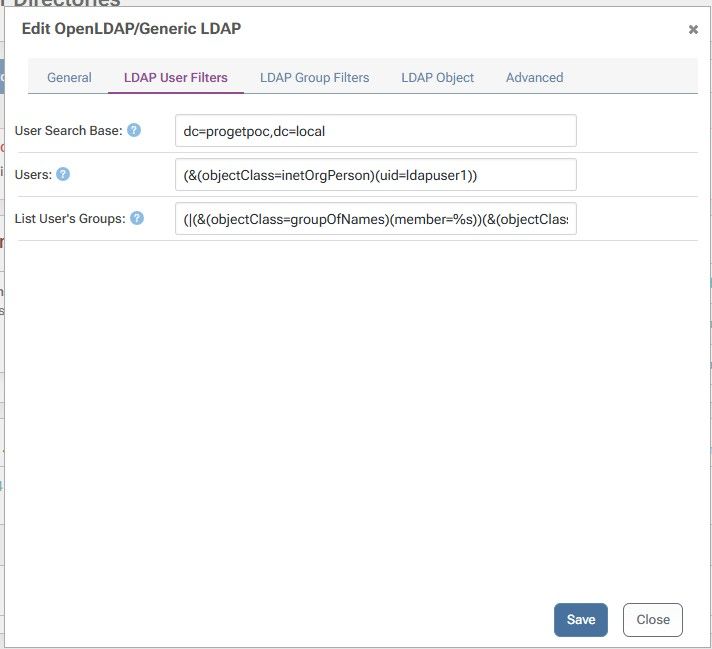
The "Users:" field ships pre-filled by ProGet itself with (&(objectClass=inetOrgPerson)(uid=%s)). With a correct search base in place, the query actually sent to the LDAP server was (&(objectClass=inetOrgPerson)(?uid=)) — the %s collapsed to a literal ?, and the submitted username never made it into the filter. This matched zero users regardless of who was authenticating.
- The credential-verification bind uses an empty DN instead of the resolved user
To isolate #2, we temporarily hardcoded the filter to (uid=ldapuser1). The search then correctly found the user (nentries=1). But the very next operation — presumably meant to verify the submitted password by binding as that user's DN — was instead BIND dn="" method=128, which succeeded trivially (an anonymous bind checks no password). ProGet then failed the overall request with an internal "No Such Object" error, surfaced to the client as a 500.
Full log excerpt:
SRCH base="dc=progetpoc,dc=local" filter="(&(objectClass=inetOrgPerson)(uid=ldapuser1))"
SEARCH RESULT tag=101 err=0 nentries=1
BIND dn="" method=128
RESULT tag=97 err=0
ProGet: "No Such Object" -> HTTP 500 to the clientIssue #3 is the one that actually blocks things — even a hand-corrected configuration that resolves the right user can't complete authentication. Is this a known issue, and is there a recommended workaround, or is this expected to be fixed in an upcoming build?
Thanks,
Sai -
Hi @sai.pabbareddy,
Thanks for the details here. For 1, looking at the code, this is to be expected. We wrote this with the expectation the host would be a DNS name and we used that to build the search base for users and groups. The trade off is that if an IP address is used, then you will need to manually specify the search bases. WE will update our documentation to reflect this.
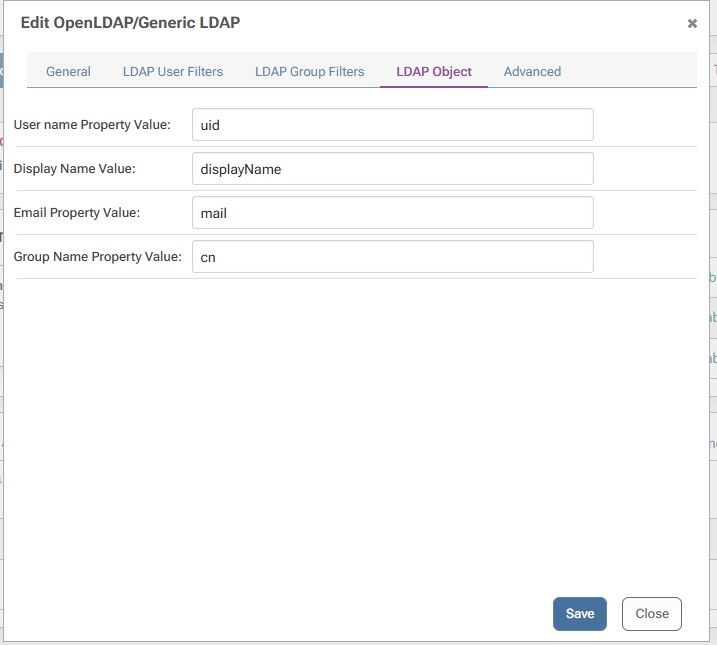
As for 2 and 3, I'm unable to recreate what you are seeing. Could you please provide screen shots with the values you have configured for the OpenLDAP User Directory?
Thanks,
Rich -
-
Hi @sai.pabbareddy,
You will have to also set the Group Search Base as well. Can you test that and let me know if anything changes?
Also, what OpenLDAP server are you using to run these test with?
Thanks,
Rich -
Thanks — tried this. Two updates:
- Group Search Base did not resolve the %s placeholder issue
Set Group Search Base to the same value as User Search Base (dc=progetpoc,dc=local) and re-tested. The search now completes cleanly (err=0, matching a properly-set base), but the filter sent is still:
filter="(&(objectClass=inetOrgPerson)(?uid=))"
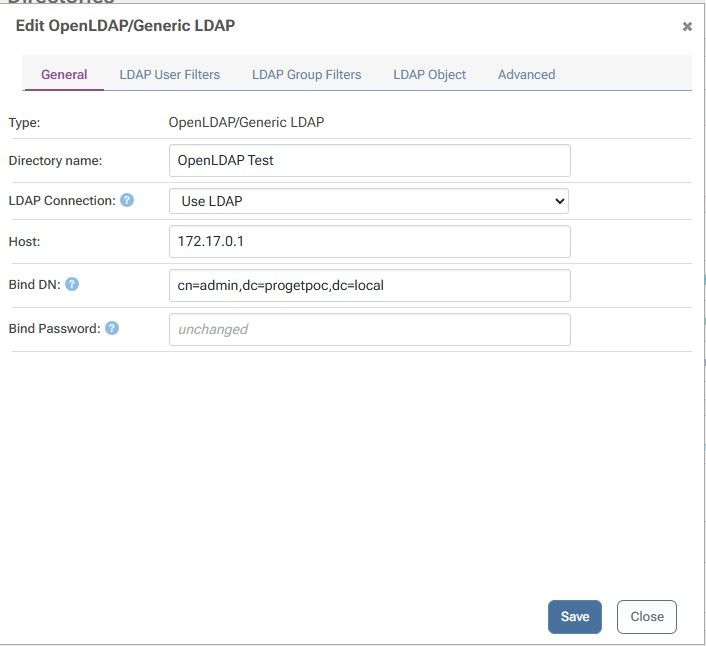
SEARCH RESULT tag=101 err=0 nentries=0The %s in the "Users:" field ((&(objectClass=inetOrgPerson)(uid=%s))) still isn't being substituted with the submitted username — it collapses to a literal ?uid= with nothing after the =, so it matches zero users regardless of who's authenticating. Screenshots of our current full config (General, LDAP User Filters, LDAP Group Filters) attached.
- Found something else along the way: Host field doesn't seem to support host:port syntax
While troubleshooting, we temporarily ran our test OpenLDAP server on a non-default port and set Host to 172.17.0.1:1389. With that value, ProGet produced a 403 with zero connection attempts ever reaching the LDAP server (confirmed via its own connection log) and no log entry at any severity in the Diagnostic Center — a completely silent failure, no exception, nothing. Reverting Host back to a bare IP (default port 389) immediately restored the behavior above (a real, logged LDAP query, just still hitting the %s bug). Is host:port meant to be supported on this field, or is there a separate port field we're missing (similar to the Active Directory directory type's "LDAP Port Override")? If it's not supported, a validation error would be a lot easier to debug than total silence.
We are using osixia/openldap OpenLDAP Server with version 1.5.0.
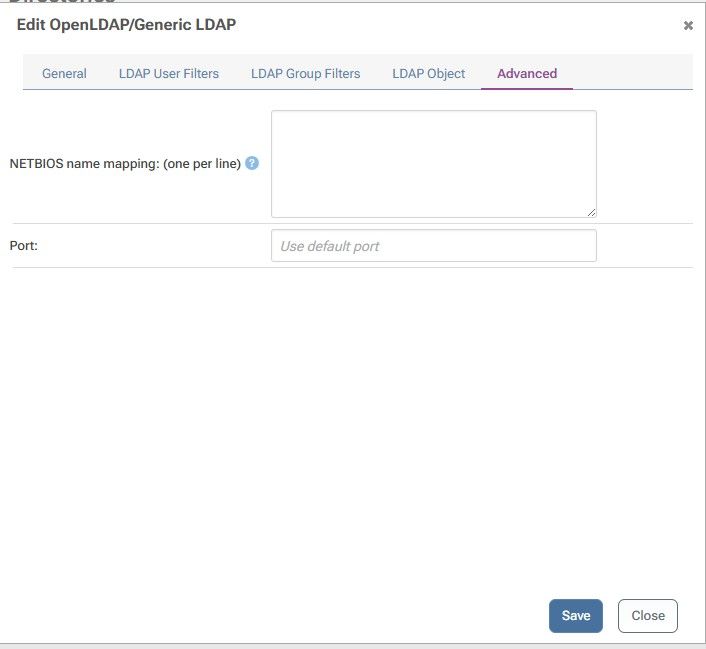
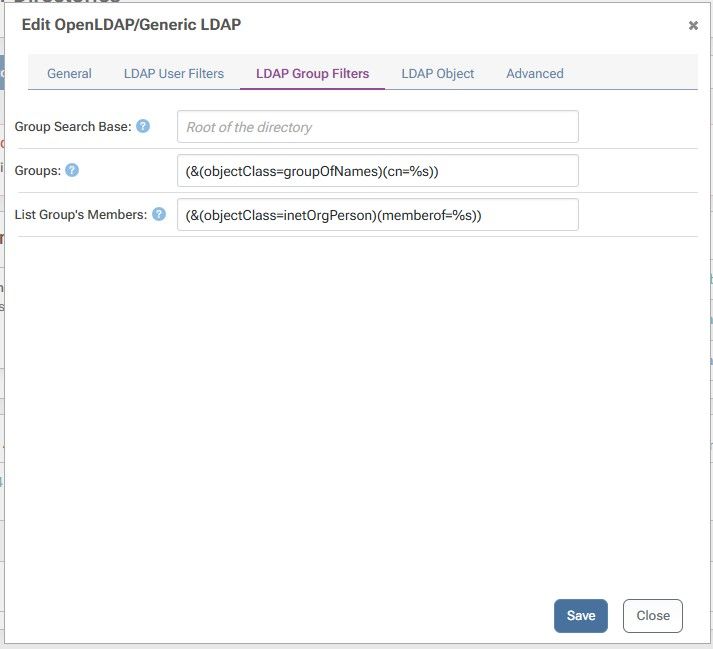
Please find the latest screen shots.
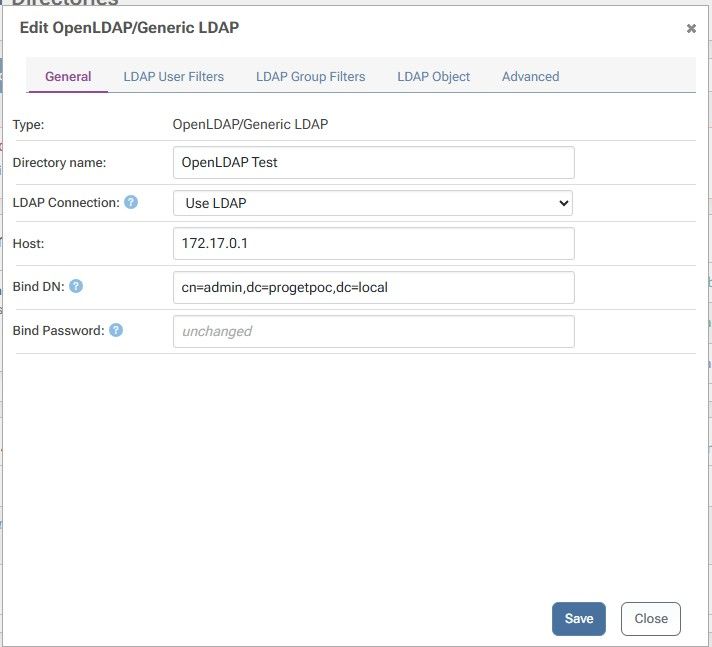
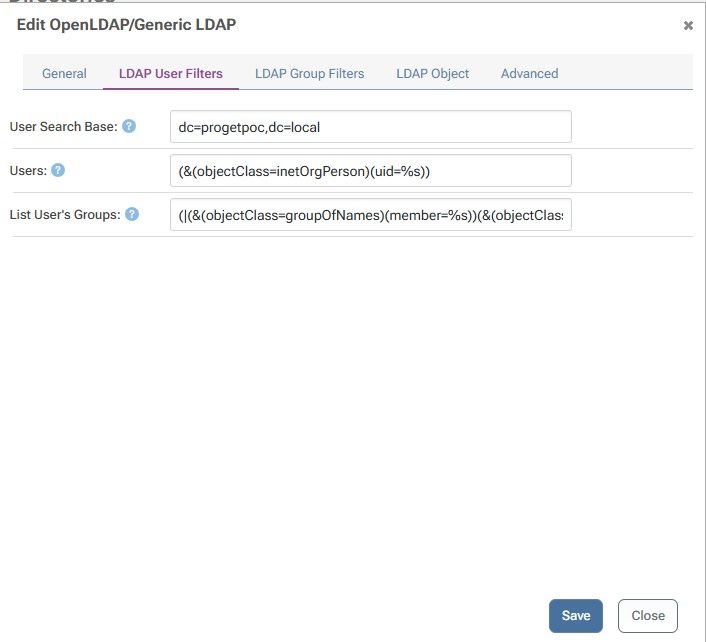
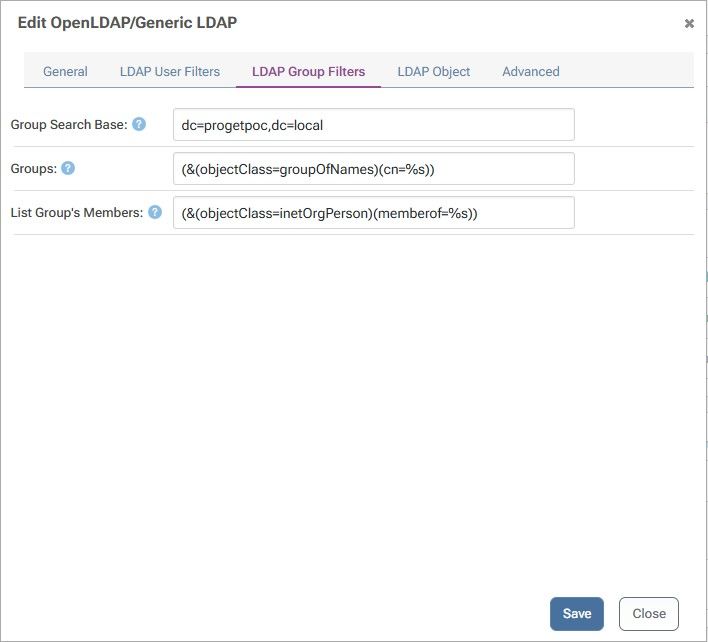
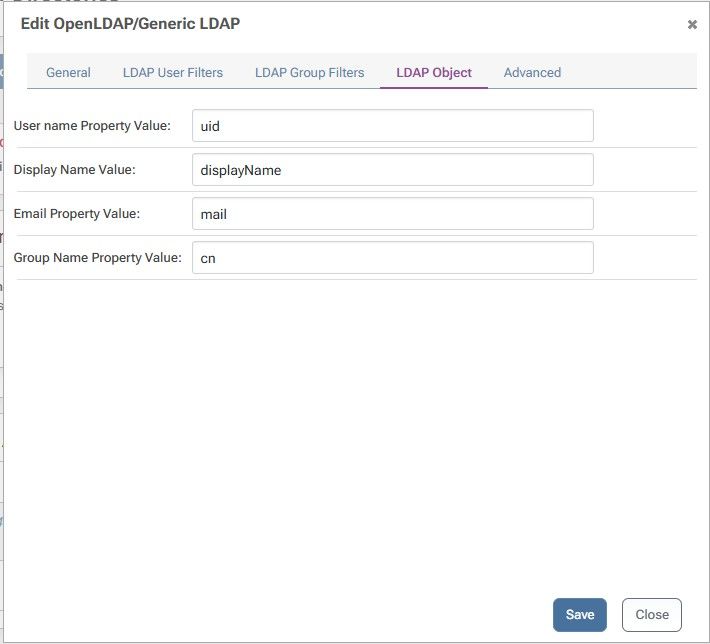
Thanks,
Sai -
Hi @sai.pabbareddy,
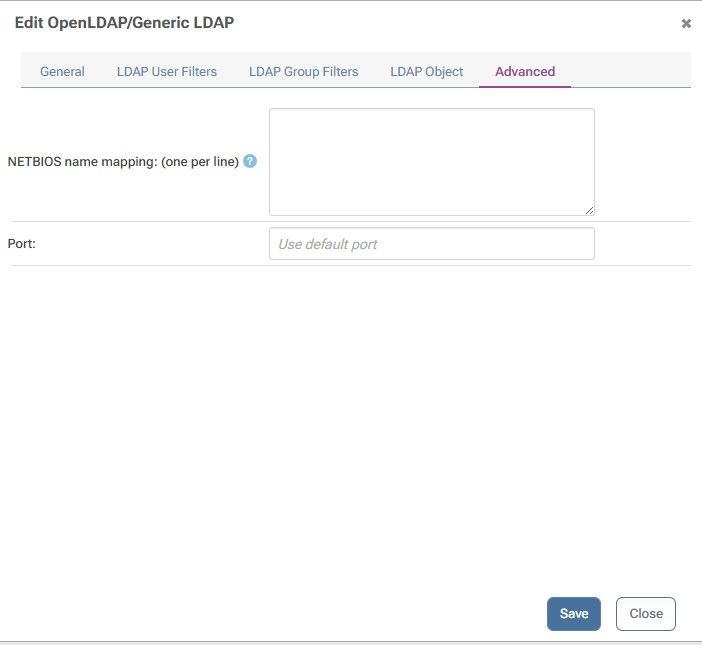
The port can be changed to a custom port on the advanced tab.
It looks like the %s is actually working in ProGet, but instead this is a feature of osixia/openldap OpenLDAP Server. When the logs shows a ? mark in front of an attribute in a sqerch query (like
?uid=), it means that either the uid attribute is missing of the objectClass does not exist, which therefore cannot confirm that uid exists on those objects. It also could be that the value is hidden for security reasons and you have to change your logging level to see. If you can provide me with the LDAP object for ldapuser1, I can help you build the proper search queries.Thanks,
Rich -
Thanks — good to know about the Advanced tab port field, that resolves our earlier question about host:port syntax.
On the %s question, here's the LDAP object for ldapuser1 (LDIF):
dn: uid=ldapuser1,ou=people,dc=progetpoc,dc=local
objectClass: inetOrgPerson
objectClass: posixAccount
objectClass: shadowAccount
uid: ldapuser1
sn: TestUser
givenName: Ldap
cn: Ldap TestUser
displayName: Ldap TestUser
uidNumber: 10001
gidNumber: 10001
userPassword: LdapUser!2026
gecos: Ldap TestUser
loginShell: /bin/bash
homeDirectory: /home/ldapuser1
mail: ldapuser1@progetpoc.localI think we have evidence that narrows this down, though: we tried the same object with a hardcoded, literal filter — (uid=ldapuser1), no %s involved at all — and that search succeeded cleanly:
filter="(&(objectClass=inetOrgPerson)(uid=ldapuser1))"
SEARCH RESULT tag=101 err=0 nentries=1So the object itself definitely has a matching uid attribute and objectClass=inetOrgPerson — a real value search finds it fine. The (?uid=) rendering only appeared when the "Users:" field's %s placeholder was in play, with the exact same object as the target. That seems to point at something about how the placeholder gets expanded (or not) before the query is sent, rather than something about our test object's attributes. Does that change your read on it, given the hardcoded-filter result?
-
Hi @sai.pabbareddy,
Let me run some other tests. It could be related to the LDAP escaping that is happening, but that would be highly unlikely as we have many other users currently using the OpenLDAP/Generic LDAP user directory. I think the more peculiar thing is that when you hard coded the uid, the logs didn't show ?uid=, but with the %s it did. That makes me think that it does not like the value that is being passed in. Does the group search have the same issue and log message?
Thanks,
Rich -
Thanks for the follow-up — tested this directly.
Group search does not have the same issue. Using the directory's "Load group by group name" test tool against the
Groups:filter ((&(objectClass=groupOfNames)(cn=%s))), the server's own connection log shows%ssubstituted correctly:SRCH base="dc=progetpoc,dc=local" scope=2 deref=0 filter="(&(objectClass=groupOfNames)(cn=proget-users))" SEARCH RESULT tag=101 err=0 nentries=1The follow-up "List Group's Members" filter (
(&(objectClass=inetOrgPerson)(memberOf=%s))) also substituted correctly — it inserted the full resolved group DN:SRCH base="dc=progetpoc,dc=local" scope=2 deref=0 filter="(&(objectClass=inetOrgPerson)(memberOf=cn=proget-users,dc=progetpoc,dc=local))" SEARCH RESULT tag=101 err=0 nentries=0(That one came back empty, but that's expected on our end — our test OpenLDAP server doesn't have the
memberofoverlay loaded, somemberOfis never actually populated on user entries. Not related to the bug.)So: both group-side filters resolve
%scorrectly. Only the user-search filter ((&(objectClass=inetOrgPerson)(uid=%s))) produces the broken(?uid=)pattern. Since substitution clearly works elsewhere, I don't think this is a general escaping/value-handling issue — it looks isolated to whatever code path handles the user-search filter specifically. Happy to send the exact directory config (User Search Base, Users filter) again if it helps narrow it down further. -
Hi @sai.pabbareddy,
I think it would be a good idea to have you send over the exact directory config. The code paths for searching for users and groups are virtually identical, with the only difference being the LDAP filter. You can see what we are doing directly by looking at the code in GitHub: https://github.com/Inedo/inedox-inedocore/blob/16155c425cf4b4d180e2e7ced7af90e36fb4ed35/InedoCore/InedoExtension/UserDirectories/OpenLdap/OpenLdapUserDirectory.cs#L300
I'm guessing there is something else going on that is causing this, maybe a hidden unicode character or something. When you paste in the ldap queries, can you make sure to include them using a markdown code block (
``` ... ```)?Thanks,
Rich -
Thanks for the code link, Rich — that confirmed what I suspected: the user-search and group-search paths really are identical (one
SearchAsyncmethod, same escaping call, just a different filter string), so I went back and re-tested rather than guess further.I can no longer reproduce either issue (empty filter substitution or the empty-DN bind). Tested against a rebuilt OpenLDAP container:
ldapuser1authenticates successfully via a real HTTP Basic-auth request. Log shows the filter correctly built:filter="(&(objectClass=inetOrgPerson)(uid=ldapuser1))"— not(?uid=).- The credential-verification bind now correctly uses the resolved DN:
BIND dn="uid=ldapuser1,dc=progetpoc,dc=local". A wrong password correctly returnserr=49(invalid credentials) rather than binding anonymously. - To rule out a leftover hardcoded filter from earlier debugging, I created a second user,
ldapuser2, with a different username. Its filter also correctly showeduid=ldapuser2— genuine%ssubstitution, not a stale config value.
One side note that might be relevant to your side, not a new report:
ldapuser2got a401on its first couple of attempts despite the auth itself being correct in the log — resolved immediately by restarting the ProGet container. Looked identical to the permission-cache issue you already have documented (PG-3374).I want to be upfront that I don't think you actually shipped a fix here —
X-ProGet-Versionon this instance is still26.0.10.14, the same build I originally tested on, not2026.11. So I can't explain why it's working now. My best guess, given theldapuser2cache symptom above, is that this was itself downstream of the same caching regression asPG-3374— some stale state that eventually cleared with enough restarts, rather than a real code path being broken. I don't have a way to prove that theory either way from my side.Given that, I'd treat this as "not currently reproducible, cause unconfirmed" rather than "fixed" — happy to keep an eye out and re-test properly once 2026.11 is actually out, if that's useful data for you. Let me know if you want the exact directory config anyway for your own review.
-
Hi @sai.pabbareddy,
Thanks for the heads up. The cache fix should exist in 26.0.11-rc.15, but I'll be very interested to hear if you still see those issues after the upgrade. Please keeps us informed and we can look into it further.
Thanks,
Rich -
@rhessinger,
Upgraded to 26.0.11-rc.15 and re-ran the exact same tests — confirmed fixed.ldapuser1 with the correct password authenticates successfully; wrong password correctly rejected. And the real test — ldapuser2 (the second user I added specifically to rule out a stale hardcoded filter) — succeeded on the first try, no restart needed this time. Previously that same scenario needed a docker restart proget to pick up the new permission grant.
Log confirms it's genuinely correct, not just passing by luck:
SRCH filter="(&(objectClass=inetOrgPerson)(uid=ldapuser2))"
BIND dn="uid=ldapuser2,dc=progetpoc,dc=local" method=128
RESULT tag=97 err=0Correct substitution, correct resolved-DN bind, correct result. This is a real fix — thanks for pointing me at the RC build and for digging into this as much as you did. Data (packages, database) all persisted fine through the upgrade too, for what it's worth, in case that's useful signal for anyone else planning the same jump.
-

Hello! It looks like you're interested in this conversation, but you don't have an account yet.
Getting fed up of having to scroll through the same posts each visit? When you register for an account, you'll always come back to exactly where you were before, and choose to be notified of new replies (either via email, or push notification). You'll also be able to save bookmarks and upvote posts to show your appreciation to other community members.
With your input, this post could be even better 💗
Register Login