Welcome to the Inedo Forums! Check out the Forums Guide for help getting started.
If you are experiencing any issues with the forum software, please visit the Contact Form on our website and let us know!
Proget Docker Documentation Postgresql
-
Hi there,
we are currently exploring artifact repositories and thus Proget as well. Sadly, the documentation is lacking in our view.
Here (https://docs.inedo.com/docs/installation/linux/docker-guide) it says, that the integrated database is postgres. However when using the connection string
PROGET_SQL_CONNECTION_STRING, it seems that proget tries to connect to an MSSQL database.Unhandled exception. System.ArgumentException: Keyword not supported: 'port'. at Microsoft.Data.SqlClient.SqlConnectionStringBuilder.GetIndex(String keyword) at Microsoft.Data.SqlClient.SqlConnectionStringBuilder.set_Item(String keyword, Object value) at System.Data.Common.DbConnectionStringBuilder.set_ConnectionString(String value) at Microsoft.Data.SqlClient.SqlConnectionStringBuilder..ctor(String connectionString) at Inedo.ProGet.SharedConfig.ProcessConnectionString(String connectionString) in C:\Users\builds\AppData\Local\Temp\InedoAgent\BuildMaster\192.168.44.60\Temp\_E656337\Src\src\ProGet\Configuration\SharedConfig.cs:line 196 at Inedo.ProGet.SharedConfig.Initialize(Boolean reloadFile) in C:\Users\builds\AppData\Local\Temp\InedoAgent\BuildMaster\192.168.44.60\Temp\_E656337\Src\src\ProGet\Configuration\SharedConfig.cs:line 47 at Inedo.ProGet.Service.Program.Main(String[] args) in C:\Users\builds\AppData\Local\Temp\InedoAgent\BuildMaster\192.168.44.60\Temp\_E656337\Src\src\ProGet\Service\Program.cs:line 50 at Inedo.ProGet.Service.Program.<Main>(String[] args)What options does the docker image actually support. Not being able to connect to an external postgresql would be a showstopper for us.
Best regards
Adrian -
Hi @a.sieger ,
Please note that we do not recommend an external PostgreSQL database. It performs slower, costs more to maintain, has a higher chance of outages, and tends to cause support headaches down the line. The database primarily stores package metadata and application configuration, doesn't take up much disk space, and it's not the business data that your DBAs would own.
That being said if you really insist on using one, then please refer to the Database Connection String section on the page you linked.
For the non-embedded PostgreSQL database backend, you will need to specify a «inedo-product»_POSTGRES_CONNECTION_STRING environment variable instead.
So you need to use
PROGET__POSTGRES_CONNECTION_STRINGThanks,
Alana -
Hi @atripp
while I did overlook that (all the other options were in the styled code blocks), I still have problems.However, I get this error when accessing the UI:
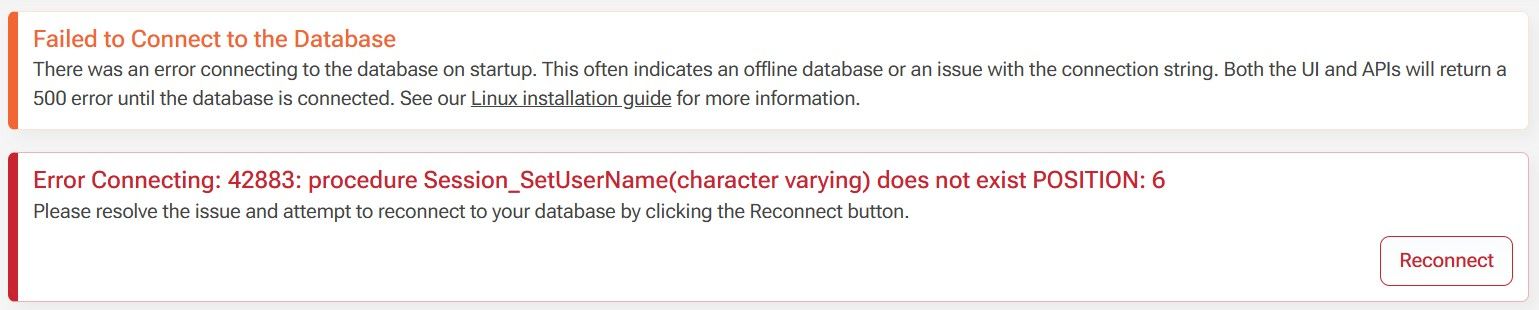
I would have expected, that proget creates everything on its own, however only the table
__InedoDb_DbSchemaChangesis created.And yes, the external database is a hard requirement for us. Before actually considering on making the switch to proget and getting a license, this needs to work.
Best regards
Adrian -
Hi @a.sieger ,
I would push back on that "hard requirement" because it doesn't make any technical or business sense, and will only lead to support headaches just like this.
There is something wrong with your PostgreSQL server configuration, perhaps permission related, that's causing the database to not be created. The error cannot be logged in the database because it doesn't exist.
I would delete the database and start again, but verify you've created the database exactly as specified using the exact version supported:
https://docs.inedo.com/docs/installation/postgresql#external-postgresThings like improper locales will cause errors.
Then, don't run ProGet detached (i.e. ommit
-d) so you can get the console logs. That's where you will see database errors. You can also run theupgradedbcommand instead:
https://docs.inedo.com/docs/installation/linux/installation-upgrading-docker-containers#upgrading-the-database-only-optionalPlease let us know what you find!
Hope that helps,
Alana

Hello! It looks like you're interested in this conversation, but you don't have an account yet.
Getting fed up of having to scroll through the same posts each visit? When you register for an account, you'll always come back to exactly where you were before, and choose to be notified of new replies (either via email, or push notification). You'll also be able to save bookmarks and upvote posts to show your appreciation to other community members.
With your input, this post could be even better 💗
Register Login