Welcome to the Inedo Forums! Check out the Forums Guide for help getting started.
If you are experiencing any issues with the forum software, please visit the Contact Form on our website and let us know!
ProGet web requests stuck returning 500 "Execution Timeout Expired" while background tasks & /health stay healthy — requires restart
-
First I should apologize for any slop in this post, my own knowledge on the subject is limited so I had Opus investigate this.
But in short we've had on more than one occasion now experienced that we cannot login to Proget, when we try to access the front page (root url) we only get 500. Buuut the /health endpoint is happy go lucky and returns that everything is ok. This is a little tedious since we show the /health endpoint on our dashboards and also use that for automated restarts :p
So this is what Opus found on the issue after we couldn't connect again this morning.
Product/Version: ProGet 2025.25 (Build 11) — proget.inedo.com/productimages/inedo/proget:25.0.25, Linux container
Hosting: Azure App Service (single instance, Always On)
Database: Azure SQL Database, Standard S0 (10 DTU)Summary
Intermittently, all web requests start failing with HTTP 500:
An error occurred in the web application: Execution Timeout Expired. The timeout period elapsed prior to completion of the operation or the server is not responding.
This affects both the web UI (GET /) and the Docker registry API (GET /v2/...). Once it starts, it does not self-recover; only a container restart fixes it.
Key observation — it's not the database
During the outage:
- ProGet's scheduled background tasks keep completing successfully every ~15s the entire time (Execution Dispatcher, Feed Replication, Drop Path Monitor, Node Message Cleanup, etc.). So DB connectivity clearly works.
- /health returns 200 with databaseStatus: OK, serviceStatus: OK, licenseStatus: OK.
- The Azure SQL database is idle and healthy: ~0% CPU/DTU, ≤2% workers, 0 deadlocks, 0 failed connections, ~1 session.
- The 500s return in ~3–25 ms, not after the 30s command timeout — which suggests a faulted pooled connection is being reused and rejected immediately, rather than an actual query timing out.
Only the web-request path is affected; background tasks (presumably a separate connection path/pool) are fine.
Timing / pattern
Onset is reliably around 00:00–00:05, coinciding with the burst of scheduled tasks firing at midnight. Most nights it produces a few hundred errors and recovers on its own; occasionally it wedges and stays broken for hours until restarted. Example daily 500-count (UTC): 18/6: 361, 19/6: 292, 20/6: 291, 21/6: 305, 22/6: 1177 (never recovered).
Representative log excerpt
00:01:01 Request finished GET /health - 200 648 application/json
00:01:09 An error occurred in the web application: Execution Timeout Expired. ...
00:01:09 Request finished GET / - 500 0 - 12.8ms
00:01:10 Execution Dispatcher completed. <-- background DB query OK at same momentOpus interpretation
A transient SQL connection interruption (possibly during the midnight task burst, or an Azure SQL idle/reconfiguration disconnect) leaves a connection in the web-request pool in a faulted state. ProGet keeps reusing that pool, so every subsequent web request fails instantly with "Execution Timeout Expired," while the separately-pooled background tasks are unaffected. A restart clears the pool and restores service.
Workarounds for now
- Added ConnectRetryCount=3;ConnectRetryInterval=10 to the SQL connection string.
- Azure App Service auto-heal: recycle the app on ≥50 HTTP 500s in 5 minutes.
If required I can provide more information or logs :)
Cheers
Carl -
Hi @carl-westman_8110 ,
Under Admin > Diagnostic Center, you should see some error-level messages logged. Can you share those? That will help us identify what the actual error messages are.
Under Admin > Scheduled Jobs, what do you see scheduled at midnight? Are you aware of other external scheduled jobs, for example backup or nightly builds?
One thing to be aware of... users with similar symptoms have discovered they were "rate limited" by Azure SQL. This doesn't lead to resource graph spikes or "419 errors" (like an API rate limit), but query throttling; some queries simply take 100x longer. And this eventually leads to random errors.
I think 10DTU is relatively small, so this could be happening? Anyway the error messages will show.
This may be a good opportunity to migrate to PostgreSQL, which will not have any kind of limits.
Thanks,
Steve -
Hi Steve!
Here are all the error from yesterday
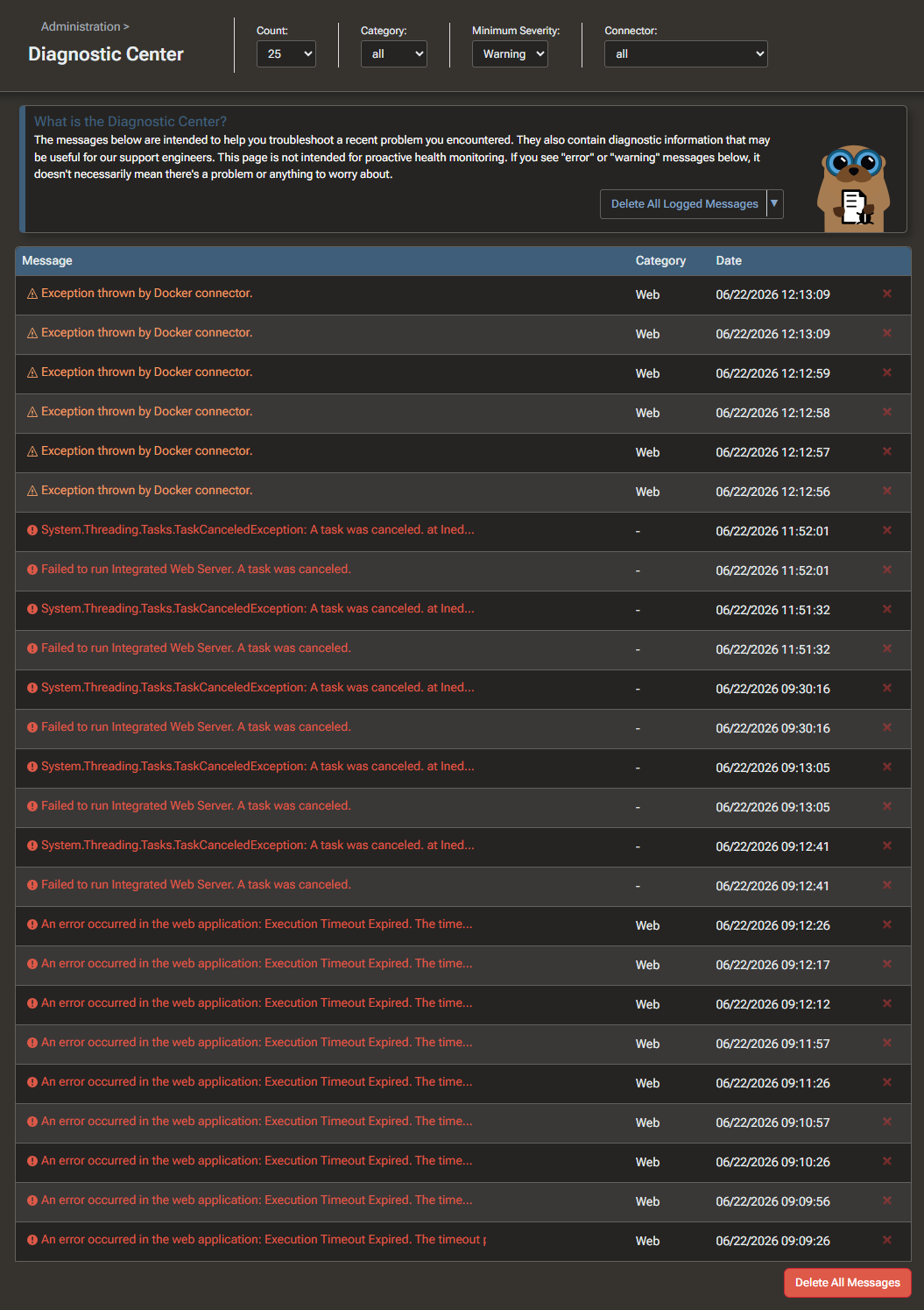
Here is the log of one of the Execution Timeout Expired messages
An error occurred in the web application: Execution Timeout Expired.  The timeout period elapsed prior to completion of the operation or the server is not responding.

URL: http://mycompanyproget.com/
Referrer: (not set)
User: (unknown)
User Agent: AlwaysOn
IP Address: 127.0.0.1:12450
Stack trace:    at Microsoft.Data.SqlClient.SqlInternalConnection.OnError(SqlException exception, Boolean breakConnection, Action`1 wrapCloseInAction)
   at Microsoft.Data.SqlClient.TdsParser.ThrowExceptionAndWarning(TdsParserStateObject stateObj, Boolean callerHasConnectionLock, Boolean asyncClose)
   at Microsoft.Data.SqlClient.TdsParserStateObject.ThrowExceptionAndWarning(Boolean callerHasConnectionLock, Boolean asyncClose)
   at Microsoft.Data.SqlClient.TdsParserStateObject.ReadSniError(TdsParserStateObject stateObj, UInt32 error)
   at Microsoft.Data.SqlClient.TdsParserStateObject.ReadSniSyncOverAsync()
   at Microsoft.Data.SqlClient.TdsParserStateObject.TryReadNetworkPacket()
   at Microsoft.Data.SqlClient.TdsParserStateObject.TryPrepareBuffer()
   at Microsoft.Data.SqlClient.TdsParserStateObject.TryReadByte(Byte& value)
   at Microsoft.Data.SqlClient.TdsParser.TryRun(RunBehavior runBehavior, SqlCommand cmdHandler, SqlDataReader dataStream, BulkCopySimpleResultSet bulkCopyHandler, TdsParserStateObject stateObj, Boolean& dataReady)
   at Microsoft.Data.SqlClient.SqlCommand.FinishExecuteReader(SqlDataReader ds, RunBehavior runBehavior, String resetOptionsString, Boolean isInternal, Boolean forDescribeParameterEncryption, Boolean shouldCacheForAlwaysEncrypted)
   at Microsoft.Data.SqlClient.SqlCommand.RunExecuteReaderTds(CommandBehavior cmdBehavior, RunBehavior runBehavior, Boolean returnStream, Boolean isAsync, Int32 timeout, Task& task, Boolean asyncWrite, Boolean inRetry, SqlDataReader ds, Boolean describeParameterEncryptionRequest)
   at Microsoft.Data.SqlClient.SqlCommand.RunExecuteReader(CommandBehavior cmdBehavior, RunBehavior runBehavior, Boolean returnStream, TaskCompletionSource`1 completion, Int32 timeout, Task& task, Boolean& usedCache, Boolean asyncWrite, Boolean inRetry, String method)
   at Microsoft.Data.SqlClient.SqlCommand.InternalExecuteNonQuery(TaskCompletionSource`1 completion, Boolean sendToPipe, Int32 timeout, Boolean& usedCache, Boolean asyncWrite, Boolean inRetry, String methodName)
   at Microsoft.Data.SqlClient.SqlCommand.ExecuteNonQuery()
   at Inedo.Data.SqlServerDatabaseContext.CreateConnection()
   at Inedo.ProGet.Data.VirtualDatabaseContext.SqlContext.CreateConnection() in C:\Users\builds\AppData\Local\Temp\InedoAgent\BuildMaster\192.168.44.60\Temp\_E653823\Src\src\ProGet\Data\VirtualDatabaseContext.cs:line 34
   at Inedo.ProGet.Data.VirtualDatabaseContext.CreateConnection() in C:\Users\builds\AppData\Local\Temp\InedoAgent\BuildMaster\192.168.44.60\Temp\_E653823\Src\src\ProGet\Data\VirtualDatabaseContext.cs:line 24
   at Inedo.Data.DatabaseContext.ExecuteInternal(String storedProcName, GenericDbParameter[] parameters, DatabaseCommandReturnType returnType)
   at Inedo.Data.DatabaseContext.<>c__DisplayClass34_0`1.<EnumerateTable>b__0()
   at Inedo.Data.StrongDataReader.Read[TRow](Func`1 getReader, Boolean disposeReader)+MoveNext()
   at Inedo.ProGet.FeedCache.FeedLookups..ctor(IEnumerable`1 allFeeds) in C:\Users\builds\AppData\Local\Temp\InedoAgent\BuildMaster\192.168.44.60\Temp\_E653823\Src\src\ProGet\FeedCache.cs:line 82
   at Inedo.ProGet.FeedCache.CreateFeedLookups() in C:\Users\builds\AppData\Local\Temp\InedoAgent\BuildMaster\192.168.44.60\Temp\_E653823\Src\src\ProGet\FeedCache.cs:line 70
   at Inedo.LazyCached`1.GetValue()
   at Inedo.LazyCached`1.get_Value()
   at Inedo.ProGet.FeedCache.GetFeeds(Boolean includeInactive) in C:\Users\builds\AppData\Local\Temp\InedoAgent\BuildMaster\192.168.44.60\Temp\_E653823\Src\src\ProGet\FeedCache.cs:line 30
   at Inedo.ProGet.Web.Security.TaskChecker..ctor() in C:\Users\builds\AppData\Local\Temp\InedoAgent\BuildMaster\192.168.44.60\Temp\_E653823\Src\src\ProGet\Web\Security\TaskChecker.cs:line 18
   at Inedo.ProGet.ProGetSdkConfig.Config.GetCurrentTaskChecker() in C:\Users\builds\AppData\Local\Temp\InedoAgent\BuildMaster\192.168.44.60\Temp\_E653823\Src\src\ProGet\ProGetSdkConfig.cs:line 81
   at Inedo.Security.UserContext.<>c.<InvalidateCache>b__16_0()
   at System.Lazy`1.ViaFactory(LazyThreadSafetyMode mode)
--- End of stack trace from previous location ---
   at System.Lazy`1.CreateValue()
   at Inedo.ProGet.WebApplication.Security.WebUserContext.IsAuthorizedForTask(ProGetSecuredTask task, Nullable`1 feedId) in C:\Users\builds\AppData\Local\Temp\InedoAgent\BuildMaster\192.168.44.60\Temp\_E653823\Src\src\ProGet\WebApplication\Security\WebUserContext.cs:line 23
   at Inedo.ProGet.WebApplication.Pages.RootPage.CreateChildControlsAsync() in C:\Users\builds\AppData\Local\Temp\InedoAgent\BuildMaster\192.168.44.60\Temp\_E653823\Src\src\ProGet\WebApplication\Pages\RootPage.cs:line 77
   at Inedo.ProGet.WebApplication.Pages.ProGetSimplePage.InitializeAsync() in C:\Users\builds\AppData\Local\Temp\InedoAgent\BuildMaster\192.168.44.60\Temp\_E653823\Src\src\ProGet\WebApplication\Pages\ProGetSimplePage.cs:line 69
   at Inedo.Web.PageFree.SimplePageBase.ExecutePageLifeCycleAsync()
   at Inedo.Web.PageFree.SimplePageBase.ProcessRequestAsync(AhHttpContext context)
   at Inedo.Web.AhWebMiddleware.InvokeAsync(HttpContext context)

::Web Error on 06/22/2026 09:12:17::
But as you're saying, maybe its time to migrate to PostgreSQL :)
-
Hi @carl-westman_8110 ,
Thanks for sharing that. This isn't a symptom of "server overload" that we've seen before.
The error you shared is occurring on
Feeds_GetFeeds, which is definitely not an intensive query, and I would not expect that to be timing out at all. It's justSELECT * FROM [Feeds].However, that's a similar symptom to the "AzureSQL resource throttling" that we've seen on other users: another query is being throttled (for example, something that joins on
[Feeds]), and that is causing a cascading impact on other queries.We don't have enough information to say that's the case here. But, an easy way to test would be to up your DTUs substantially.
Otherwise, the next troubleshooting step is to try to identify the cause of the timeouts, which involves looking at HTTP Access logs and jobs occurring around the same time under Admin > Scheduled Jobs.
Thanks,
Steve

Hello! It looks like you're interested in this conversation, but you don't have an account yet.
Getting fed up of having to scroll through the same posts each visit? When you register for an account, you'll always come back to exactly where you were before, and choose to be notified of new replies (either via email, or push notification). You'll also be able to save bookmarks and upvote posts to show your appreciation to other community members.
With your input, this post could be even better 💗
Register Login