Welcome to the Inedo Forums! Check out the Forums Guide for help getting started.
If you are experiencing any issues with the forum software, please visit the Contact Form on our website and let us know!
ProGet instance does not start after running Full Maven Connector Index Job
-
Hi there,
this is the follow up from https://forums.inedo.com/topic/5740/migrating-from-sonatype-nexus-to-proget.
On my test instance i ran the "maven.org Full Maven Connector Index Job" manually but it seems to have crashed. Now ProGet does not start anymore because it can't reach the database. I already restarted the docker container but that didn't fix the issue.
How to get the logs from the built in database to check what's wrong?
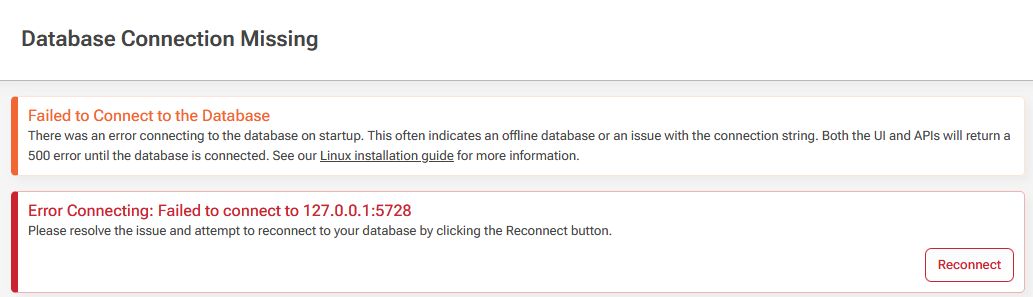
I already checked https://docs.inedo.com/docs/installation/postgresql but the troubleshooting info did not help:
root@dc6f66f82da3:/usr/local/proget/service# ./proget query --file=-
unexpected argument: query
unexpected argument: --file=-

Description:
  Hosts the ProGet service and performs various operations.

Usage:
  proget [command] [options]

Commands:
  run                 Runs the ProGet service.
  resetadminpassword  Switches to the built-in user directory and changes the Admin account password to "Admin".
  upgradedb           Upgrades the database schema version to this version of ProGet.
  database            Commands for performing database maintenance operations
I also checked the /var/log/postgresql/postgresql-17-main.log file but it is empty.
Here are the container startup logs:
docker compose -f compose-proget.yaml up
[+] up 2/2
 ✔ Network proget_default    Created                                                                                                                                                                                                0.1s
 ✔ Container proget-1 Created                                                                                                                                                                                                0.0s
Attaching to proget-1
proget-1  | Updating certificates in /etc/ssl/certs...
proget-1  | 0 added, 0 removed; done.
proget-1  | Running hooks in /etc/ca-certificates/update.d...
proget-1  | done.
proget-1  | info: Microsoft.Hosting.Lifetime[0]
proget-1  |       Application started. Press Ctrl+C to shut down.
proget-1  | info: Microsoft.Hosting.Lifetime[0]
proget-1  |       Hosting environment: Production
proget-1  | info: Microsoft.Hosting.Lifetime[0]
proget-1  |       Content root path: /usr/local/proget
proget-1  | ProGet version is 25.0.27.7.
proget-1  | Current DB schema version is unknown.
proget-1  | Updating database schema...
proget-1  | Cannot connect to database; will retry in 1 second... Full error: Failed to connect to 127.0.0.1:5728
proget-1  | Attempting to use shared configuration for ProGet.
proget-1  | Shared configuration file not found at /etc/inedo/ProGet.config.
proget-1  | No encryption key is configured. Credentials will be stored in plain text.
proget-1  | info: Inedo.Web.BackgroundTaskQueueService[0]
proget-1  |       Background Task Queue is starting.
proget-1  | warn: Microsoft.AspNetCore.Hosting.Diagnostics[15]
proget-1  |       Overriding HTTP_PORTS '8080' and HTTPS_PORTS ''. Binding to values defined by URLS instead 'http://*:80'.
proget-1  | warn: Microsoft.AspNetCore.Server.Kestrel[0]
proget-1  |       Overriding address(es) 'http://*:80'. Binding to endpoints defined via IConfiguration and/or UseKestrel() instead.
proget-1  | info: Microsoft.Hosting.Lifetime[14]
proget-1  |       Now listening on: http://[::]:80
proget-1  | info: Microsoft.Hosting.Lifetime[0]
proget-1  |       Application started. Press Ctrl+C to shut down.
proget-1  | info: Microsoft.Hosting.Lifetime[0]
proget-1  |       Hosting environment: Production
proget-1  | info: Microsoft.Hosting.Lifetime[0]
proget-1  |       Content root path: /usr/local/proget
proget-1  | info: Microsoft.Hosting.Lifetime[0]
proget-1  |       Application started. Press Ctrl+C to shut down.
proget-1  | info: Microsoft.Hosting.Lifetime[0]
proget-1  |       Hosting environment: Production
proget-1  | info: Microsoft.Hosting.Lifetime[0]
proget-1  |       Content root path: /usr/local/proget
proget-1  | Cannot connect to database; will retry in 1 second... Full error: Failed to connect to 127.0.0.1:5728
proget-1  | Cannot connect to database; will retry in 1 second... Full error: Failed to connect to 127.0.0.1:5728
proget-1  | Cannot connect to database; will retry in 1 second... Full error: Failed to connect to 127.0.0.1:5728
proget-1  | Cannot connect to database; will retry in 1 second... Full error: Failed to connect to 127.0.0.1:5728
proget-1  | Cannot connect to database; will retry in 1 second... Full error: Failed to connect to 127.0.0.1:5728
My compose file:
# See https://docs.inedo.com/docs/installation/linux/docker-compose-installation-guide
services:
  proget:
    image: proget.inedo.com/productimages/inedo/proget:${PROGET_VERSION}
    ports:
      - "127.0.0.1:8081:80"
    volumes:
      - type: bind
        source: /opt/proget/test/packages
        target: /var/proget/packages
      - type: bind
        source: /opt/proget/test/database
        target: /var/proget/database
      - type: bind
        source: /opt/proget/test/backups
        target: /var/proget/backups
    restart: always
    environment:
      - TZ=Europe/Berlin
The database folder content:
sudo ls -al /opt/proget/test/database/
insgesamt 132
drwx------ 19 systemd-network root   4096  5. Mai 16:28 .
drwxr-xr-x  5 root            root   4096  4. Mai 11:55 ..
drwx------  7 systemd-network input  4096  4. Mai 11:56 base
-rw-------  1 systemd-network input     0  5. Mai 08:17 core
drwx------  2 systemd-network input  4096  5. Mai 08:17 global
drwx------  2 systemd-network input  4096  4. Mai 11:55 pg_commit_ts
drwx------  2 systemd-network input  4096  4. Mai 11:55 pg_dynshmem
-rw-------  1 systemd-network input   206  4. Mai 11:55 pg_hba.conf
-rw-------  1 systemd-network input  2640  4. Mai 11:55 pg_ident.conf
drwx------  4 systemd-network input  4096  5. Mai 08:17 pg_logical
drwx------  4 systemd-network input  4096  4. Mai 11:55 pg_multixact
drwx------  2 systemd-network input  4096  4. Mai 11:55 pg_notify
drwx------  2 systemd-network input  4096  4. Mai 11:55 pg_replslot
drwx------  2 systemd-network input  4096  4. Mai 11:55 pg_serial
drwx------  2 systemd-network input  4096  4. Mai 11:55 pg_snapshots
-rw-r--r--  1 root            root     98  4. Mai 11:55 .pgsqlconn
drwx------  2 systemd-network input  4096  4. Mai 11:57 pg_stat
drwx------  2 systemd-network input  4096  4. Mai 11:55 pg_stat_tmp
drwx------  2 systemd-network input  4096  4. Mai 11:55 pg_subtrans
drwx------  2 systemd-network input  4096  4. Mai 11:55 pg_tblspc
drwx------  2 systemd-network input  4096  4. Mai 11:55 pg_twophase
-rw-------  1 systemd-network input     3  4. Mai 11:55 PG_VERSION
drwx------  4 systemd-network input  4096  5. Mai 00:50 pg_wal
drwx------  2 systemd-network input  4096  4. Mai 11:55 pg_xact
-rw-------  1 systemd-network input    88  4. Mai 11:55 postgresql.auto.conf
-rw-------  1 systemd-network input 30985  4. Mai 11:55 postgresql.conf
-rw-------  1 systemd-network input    64  4. Mai 11:57 postmaster.opts
What about mounting the database dirs into https://proget.inedo.com/containers/repositories/ProductImages/inedo/inedodb/overview to get the correct database logs and check them?
From what I understand, the ProGet container ships with (and starts) PostgreSQL bundled inside the same container. I completely understand the motivation from a “get started very easily” and low-friction onboarding perspective — that part makes perfect sense.
However, from a container-design standpoint, this seems to deviate from the common best practice of running a single primary process per containe (e. g. https://devops.stackexchange.com/questions/447/why-it-is-recommended-to-run-only-one-process-in-a-container).What was the main rationale behind bundling PostgreSQL directly into the ProGet container instead of keeping it as a separate service?
Is a rootless version of the image(s) planned?