Welcome to the Inedo Forums! Check out the Forums Guide for help getting started.
If you are experiencing any issues with the forum software, please visit the Contact Form on our website and let us know!
NPM Incorrect Handling of min-release-age
-
Hi,
There appears to be some disparity between the npm min-release-age and the ProGet Recently published rule on the feed.
Setup
ProGet 2025.25 (Build 11)
.npmrc:
registry=https://my-proget-server/npm/npm-public/
min-release-age=7
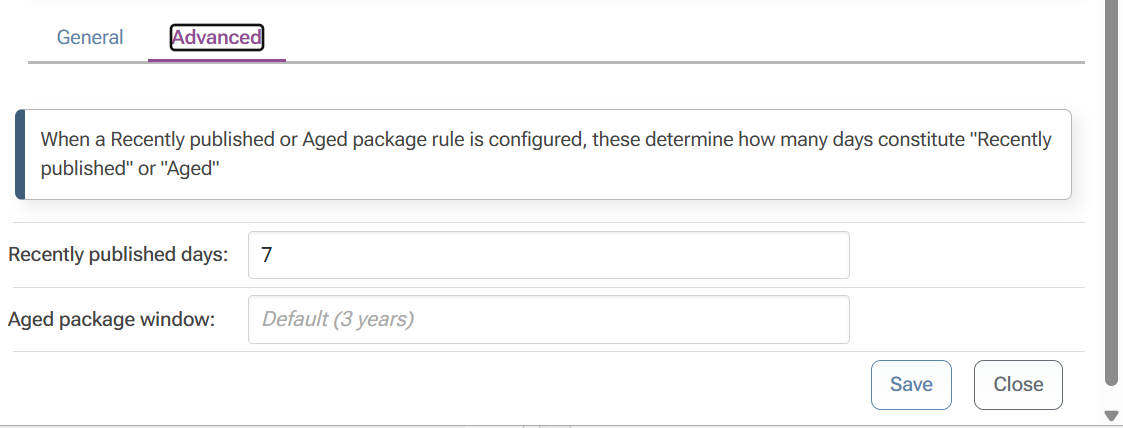
ProGet Use Connector Publish Date enabled.

ProGet npm feed has Recently published (7 days).
Install
Run npm install for the latest applicable version of @hono/node-server
> npm i @hono/node-server@latest
npm error code E400
npm error 400 Bad Request - GET https://my-proget-server/npm/npm-public/%40hono/node-server/-/node-server-1.19.14.tgz - Package is Recently Published
In Proget @hono/node-server-1.19.14 has a publish date of the 2026-04-13 02:20:00:
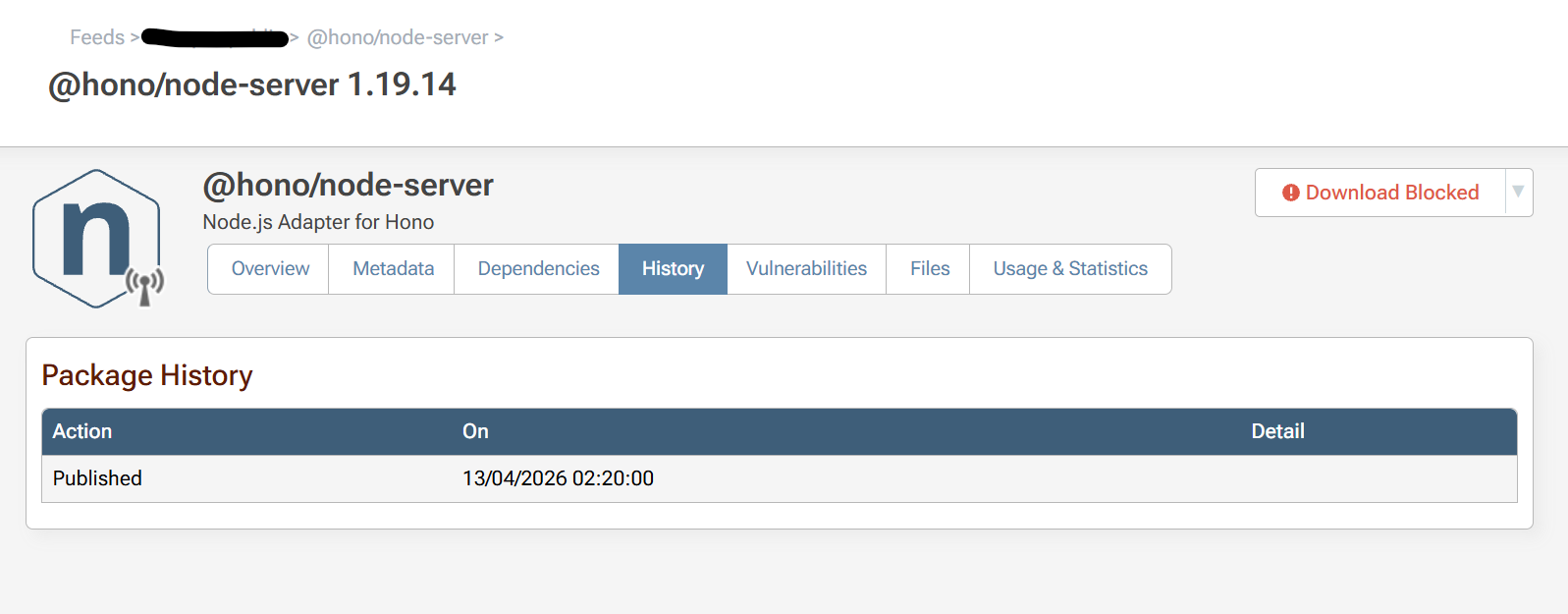
I ran the npm install on 2026-04-20 15:12 BST, minus 7 days is 2026-04-13 15:12 BST. That's greater than the ProGet npm package date of 2026-04-13 02:20:00.
If I change my npm config to have min-release-age=8, then the install works fine. Is this some issue with timezones?
Thanks!
-
Hi @ashleycanham ,
The
min-release-agesetting in npm and ProGet's "Recently published" are unrelated. One controls how the client (npm) behaves, the other controls how the server (ProGet) behaves.I'm not an expert on
min-release-ageon the client (npm) side, but I believe it changes the way the dependency resolution algorithm works. In turn, that means npm will request different packages from the server. That's why changing that value will yield different server results.On the server (ProGet) side, ProGet effectively blocks package downloads by looking at the publish date (which you can see on the history page, and even set/change on the Set Package Status Page) against the current server date time. This is obviously indicated by "Download Blocked" in your screenshot, but more precisely it has to do with "package compliance".
There's a lot involved with that, but if you Reanalyze the Package, you can get detailed logs of what's making the package Noncompliant. Specifically, in those logs, you should see something like this:
Policy "{policy.Name}" considers recently published ({recentlyPublishedDays} days) {rule}
Publish date of {package.Published.Value.Date:d} is considered recently published.
That date will be UTC-based (the UI typically displays local time, i.e. BST), but you'll get an idea of how it works.
Anyway, that's where I would start. Considering timezones, rounding, or partial days, you may find it simply easiest to set
min-release-age=8so that npm isn't requesting a package that's 6.99999 days old, or something weird like that.One last thing worth mentioning, we are no longer recommending blocking noncomplaint packages in most cases. Instead, using
pgutil builds scancan be used to "Break builds" and give a much clearer output, so that developers don't have to chase down npm error logs.Thanks,
Alana -
Hi @atripp,
I understand that min-release-age and the Recently Published rule refer to two different products, but that version of the package at that time should have been compliant in ProGet, but it wasn't. NPM correctly resolved the right version of the package.
This is obviously quite hard to re-test with the Reanalyze logs because you need a package that's just over the Recently published rule. I don't see a way in the ProGet UI of updating the published date so that I can test it?
We want to block packages from being installed on developer machines in addition to CI pipelines without additional tooling requirements.
Thanks,
Ashley -
Hi @Ashley ,
To set override the publish date, first Pull the package to ProGet so that it's no longer a cached package. Once you do that, you will see a "Set Package Status" option (you may need to refresh page). On that modal dialog, select "Override Metadata..." and enter the date.
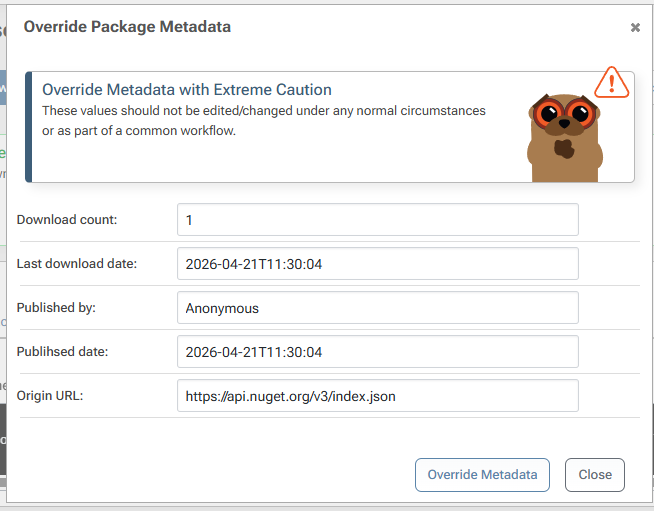
That's what we do to test these rules; note you can delete the package and re-download it to cache it again.
Let me know if you spot anything off, it seemed to work for me, but I might be looking at the wrong things.
Thanks,
Alana -
Hi @atripp,
Perfect thanks! I was able to recreate the behaviour with the metadata override and Reanalyze Package feature.
Server date now: 2026-04-21 14:52BST (13:52 UTC)
Package published date: 2026-04-14T13:00:00
Reanalyze package outcome: Non-compliantThere appears to be an issue uploading images at the moment, but heres the log:
Package "pkg:npm/%40hono/node-server@1.19.14" will analyzed with local data
Attempting to update local package with remote metadata...
Cached metadata from search on 21/04/2026 13:01:56
Detecting licenses for "pkg:npm/%40hono/node-server@1.19.14"...
Found 1 licenses: MIT
Detecting vulnerabilities for "@hono/node-server" version "1.19.14"...
Found 0 vulnerabilities.
Searching policies associated with feed "xxxxxxxxxx"...
Found 1 policy to use for analysis.
Beginning license rule analysis...
Default rules: undectableLicense=Warn, unspecifiedLicense=Compliant
Checking MIT against rules...
No matching license rules; applying unspecifiedLicense rule (Compliant)
License rule analysis complete.
Policy "Global" considers aged packages (3 years) Warn
Policy "Global" considers recently published (7 days) Noncompliant
Publish date of 14/04/2026 is considered recently published.
No policies define a latest patch, so latest patch will not be checked.
Analysis resulted in a Noncompliant result.
and the failing npm install:
npm i -g @hono/node-server@1.19.14 --cache ./c npm error code E400 npm error 400 Bad Request - GET https://xxxxx/npm/npm-public/%40hono/node-server/-/node-server-1.19.14.tgz - Package is Recently Published npm error A complete log of this run can be found in: xxxxx -
Thanks @Ashley, that's exactly what I was thinking.
I haven't tried reproducing this yet, but I've got all the steps to now! And at that point, I'll have a debugger and all the code in front of me, so it should be an easy fix. It's probably related to UTC/local time, I don't think we've ever tested it "by the hour" like that :)
Anyway stay tuned we'll get it fixed pretty soon.
-
Hi @Ashley ,
Good news -- this will be fixed via PG-3265 in the upcoming maintenance release (next Friday).
In case you're curious, the bug was that we were comparing
packagePublished.AddDays(recentlyPublishedDays.Value) > DateTime.UtcNow.Date, which includes the time-portion on the left side, but not the right-side (so 12:00A).Just changing to
packagePublished.Date.AddDays(recentlyPublishedDays.Value) > DateTime.UtcNow.Datedoes the trick, and it works for both Aged and Recently Published.cheers,
Alana -
Hi @atripp,
Thanks for investigating and implementing a fix so quickly! It was always going to be something to do with a developers worst nightmare, time & timezones

I'll update to the maintenance release after it's out and let you know our findings.
-
Hi @atripp,
I upgraded to the latest ProGet version and the package is now complaint if it's older than 7 days but less than 8 days. Unfortunately, it looks like packages that are newer than 7 days (but older than 6) are now compliant. I guess this makes sense if you removed the time component in the comparison.
Examples:
Time now: 2026-05-04T09:53:00 (GMT)
Package published date: 2026-04-27T09:45:00
Outcome compliant
Time now: 2026-05-04T09:53:00 (GMT)
Package published date: 2026-04-27T15:00:00
Outcome compliant (It should be Noncompliant)
Package "pkg:npm/%40hono/node-server@1.19.14" will analyzed with local data Attempting to update local package with remote metadata... Cached metadata from search on 04/05/2026 08:41:11 Detecting licenses for "pkg:npm/%40hono/node-server@1.19.14"... Found 1 licenses: MIT Detecting vulnerabilities for "@hono/node-server" version "1.19.14"... Found 0 vulnerabilities. Searching policies associated with feed "npm-public"... Found 1 policy to use for analysis. Beginning license rule analysis... Default rules: undectableLicense=Warn, unspecifiedLicense=Compliant Checking MIT against rules... No matching license rules; applying unspecifiedLicense rule (Compliant) License rule analysis complete. Policy "Global" considers aged packages (3 years) Warn Policy "Global" considers recently published (7 days) Noncompliant No policies define a latest patch, so latest patch will not be checked. Analysis resulted in a Compliant result.I'm guessing that a for a full fix it needs to compare the time of the package in UTC against UTC time on the server in addition to the date.
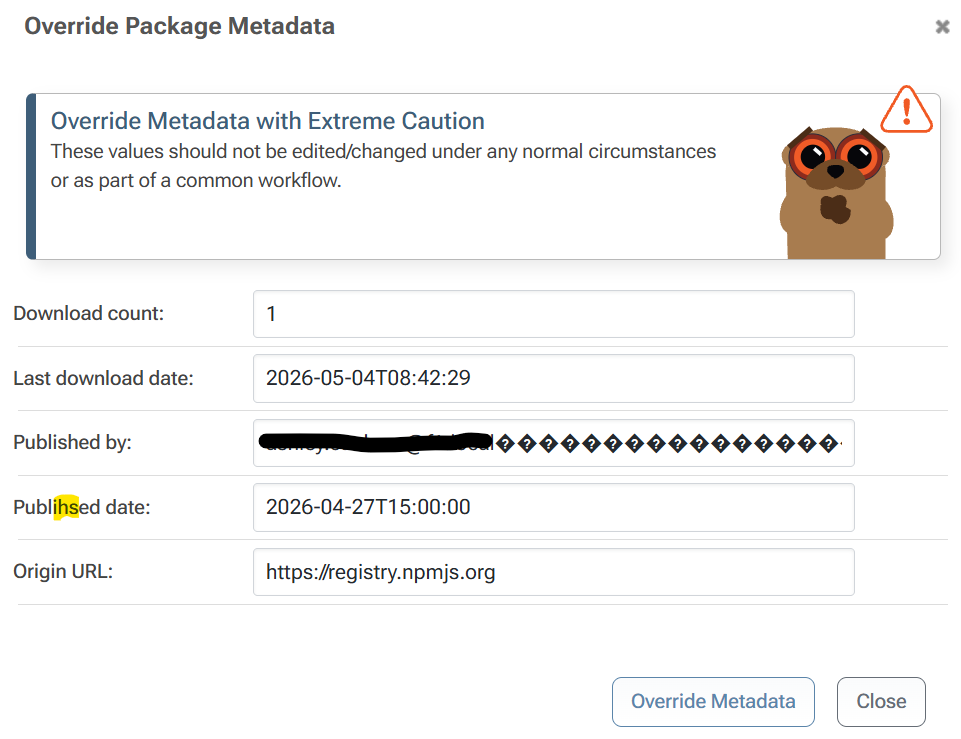
P.S: I only just noticed that there's a typo in Set Package Status for "Publihsed date:"
af87249d-4355-4cd3-8b69-4bd62ef8b731-image.pngThanks for all your effort on this.
Ashley -
Hi @Ashley,
Thanks for testing it! That was the intended behavior here - to count "days" not "24H blocks". That's a more intuitive pattern in general, as people think "the next day" or "a few days later" and don't really consider the time.
That does lead to some strange behaviors like
2026-05-03 23:59:59to2026-05-04 to 00:00:01being considered "1 day". However, in this use case, I guess we're talking just a difference of hours which isn't going to make a package any "safer" realistically.Thanks,
AlanaPS good catch on typo, I adjusted it on 2026 branch.
-
Thanks @atripp, that makes sense.
I was having another issue with pgutil which turned out to be my fault, however I believe there is a follow on issue to do with the compliance analysis for project builds that have yet to have been pulled to ProGet. More detail on my original post here: https://forums.inedo.com/topic/5733/proget-unable-to-publish-sbom-from-pgutil/4.
@Dan_Woolf suggested continuing the topic here as it's related to non-compliant packages and what I believe to be the recently published rule. Is this something you can take a look at?
Thanks!

Hello! It looks like you're interested in this conversation, but you don't have an account yet.
Getting fed up of having to scroll through the same posts each visit? When you register for an account, you'll always come back to exactly where you were before, and choose to be notified of new replies (either via email, or push notification). You'll also be able to save bookmarks and upvote posts to show your appreciation to other community members.
With your input, this post could be even better 💗
Register Login