Welcome to the Inedo Forums! Check out the Forums Guide for help getting started.
If you are experiencing any issues with the forum software, please visit the Contact Form on our website and let us know!
[ProGet] Debian connector for Jenkins
-
My primary use case for ProGet is to replace artifactory as an ubuntu repository proxy. Most ubuntu machines do not need direct access to the web, and thus would update packages via ProGet. I am having a particular issue when attempting to proxy the debian-stable repo for Jenkins specifically. No matter how I set my connector URL, distribution, and component I get a 404:
Local index file update failure: The remote server returned an error: (404) Not Found.

System.Net.WebException: The remote server returned an error: (404) Not Found.
   at System.Net.HttpWebRequest.EndGetResponse(IAsyncResult asyncResult)
   at System.Threading.Tasks.TaskFactory`1.FromAsyncCoreLogic(IAsyncResult iar, Func`2 endFunction, Action`1 endAction, Task`1 promise, Boolean requiresSynchronization)
--- End of stack trace from previous location ---
   at System.Net.WebRequest.GetResponseAsync()
   at Inedo.ProGet.GlobalExtensions.GetResponseAsync(HttpWebRequest request, CancellationToken cancellationToken)
   at Inedo.ProGet.Feeds.Connector.GetDirectResponseAsync(String url, CancellationToken cancellationToken)
   at Inedo.ProGet.Feeds.Connector.GetCachedResponseAsync(String url, CancellationToken cancellationToken)
   at Inedo.ProGet.Feeds.Connector.GetCachedTextReaderAsync(String url, Boolean bufferEntireResponse, CancellationToken cancellationToken)
   at Inedo.ProGet.Feeds.Debian2.Debian2Connector.UpdateIndexAsync(Debian2ConnectorIndex localIndex)
   at Inedo.ProGet.Feeds.Debian2.Debian2Connector.Inedo.ProGet.Feeds.ILocalIndexFileConnector.UpdateIndexAsync(CancellationToken cancellationToken)
   at Inedo.ProGet.Feeds.CachedIndexFileMan.UpdateConnectorIndexAsync(Int32 connectorId, CancellationToken cancellationToken)

::Connector Error on 2/19/2026 5:22:07 PM::
This might be a redirect on the Jenkins side, but I have just not been able to get this to work.
https://pkg.jenkins.io/debian-stable binaryIf my apt file is setup to the above directly, it works fine. My artifactory repo is set to use https://pkg.jenkins.io/ and it works fine. I cannot get ProGet connector to connect.
Am I missing something obvious?
-
Hi @adoran_4131 ,
It looks like the 404 error is occurring while trying to download the
Releasefile (i.e. the index) for the repository. The file is being downloaded from this URL:{connector-url}/dists/{distro}/Release"And that URL is returning a 404. So make sure you are entering the correct
distroin the connector.Thanks,
Steve -
@stevedennis That is where I am having the trouble, I believe the connector is setup correctly (unless I am misunderstanding).
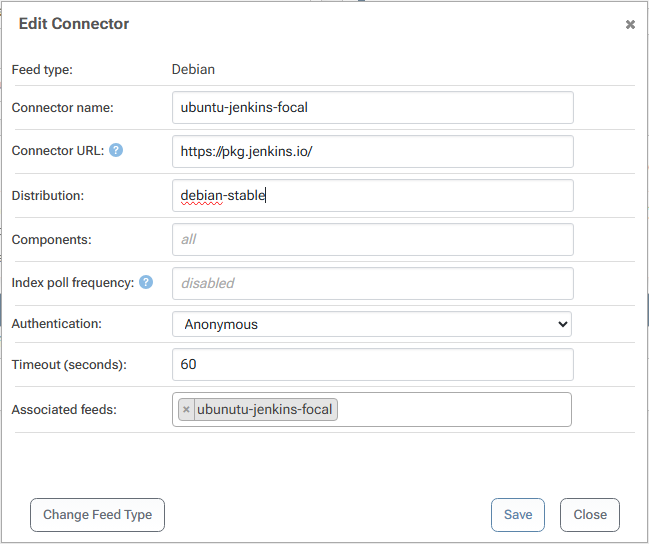
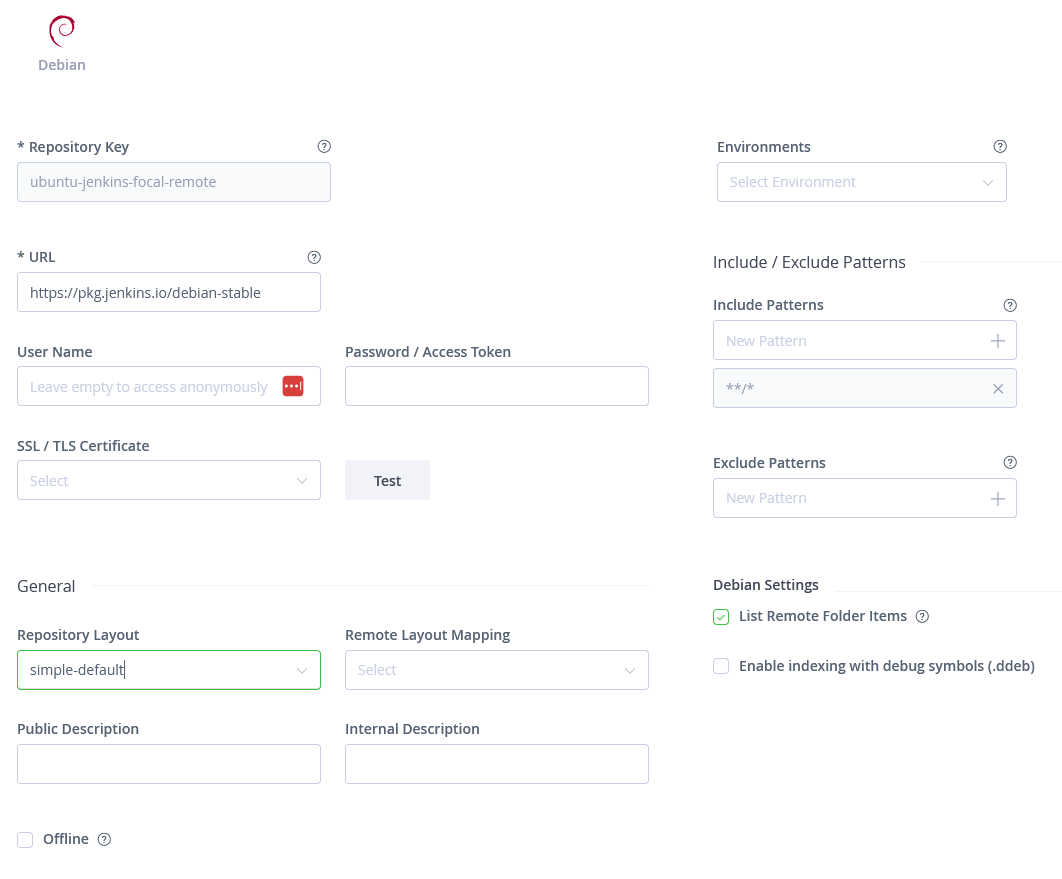
For reference here is the currently working artifactory setup:
-
Hi @adoran_4131 ,
Keep in mind that ProGet and Artifactory work differently; Artifactory is basically a "file server" and is just does "blind proxying" of HTTP requests. That's why it doesn't matter what URLs you put in. ProGet, on the other hand, is a package server, and will index the remote repository first. That's where things are failing right now.
It's failing because the index file is not being found based on the input. This is what a Debian repository is supposed to look like:
dists/
    {distribution-name}/
        Release
        Release.gpg
        main/
            binary-amd64/
                Packages
                …
pool/
    main/ …
So, the
distribution-nameis incorrect. I thought it might bebinarybased on the instructions, but these URLs are both a 404:https://pkg.jenkins.io/debian-stable/dists/binary/Release https://pkg.jenkins.io/debian-stable/dists/binary/InReleaseSo, it must be something else. It's whatever
aptis sending by default, I guess?Anyway, if you can find what distribution it should be, then it will work. Perhaps consider just doing something like this:
sudo apt update -o Debug::Acquire::http=trueThat will show you the HTTP requests being made, and you can see exactly the URL for the Release file, which you can then use to reverse-engineer the distribution name.
Let us know what you find!
Hope that helps,
Steve -
@dean-houston
By way of follow up, unfortunately the verbose output of an apt update against the jenkins repo provided exactly 0 clarity.apt update -o Debug::Acquire::http=true Ign:1 https://pkg.jenkins.io/debian-stable binary/ InRelease Hit:2 https://pkg.jenkins.io/debian-stable binary/ Release Reading package lists... Done Building dependency tree... Done Reading state information... Done All packages are up to date.I appreciate the help in trying to make this work, but I am going to punt on this and just grant the specific server access directly to pkg.jenkins.io.


Hello! It looks like you're interested in this conversation, but you don't have an account yet.
Getting fed up of having to scroll through the same posts each visit? When you register for an account, you'll always come back to exactly where you were before, and choose to be notified of new replies (either via email, or push notification). You'll also be able to save bookmarks and upvote posts to show your appreciation to other community members.
With your input, this post could be even better 💗
Register Login