Welcome to the Inedo Forums! Check out the Forums Guide for help getting started.
If you are experiencing any issues with the forum software, please visit the Contact Form on our website and let us know!
[ProGet] How do I specify Storage.PackagesRootPath in configuration?
-
Moin!
I am currently in the process of trying to automate a ProGet 2025.16 installation on Windows.
However, I cannot figure out where I need to set the "Storage.PackagesRootPath" value in order for ProGet to load it into configuration
I have tried using-
the "C:\ProgramData\Inedo\SharedConfig\ProGet.config" file for
- service configuration (changing the file and restarting the service
- installation configuration (changing the file and re-installing)
-
the "C:\Program Files\ProGet\Service\web.config" file for
- service configuration (changing the file and restarting the service) -
the "C:\Program Files\ProGet\Service\ProGet.Service.exe.config" file for
- service configuration (changing the file and restarting the service)
Also, I have tried using the keys "ProGetConfig.Storage.PackagesRootPath" / "Storage.PackagesRootPath" and "PackagesRootPath"
Where do I need to specify the path in order for ProGet to recognize it and to use it in its own behaviour? I would really like to avoid having to write into the database manually.
Did I miss something obvious?
-
-
Hi @jonathan-werder_8656 ,
You can set this value under Admin > Advanced Settings.
Thanks,
Steve -
@stevedennis moin and thanks for the reply!
I know I can set it manually using the Web UI.
However, I want to set it programatically for an automated install and the ProGet documentation (along with the UI under "Admin > Advanced Settings") specifies that the configuration files can be used for this.How do I need to set values in which configuration file in order to set the PackagesRootPath option?
-
Hi @jonathan-werder_8656 ,
Thanks for clarifying! I'll be honest, I had no idea where you were getting configuration files in the first place... and I forgot that was ever a thing. Sorry about that.
Anyway, I don't think that this has worked in years, and it's most definitely not something we'd recommend today. We'll try to track it down and remove it in the docs / help text.
For your use case (automated installation) just use
pgutil settingsto set that value.Thanks,
Steve -
moin, thanks for the reply!
pgutil works for the automated use-case.
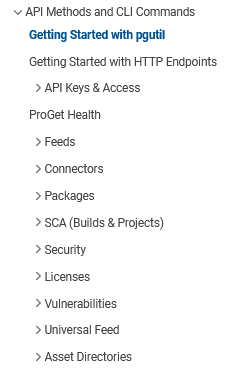
However, just FYI, the API documentation (which also serves as the pgutil overview) also doesn't show that changing settings is supported, at least not in the same way as other endpoints are documented (it is visible in the commands overview: ):
https://docs.inedo.com/docs/proget/api
-
@jonathan-werder_8656 great point, we'll add that to our list to document! Thanks for pointing it out


Hello! It looks like you're interested in this conversation, but you don't have an account yet.
Getting fed up of having to scroll through the same posts each visit? When you register for an account, you'll always come back to exactly where you were before, and choose to be notified of new replies (either via email, or push notification). You'll also be able to save bookmarks and upvote posts to show your appreciation to other community members.
With your input, this post could be even better 💗
Register Login