Welcome to the Inedo Forums! Check out the Forums Guide for help getting started.
If you are experiencing any issues with the forum software, please visit the Contact Form on our website and let us know!
ProGet Lock Issues
-
Hi ProGet Support,
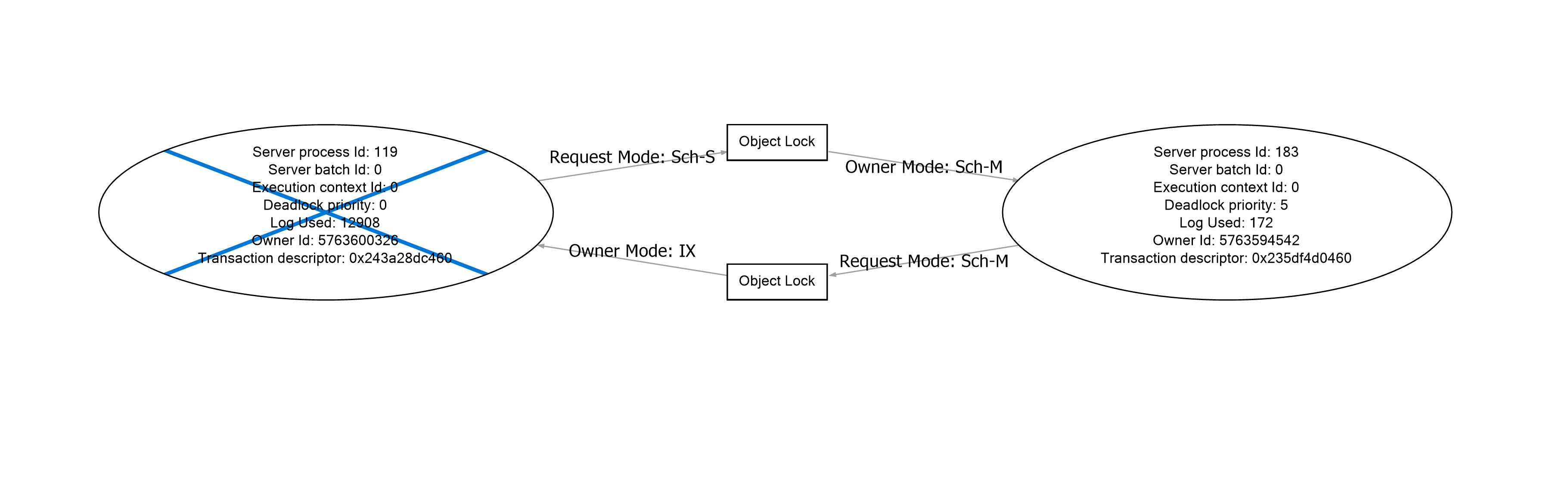
We have an issue where our High-Availability ProGet infrastructure uses over 1000 SQL connections and reaches the max pool size. Some investigation on the SQL server using the activity monitor has shown the following queries running.
CREATE PROCEDURE [PgvdVulnerabilities_GetVulnerabilitiesForPackage]
(
	@PackageName_Id INT
)
AS
BEGIN

    SELECT * INTO #PgvdPackageNames FROM [PgvdPackageNames_Extended] WHERE [PackageName_Id] = @PackageName_Id
    SELECT * FROM [PgvdVulnerabilities_Extended]
     WHERE [Pgvd_Id] IN (SELECT [Pgvd_Id] FROM #PgvdPackageNames)

    SELECT * FROM #PgvdPackageNames

    SELECT * FROM [PgvdAssessments_Extended]
     WHERE [Pgvd_Id] IN (SELECT [Pgvd_Id] FROM #PgvdPackageNames)

END
CREATE PROCEDURE [Feeds_GetExtendedConfiguration] ( @Feed_Id INT ) AS BEGIN SET NOCOUNT ON SELECT * FROM [FeedPackageAccessRules] WHERE [Feed_Id] = @Feed_Id ORDER BY [Sequence_Number] SELECT C.* FROM [FeedConnectors] FC INNER JOIN [Connectors] C ON C.[Connector_Id] = FC.[Connector_Id] WHERE FC.[Feed_Id] = @Feed_Id ORDER BY FC.[Sequence_Number] SELECT * FROM [FeedPackageFilters] WHERE [Feed_Id] = @Feed_Id ORDER BY [Sequence_Number] ENDThis is causing an object lock
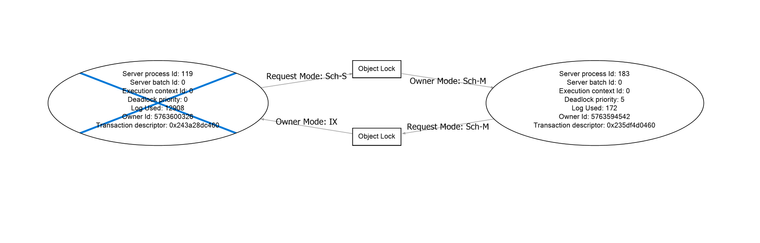
Our CD/CI process keeps requesting packages, and within 5 minutes, all the have 1000's of connections, and we get the following errors in ProGet when the lock releases.
An error occurred processing a GET request to http://proget.XXXXX/npm/Registry/cache-base: Timeout expired. The timeout period elapsed prior to obtaining a connection from the pool. This may have occurred because all pooled connections were in use and max pool size was reached.
Details:System.InvalidOperationException: Timeout expired. The timeout period elapsed prior to obtaining a connection from the pool. This may have occurred because all pooled connections were in use and max pool size was reached.
at Microsoft.Data.Common.ADP.ExceptionWithStackTrace(Exception e)
--- End of stack trace from previous location ---
at Inedo.Data.SqlServerDatabaseContext.CreateConnectionAsync()
at Inedo.Data.DatabaseContext.ExecuteInternalAsync(String storedProcName, GenericDbParameter[] parameters)
at Inedo.Data.SqlServerDatabaseContext.ExecuteInternalAsync(String storedProcName, GenericDbParameter[] parameters)
at Inedo.Data.DatabaseContext.ExecuteTableAsync[TRow](String storedProcName, GenericDbParameter[] parameters)
at Inedo.ProGet.WebApplication.FeedEndpoints.Npm.NpmPackageMetadataHandler.TryProcessRequestAsync(AhHttpContext context, WebApiContext apiContext, NpmFeed feed, String relativeUrl)
at Inedo.ProGet.WebApplication.FeedEndpoints.Npm.NpmHandler.ProcessRequestAsync(AhHttpContext context, WebApiContext apiContext, NpmFeed feed, String relativeUrl)
at Inedo.ProGet.WebApplication.FeedEndpoints.FeedEndpointHandler.FeedRequestHandler.ProcessRequestAsync(AhHttpContext context)
We are running version 23.0.31.
Regards Scott
-
Hi @scott-wright_8356 ,
Thanks for sharing a lot of the details; it's not really clear what objects the locks are on, can you look at the XML view of the deadlock report to find out?
Since you're "already there", you're welcome to try doing what we would do --- just add
WITH (READUNCOMMITTED)to the problematic queries (i.e. the ones where object locks are occurring on).For example, like this:
SELECT * INTO #PgvdPackageNames FROM [PgvdPackageNames_Extended] WITH (READUNCOMMITTED) WHERE [PackageName_Id] = @PackageName_IdAs an FYI, this should not be an issue in ProGet 2024, since package analysis is cached for a short while. Also, our internal development practices (going forward) are to
READUNCOMMITTEDin "hot" queries this anyway.-- Dean
-
Hi Dean,
We have narrowed the problem down to a particular query causing SQL CPU Blocking. Connectors_GetCachedResponse. This is causing significant timeouts when our server is under load.
ALTER PROCEDURE [dbo].[Connectors_GetCachedResponse]
(
@Connector_Id INT,
@Request_Hash BINARY(32)
)
AS BEGINSET NOCOUNT ON
BEGIN TRY
BEGIN TRANSACTIONUPDATE [ConnectorResponses]
SET [LastUsed_Date] = GETUTCDATE(),
[Request_Count] = [Request_Count] + 1
WHERE [Connector_Id] = @Connector_Id
AND [Request_Hash] = @Request_HashSELECT *
FROM [ConnectorResponses]
WHERE [Connector_Id] = @Connector_Id
AND [Request_Hash] = @Request_HashCOMMIT
END TRY BEGIN CATCH
IF XACT_STATE()<>0 ROLLBACK
EXEC [HandleError]
END CATCHEND

-
Hi @scott-wright_8356 ,
That procedure is ancient and hasn't caused problems before. I suspect the issue might be the size of the data in that able - you can see what that looks like on the connector cache management page.
You could also try to optimize the query like so:
ALTER PROCEDURE [dbo].[Connectors_GetCachedResponse]
(
  @Connector_Id INT,
  @Request_Hash BINARY(32)
)
AS BEGIN

SELECT * INTO #ConnectorResponses
   FROM [ConnectorResponses] WITH (READUNCOMMITTED)
   WHERE [Connector_Id] = @Connector_Id
   AND [Request_Hash] = @Request_Hash

UPDATE [ConnectorResponses]
   SET [LastUsed_Date] = GETUTCDATE(),
       [Request_Count] = CR.[Request_Count] + 1
 FROM  [ConnectorResponses] CR
  JOIN #ConnectorResponses _CR ON CR.[Connector_Id] = _CR.[Connector_Id]

SELECT * FROM #ConnectorResponses

END
Let us know if that works, we can update the code accordingly if so.
-- Dean
-
I set our metadata caching to 10000 queries over 24 hours. I will reduce to the default first and monitor.
Thanks Dean

Hello! It looks like you're interested in this conversation, but you don't have an account yet.
Getting fed up of having to scroll through the same posts each visit? When you register for an account, you'll always come back to exactly where you were before, and choose to be notified of new replies (either via email, or push notification). You'll also be able to save bookmarks and upvote posts to show your appreciation to other community members.
With your input, this post could be even better 💗
Register Login