Welcome to the Inedo Forums! Check out the Forums Guide for help getting started.
If you are experiencing any issues with the forum software, please visit the Contact Form on our website and let us know!
Updating to Proget to 24.0.0 from 23.0.18 gives "Cannot drop the view 'database_firewall_rules', because it does not exist or you do not have permission."
-
Hi there!
Trying to update my Proget instance which is running as an Azure Container Web App from 23.0.18 to 24.0.0 but I get some weird error when the container is trying to start, see below.
2024-04-23T12:32:55.267041815Z Unhandled exception: Microsoft.Data.SqlClient.SqlException (0x80131904): Cannot drop the view 'database_firewall_rules', because it does not exist or you do not have permission.
2024-04-23T12:32:55.267114815Z    at Microsoft.Data.SqlClient.SqlConnection.OnError(SqlException exception, Boolean breakConnection, Action`1 wrapCloseInAction)
2024-04-23T12:32:55.267119415Z    at Microsoft.Data.SqlClient.SqlInternalConnection.OnError(SqlException exception, Boolean breakConnection, Action`1 wrapCloseInAction)
2024-04-23T12:32:55.267122715Z    at Microsoft.Data.SqlClient.TdsParser.ThrowExceptionAndWarning(TdsParserStateObject stateObj, SqlCommand command, Boolean callerHasConnectionLock, Boolean asyncClose)
2024-04-23T12:32:55.267126315Z    at Microsoft.Data.SqlClient.TdsParser.TryRun(RunBehavior runBehavior, SqlCommand cmdHandler, SqlDataReader dataStream, BulkCopySimpleResultSet bulkCopyHandler, TdsParserStateObject stateObj, Boolean& dataReady)
2024-04-23T12:32:55.267133315Z    at Microsoft.Data.SqlClient.SqlCommand.RunExecuteNonQueryTds(String methodName, Boolean isAsync, Int32 timeout, Boolean asyncWrite)
2024-04-23T12:32:55.267141515Z    at Microsoft.Data.SqlClient.SqlCommand.InternalExecuteNonQuery(TaskCompletionSource`1 completion, Boolean sendToPipe, Int32 timeout, Boolean& usedCache, Boolean asyncWrite, Boolean inRetry, String methodName)
2024-04-23T12:32:55.267145115Z    at Microsoft.Data.SqlClient.SqlCommand.ExecuteNonQuery()
2024-04-23T12:32:55.267148215Z    at Inedo.DbUpdater.SqlServer.SqlServerDatabaseConnection.ExecuteQueryWithSplitter(String query, SqlTransaction transaction)
2024-04-23T12:32:55.267151315Z    at Inedo.DbUpdater.SqlServer.SqlServerDatabaseConnection.ExecuteScripts(IEnumerable`1 scripts, ChangeScriptState state)
2024-04-23T12:32:55.267154415Z    at Inedo.DbUpdater.ConsoleHost.Update(String scriptPath, String connectionString, Boolean force)
2024-04-23T12:32:55.267157515Z    at Inedo.DbUpdater.ConsoleHost.Run(ArgList args)
2024-04-23T12:32:55.267160515Z    at Inedo.DbUpdater.ConsoleHost.RunAsync(IEnumerable`1 args)
2024-04-23T12:32:55.267163615Z    at Inedo.ProGet.Service.Program.UpdateDatabaseSchemaAsync() in C:\Users\builds\AppData\Local\Temp\InedoAgent\BuildMaster\192.168.44.60\Temp\_E438586\Src\ProGet.Service\Program.cs:line 318
2024-04-23T12:32:55.267169215Z    at Inedo.ProGet.Service.Program.Run(WebServerMode mode, Boolean runAsService, Boolean linuxContainer, String urls) in C:\Users\builds\AppData\Local\Temp\InedoAgent\BuildMaster\192.168.44.60\Temp\_E438586\Src\ProGet.Service\Program.cs:line 28
2024-04-23T12:32:55.267173015Z    at System.RuntimeMethodHandle.InvokeMethod(Object target, Void** arguments, Signature sig, Boolean isConstructor)
2024-04-23T12:32:55.267176215Z    at System.Reflection.MethodBaseInvoker.InvokeDirectByRefWithFewArgs(Object obj, Span`1 copyOfArgs, BindingFlags invokeAttr)
I'm using an Azure sql database which have worked fine with 23.0.18

Cheers
Carlhttps://github.com/Wesztman
-
Hi @carl-westman_8110,
In ProGet 2024, we took a new approach to upgrading the database; specifically, we cleanup all code in the database that we did not create. We do this by running the following script:
DECLARE @SQL NVARCHAR(MAX) SET @SQL = ''
SELECT  @SQL = @SQL + 'DROP PROCEDURE ' + QUOTENAME(name) + ' ' FROM sys.procedures
SELECT @SQL = @SQL + 'DROP TYPE ' + QUOTENAME(name) + ' ' FROM sys.table_types
SELECT  @SQL = @SQL + 'DROP VIEW ' + QUOTENAME(name) + ' ' FROM sys.views
SELECT  @SQL = @SQL + 'DROP FUNCTION ' + QUOTENAME(name) + ' ' FROM sys.objects WHERE type IN ('FN','TF')
EXEC sp_executesql @SQL
Apparently, those queries are returning a system view called database_firewall_rules, which it should be not.
Can you help us troubleshoot/identify what data is being returned in those views? It's supposed to be only user-added code (not system views like
database_firewall_rules).In theory, an empty database (before ProGet is installed) should have nothing returned from any of those tables. Any help you can provide would be great.
Thanks,
Alana -
Hi @atripp,
When creating a new empty Azure SQL DB this seems to be there by default.
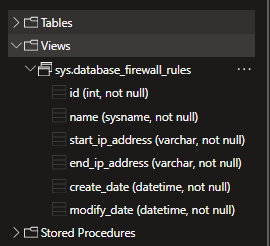
It's also present in my Proget DB
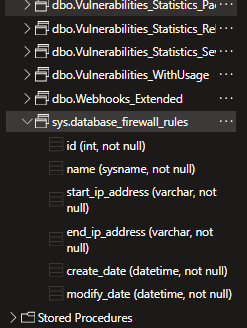
https://github.com/Wesztman
-
Thanks @carl-westman_8110, that's really helpful to see.
I don't know why it didn't show on ours, but I understand that SQL Server creates new databases by copying the
modeldatabase, so I'm guessing that your instance of SQL Azure must have something off about its model?Anyway we can modify this script a bit.... can I ask you to check another thing?
I assume it shows up in this query:
select * from sys.objects where name='database_firewall_rules'Can you what the
schema_idandis_ms_shippedvalues? -
Yep, it's there
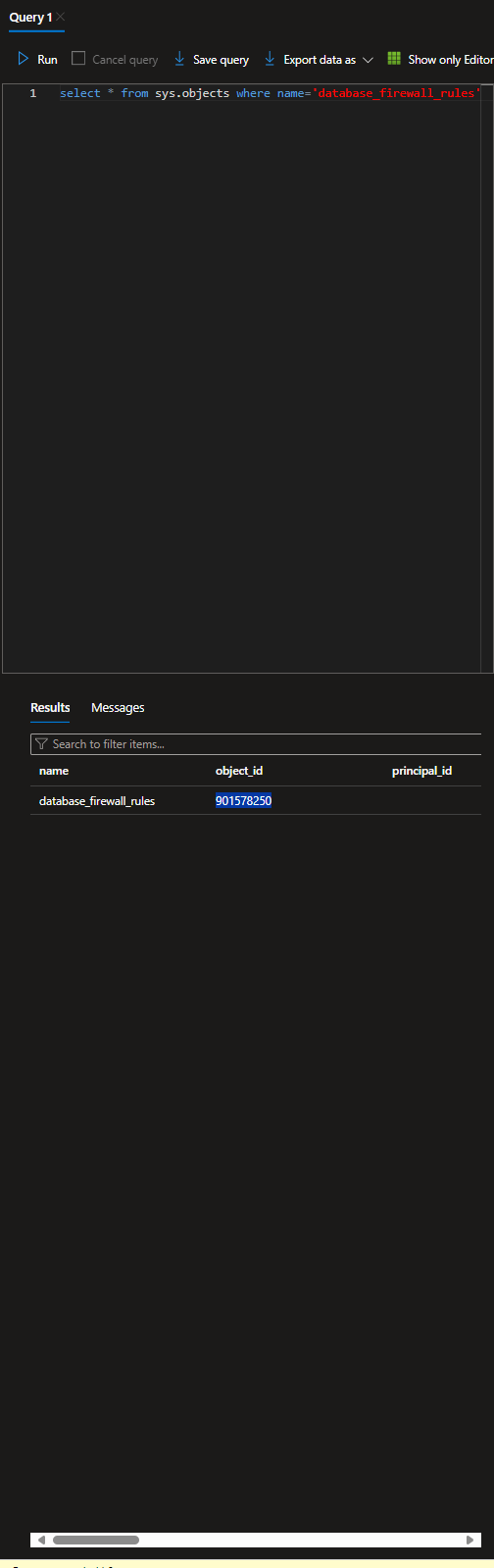
schema_id = 4
is_ms_shipped = TrueI'm no database master of any kind, but I think I've chosen all defaults when creating both the Az sql server and the db
https://github.com/Wesztman
-
Thanks for confirming that @carl-westman_8110 ! That should definitely not be showing up :)
This is definitely a bug on Microsoft's end (we've seen similar in some early distributions of SQL Server 2008). We will work around this in 2024.1 via PG-2624 - we are planning to ship on Friday.
As an FYI, here is the new script:
DECLARE @SQL NVARCHAR(MAX) SET @SQL = ''
SELECT  @SQL = @SQL + 'DROP PROCEDURE ' + QUOTENAME(name) + ' ' FROM sys.procedures WHERE schema_id <> 4
SELECT @SQL = @SQL + 'DROP TYPE ' + QUOTENAME(name) + ' ' FROM sys.table_types  WHERE schema_id <> 4
SELECT  @SQL = @SQL + 'DROP VIEW ' + QUOTENAME(name) + ' ' FROM sys.views  WHERE schema_id <> 4
SELECT  @SQL = @SQL + 'DROP FUNCTION ' + QUOTENAME(name) + ' ' FROM sys.objects WHERE type IN ('FN','TF') and  schema_id <> 4
EXEC sp_executesql @SQL
In the likely event that Azure SQL slips another sys object into those tables, this will at least ignore that error.
-
Awsome @atripp, thanks for the quick support!

-
@atripp, I can confirm that 2024.1 works great



Hello! It looks like you're interested in this conversation, but you don't have an account yet.
Getting fed up of having to scroll through the same posts each visit? When you register for an account, you'll always come back to exactly where you were before, and choose to be notified of new replies (either via email, or push notification). You'll also be able to save bookmarks and upvote posts to show your appreciation to other community members.
With your input, this post could be even better 💗
Register Login