Welcome to the Inedo Forums! Check out the Forums Guide for help getting started.
If you are experiencing any issues with the forum software, please visit the Contact Form on our website and let us know!
VulnerabilityDownloader fails with error
-
ProGet 2023.31 (Build 5)
Executing the VulnerabilityDownloader job always leads to the error below:
Updating local PGVD index...
Downloading latest vulnerability definitions from Inedo Security Labs...
Download complete. Unpacking database...
Processed 1000 entries.
Processed 2000 entries.
Processed 3000 entries.

Processed 37000 entries.
Processed 38000 entries.
Processed 39000 entries.
Unable to read data from the transport connection: An existing connection was forcibly closed by the remote host..
Update complete.
Few observations:
- The whole import runs around 12mins before it dies
- One thread of the SQL Server is sitting at 100% CPU during import
- The import progress slows down significantly after the 25000 entries mark
Initially we thought our anti virus is slowing down things too much, but even after excluding everything ProGet-related this error still appears.
-
Hi @jw ,
This job should take like a minute tops. It's inserting/updating about 50k vulnerability records (
PgvdVulnerabilities) and maybe 200k related package records (PgvdPackageNames). The later packages tend to have more related packages, but not that many. In either case that's not a lot for SQL Server.Any help in troubleshooting would be appreciated, since we're kind of at a loss. Behind the scenes, the
PgvdVulnerabilities_UpdateIndexprocedure is being called with batches of 1000 vulnerability records, and it's exclusively locking both tables.We noticed that micro-instances of SQL Server (e.g. 1 core / 512MB ram) would fail without batching, but otherwise it completes in about 5 minutes. I assume you're not running that?
One user reported an unpatched SQL 2016 had a severe performance issue with an
OUTPUTclause we were using, so we stopped using that. Now it works in that version.Maybe it's another SQL Server bug? Or perhaps something we're otherwise missing?
Maybe a forced
sp_updatestatswould do the trick? Or cleaning up fragmentation on those tables (again, shouldn't be a problem....)Any insight would be helpful. We don't know how to rewrite this any more effectively, and batches of 1000 seem about as small as we want to make them.
Thanks,
Alana -
I have found that my test instance also suffers from the same problem.
Both instances and their SQL-Servers are running on Windows and were installed with Inedo Hub. The only modification that was done to SQL Server is making the instance remotely accessible via TCP.
Hardware should not be an issue, both VMs have 4 (or 8) cores, 8GB RAM and SSD disk space assigned to them.
What is interesting that the error is not actually time related. On my local test instance, that has a more powerful CPU, the same error occurs, but already after 6-7 minutes.
From the execution logs it seems like it is unrelated to a particular version or upgrades and rather some issue that appears over time.
The screenshots below show all available execution logs for the VulnerabilityDownloader. I marked the date when ProGet was updated to to a particular version left in the tables.
Production instance:Microsoft SQL Server 2022 (RTM-GDR) (KB5032968) - 16.0.1110.1 (X64) Nov 9 2023 22:31:58 Copyright (C) 2022 Microsoft Corporation Express Edition (64-bit) on Windows Server 2022 Standard 10.0 <X64> (Build 20348: ) (Hypervisor)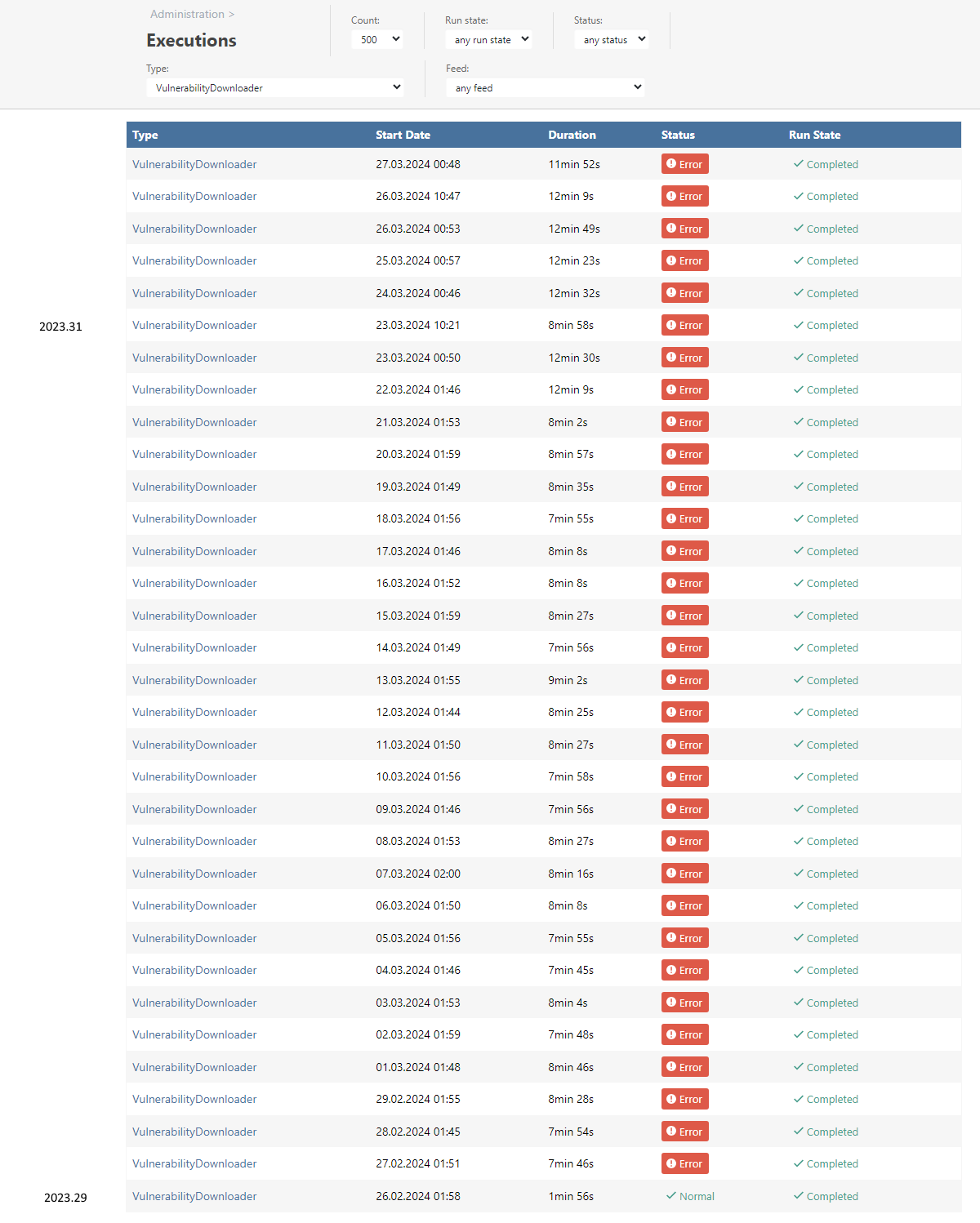
Test instance:
Microsoft SQL Server 2016 (SP1) (KB3182545) - 13.0.4001.0 (X64)
	Oct 28 2016 18:17:30
	Copyright (c) Microsoft Corporation
	Express Edition (64-bit) on Windows 10 Pro 6.3 <X64> (Build 19045: ) (Hypervisor)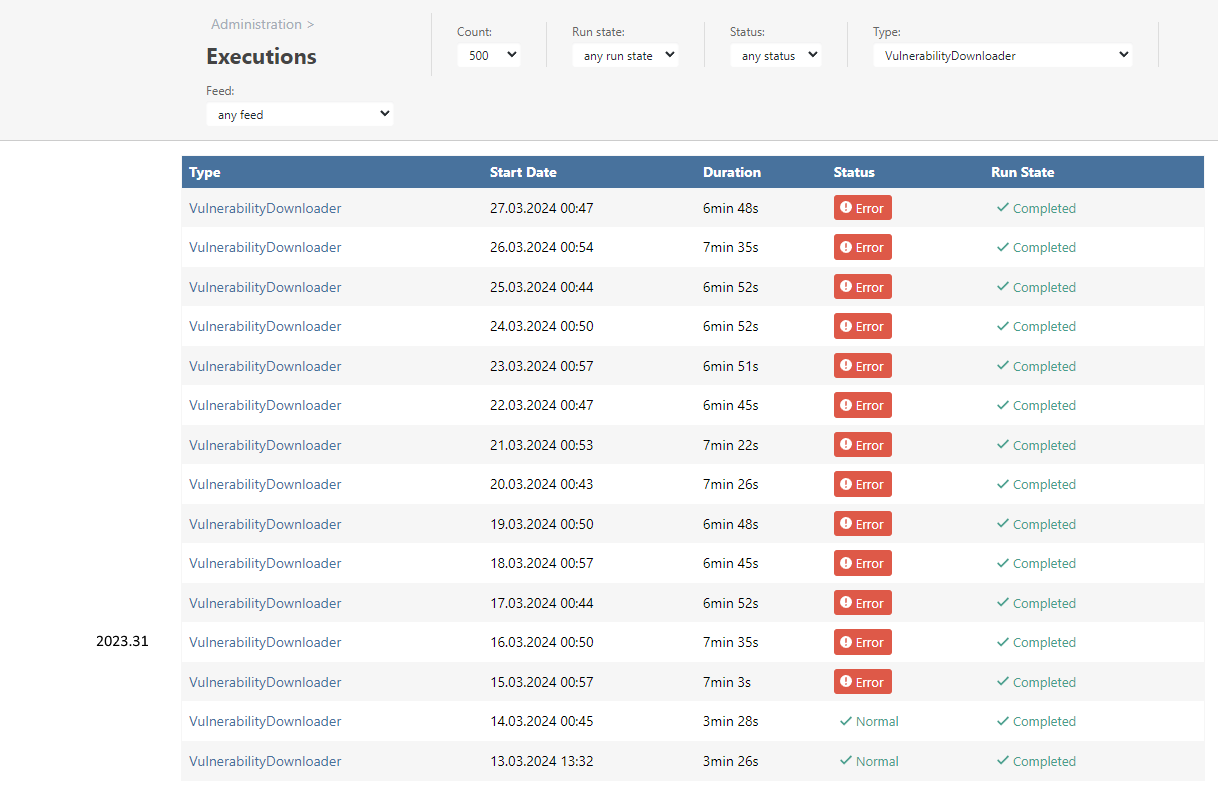
-
@jw That is so weird.
Is it always failing with the follow?
Unable to read data from the transport connection: An existing connection was forcibly closed by the remote host..
Looking over your Prod dates... did you happen to upgrade after 2024.03.14? Or maybe that's when you enabled the preview feature?
Could you try running
sp_updatestatsand cleaning fragmentation on those tables usig SQL Management Studio? Clearly there's something we're missing here...
Thanks,
Alana -
Is it always failing with the follow?
Unable to read data from the transport connection: An existing connection was forcibly closed by the remote host..
Yes, the error is exactly this one every time.
Looking over your Prod dates... did you happen to upgrade after 2024.03.14? Or maybe that's when you enabled the preview feature?
The production instance was coming from 2023.29, the .30 was skipped and the .31 applied only on 22.03.
My test instance is a bit tricky, since I did not track when I was updating something or enabling preview features. Inedo Hub says my last installation was on 17.03.2024, so that must have been the upgrade to .31, I was slightly off in my screenshot.
Inedo Hub log does not seem to reveal which version was installed in the logs. Can I find that somewhere else?
Could you try running
sp_updatestatsand cleaning fragmentation on those tables usig SQL Management Studio? Clearly there's something we're missing here...Just ran the command on my test instance. According to the output nothing was updated. Ran another VulnerabilityDownloader job to double check, but it failed again.
I will now try to patch my test instance (SQL Server 2016) to the latest version and see if that helps in any way.
-
Updated my test instance from SQL Server 2016 - 13.0.4001 to 13.0.6435.1, which should be the latest if one ignore Azure features - still no luck.
This is what the activity monitor looks like during job execution. The average seems to be around 900-1000 batch requests/sec. No idea if that is normal or resonable.

-
Thanks @jw, we still aren't quite sure what's behind this, but we rewrote
PgvdVulnerabilities_UpdateIndexprocedure to run much faster: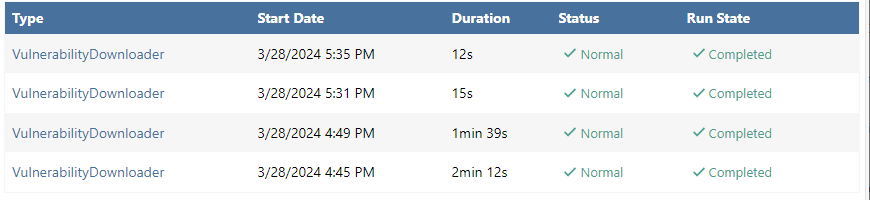
This will be included in ProGet 2023.32 via PG-2615
I just published ProGet 2023.32-rc.1 as a pre-release ; would you mind to try it out on your test server, since you can reproduce it?
https://docs.inedo.com/docs/howto-install-prerelease-product-versions
-
Looks like success!

Thanks for addressing this so quickly.


Hello! It looks like you're interested in this conversation, but you don't have an account yet.
Getting fed up of having to scroll through the same posts each visit? When you register for an account, you'll always come back to exactly where you were before, and choose to be notified of new replies (either via email, or push notification). You'll also be able to save bookmarks and upvote posts to show your appreciation to other community members.
With your input, this post could be even better 💗
Register Login