Welcome to the Inedo Forums! Check out the Forums Guide for help getting started.
If you are experiencing any issues with the forum software, please visit the Contact Form on our website and let us know!
Docker::Build-Image on Linux server
-
Not sure what exactly is wrong here. I have a Dockerfile in the git repo under code/
Here is my OtterScript
Git::Checkout-Code();

SHExec >>pwd;
ls;>>;

Docker::Build-Image
(
    Repository: mydockerserver/foo,
    From: $WorkingDirectory/code
);
I get this error:
Unhandled exception: System.ArgumentException: The specified DockerRepository resource ("mydockerserver/foo") was not found.
at Inedo.Extensibility.SecureResources.SecureResource.Create(SecureResourceType type, String resourceName, IResourceResolutionContext context)
at Inedo.Extensions.Docker.Operations.DockerOperation_ForTheNew.CreateRepository(ICredentialResolutionContext context, String repositoryResourceName, String repositoryNameOverride) in C:\Users\builds\AppData\Local\Temp\InedoAgent\BuildMaster\192.168.44.60\Temp_E374097\Src\Docker\InedoExtension\Operations\DockerOperation.cs:line 41
at Inedo.Extensions.Docker.Operations.BuildImageOperation.ExecuteAsync(IOperationExecutionContext context) in C:\Users\builds\AppData\Local\Temp\InedoAgent\BuildMaster\192.168.44.60\Temp_E374097\Src\Docker\InedoExtension\Operations\BuildImageOperation.cs:line 91
at Inedo.BuildMaster.Windows.ServiceApplication.Executions.PlanExecuter.OtterScriptExecuter.Inedo.ExecutionEngine.Executer.IExecutionHostEnvironment.ExecuteActionAsync(ActionStatement actionStatement, IExecuterContext context)
I manually built the docker image and pushed it as mydockerserver/foo:latest ahead of time, to verify that all works.
Suggestions?
-
Hi @PhilipWhite
The
Docker::operations are intended to work with a Docker Repository Connection that you've configured for the application.The
Repositoryparameter refers to the name under Application > Settings > Connections, and the error message is saying you don't have a connection namedmydockerserver/fooconfigured.When it comes to Docker, our general guidance is to use the
namespacepart of a repository name, so instead ofproget.corp.local/myDockerFeed/corp/myappyou would juse usecorp/myappormyapp.Hope that helps,
Alana -
Ok thanks, I'll be a little more diligent looking through the docs next time. Here, I think, is a real issue though, the docker connection doesn't seem to allow digits in the repository name, despite the message:

Our actual Docker registry, does in fact, start with 'c4i'. -
Hi @PhilipWhite,
The Repository Name field is actually the name of a Docker Repository Connection, not the Repository itself. To add a Docker Repository Connection:
- Navigate to your application -> Settings -> All Settings
- Click "add" to the right of the Connections heading
- Select Docker Repository
- Select the repository type and fill in the fields (note: if this is not a ProGet Docker Registry, use Generic Docker Repository and then your registry and name will go in the Repository Name field here)
Then take that resource name and add use that in the "
Repository name" field in theDocker::Buid-Imageoperation. Also if you only have one Docker Repository Connection, you can leave it blank and it will use the variable$DockerRepositoryby default, which is automatically set to your Docker Repository Connection.Hope this helps!
Thanks,
Rich -
Hi @rhessinger,
I should have taken a larger screenshot to show the context. That error I mention in my reply is when creating the connection:
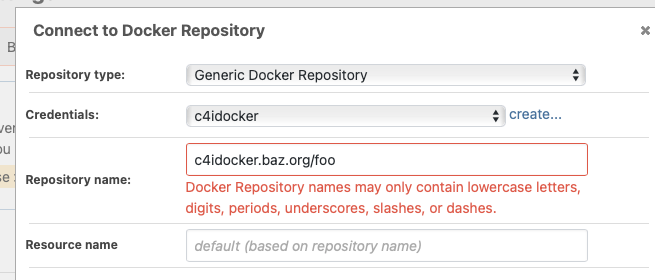
I'm pretty sure there is a bug in validating the "Repository name" field and it is disallowing digits in the name even though they should be allowed.
-Philip -
Hi @PhilipWhite ,
You're correct, this is a regression in the validation code...
if (!value.All(c => (char.IsLetterOrDigit(c) && char.IsLower(c)) || c == '.' || c == '_' || c == '-' || c == '/'))
    return new ValidationResults(false, $"Docker Repository names may only contain lowercase letters, digits, periods, underscores, slashes, or dashes.");
I guess we recently added
char.IsLowerbecause UpperCase characters caused all sorts of problems.... easy fix, and easy work around.- Just enter
blahin the Repository name field, Click Save - Click "view all"
- Click on the Docker repository in that view, edit
We'll get this fixed for teh next maintenance release via BM-3932
Cheers,
Alana - Just enter


Hello! It looks like you're interested in this conversation, but you don't have an account yet.
Getting fed up of having to scroll through the same posts each visit? When you register for an account, you'll always come back to exactly where you were before, and choose to be notified of new replies (either via email, or push notification). You'll also be able to save bookmarks and upvote posts to show your appreciation to other community members.
With your input, this post could be even better 💗
Register Login