Welcome to the Inedo Forums! Check out the Forums Guide for help getting started.
If you are experiencing any issues with the forum software, please visit the Contact Form on our website and let us know!
Error when checking for Az powershell module
-
Hi,
I'm trying to make sure the Azure powershell module is installed on certain server roles.
In the desired configuration OtterScript I have:
Ensure-PsModule
(
    Module: Az,
    Exists: true,
    Repository: PSGallery
);
This correctly detects the server as drifted:

When I then try to remediate the drift I get an error:
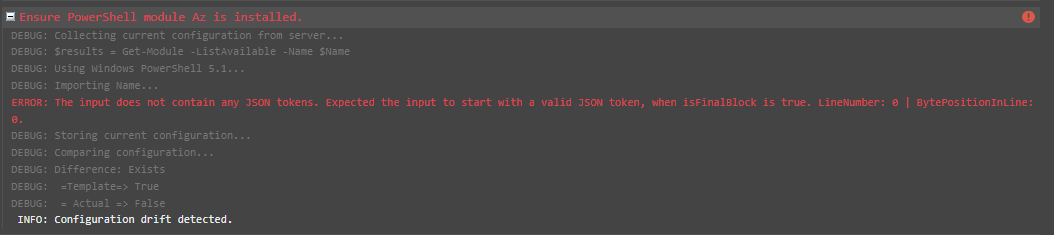
I'm not very experienced in remediating drift with otter in this way yet, so I might be missing something obvious?
Thanks,
Justin -
Hi @Justinvolved ,
That looks like an error coming from PowerShell; you can see what Powershell commands are being emitted executed, so I'm guessing it's some kind of issue with the source?
I'd try to start there, and see if you figure out the underlyinig Powershell error. Here is the code that's generating the scrpt
Cheers,
Alana -
Hey Alana,
Turns out the error is already in the Collection step. When I set the variable to use PowerShell core the error is not there:

I do have powershell 5.1 installed on the server, and when I run a Get-Module -ListAvailable I get a valid result (this is the part where the Collect step errors...) When I run Get-Module -ListAvailable with a Module name that is not installed yet I get an empty line. Is the code somehow choking on the empty line? because it seems "Expected to start with a valid JSON token" does not expect an empty string..
Thanks,
Justin
-
Hi @Justinvolved,
Would you be able to send us the output of
Get-Module -ListAvailableon PowerShell 5.1? I would like to take a look and see if there is anything causing a parsing error in Otter. If it is not safe to post here, you can email it to support@inedo.com and prefix the subject with[QA-1405]and then comment back here when you have sent it.Thanks,
Rich


Hello! It looks like you're interested in this conversation, but you don't have an account yet.
Getting fed up of having to scroll through the same posts each visit? When you register for an account, you'll always come back to exactly where you were before, and choose to be notified of new replies (either via email, or push notification). You'll also be able to save bookmarks and upvote posts to show your appreciation to other community members.
With your input, this post could be even better 💗
Register Login