Welcome to the Inedo Forums! Check out the Forums Guide for help getting started.
If you are experiencing any issues with the forum software, please visit the Contact Form on our website and let us know!
[BM] Push Artifact to Buildmaster and start deployment
-
Hi,
I would like to check and see if I can push the artifact to Buildmaster and trigger a deployment.
The reason, I am asking is because we want to use Buildmaster as only CD and not CI as we have our builds happening in Teamcity and producing artifacts. I just want to push artifact to Buildmaster and trigger a deployment if it exposes an API of some kind.Thanks
-
Hi @andy222 ,
The workflow you describe -- TeamCity (CI) + BuildMaster (CD) -- is definitely supported.
However, artifacts are "pulled" (imported) from a TeamCity build. There are two patterns:
- BuildMaster "monitors" TeamCity projects for new builds and imports builds that meet certain conditions you define; see TeamCity Project Monitors
- TeamCity kicks-off an import in a BuildMaster application using the API; see Automatically Importing to BuildMaster after a CI Build
That being said, you can also create a TeamCity (CI) + ProGet (Package Repository) + BuildMaster (CD) workflow. This scenario is the closest to the "Octopus Deploy" workflow (i.e. TeamCity pushes a NuGet package), and a number of users will use this as a kind of "bridge" to migrate away from Octopus.
Cheers,
Alana -
@atripp,
Thanks for your response.
We have a proget we are using for our nuget and other feeds. I liked an approach to push package from Teamcity to Proget and then Ask Teamcity to create a release in Buildmaster.. Buildmaster then will download an asset from proget and deploy it on target server. Since I wanted to test the Proget/Buioldmaster integration, I created a very simple step to just download a zip file from Proget's Assets and extract it to C:\temp directory on destination server. It is failing on very first step of downloading a package. Here is my setup for a step:
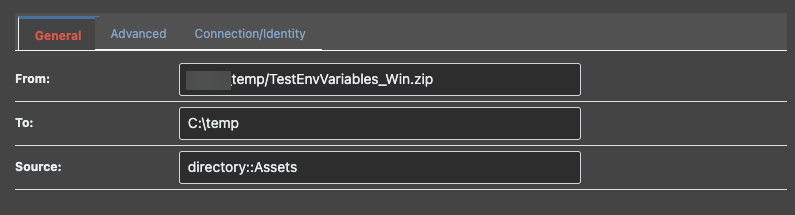
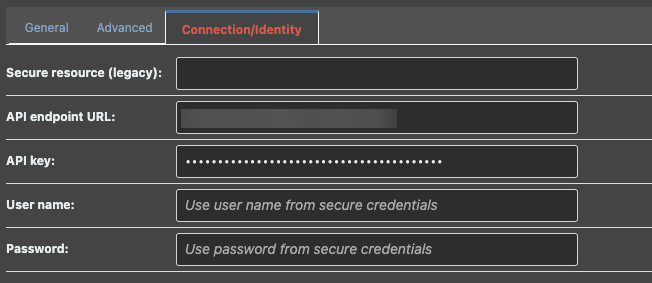
And here is the same otterscript for a step:{ ProGet::Download-Asset temp/TestEnvVariables_Win.zip ( Source: directory::Assets, ApiKey: <API_KEY>, EndpointUrl: <PROGET ENDPOINT>, To: C:\temp ); }I get following error on this step:
ERROR: Unhandled exception: System.Text.Json.JsonReaderException: '<' is an invalid start of a value. LineNumber: 0 | BytePositionInLine: 0. at System.Text.Json.ThrowHelper.ThrowJsonReaderException(Utf8JsonReader& json, ExceptionResource resource, Byte nextByte, ReadOnlySpan`1 bytes) at System.Text.Json.Utf8JsonReader.ConsumeValue(Byte marker) at System.Text.Json.Utf8JsonReader.ReadFirstToken(Byte first) at System.Text.Json.Utf8JsonReader.ReadSingleSegment() at System.Text.Json.Utf8JsonReader.Read() at System.Text.Json.JsonDocument.Parse(ReadOnlySpan`1 utf8JsonSpan, JsonReaderOptions readerOptions, MetadataDb& database, StackRowStack& stack) at System.Text.Json.JsonDocument.Parse(ReadOnlyMemory`1 utf8Json, JsonReaderOptions readerOptions, Byte[] extraRentedArrayPoolBytes, PooledByteBufferWriter extraPooledByteBufferWriter) at System.Text.Json.JsonDocument.Parse(Stream utf8Json, JsonDocumentOptions options) at Inedo.AssetDirectories.AssetDirectoryItem.ReadFromJson(Stream stream) at Inedo.AssetDirectories.AssetDirectoryClient.GetItemMetadataAsync(String path, Boolean throwIfNotFound, CancellationToken cancellationToken) at Inedo.Extensions.Operations.ProGet.AssetDirectories.RemotableOperations.DownloadAssetAsync(IDownloadAsset input, Func`2 createDirectoryAsync, Func`2 openTargetAsync, Action`2 reportProgress, CancellationToken cancellationToken) in C:\Users\builds\AppData\Local\Temp\InedoAgent\BuildMaster\192.168.44.60\Temp\_E409968\Src\InedoCore\InedoExtension\Operations\ProGet\AssetDirectories\RemotableOperations.cs:line 46 at Inedo.Extensions.Operations.ProGet.AssetDirectories.DownloadAssetJob.ExecuteAsync(CancellationToken cancellationToken) in C:\Users\builds\AppData\Local\Temp\InedoAgent\BuildMaster\192.168.44.60\Temp\_E409968\Src\InedoCore\InedoExtension\Operations\ProGet\AssetDirectories\DownloadAssetJob.cs:line 22 at Inedo.Agents.AgentCommand`1.Inedo.Agents.IAgentCommandWithResponse.ExecuteAsync(Stream responseStream) at Inedo.Agents.AgentCommandDispatcher.ExecuteCommandAsync(AgentCommand command, IClientConnection connection) Cleaning up... Deleting C:\Windows\TEMP\InedoAgent\BuildMaster\10.215.229.216\Temp\_E4295 on SERVER01... C:\Windows\TEMP\InedoAgent\BuildMaster\10.215.229.216\Temp\_E4295 on SERVER01 deleted. -
Hi @andy222 ,
Based on the error/stack trace, it looks like you're getting a HTML page as a response instead of the expected JSON. I don't know what url is being queried, but it's clearly incorrect.
Looking at the OtterSCript, you shouldn't be specifying an
ApiKeyandEndpointUrlwhen also specifying aSource, since BuildMaster will automatically discover those from the source. I suspect this is where the issue is.Try this instead:
ProGet::Download-Asset temp/TestEnvVariables_Win.zip ( Source: directory::Assets, To: C:\temp ); -
@atripp,
Sorry for the late response.
I don't know how to configure "directory:Assets"
I know that I successfully connected Proget with Buildmaster as seen below:
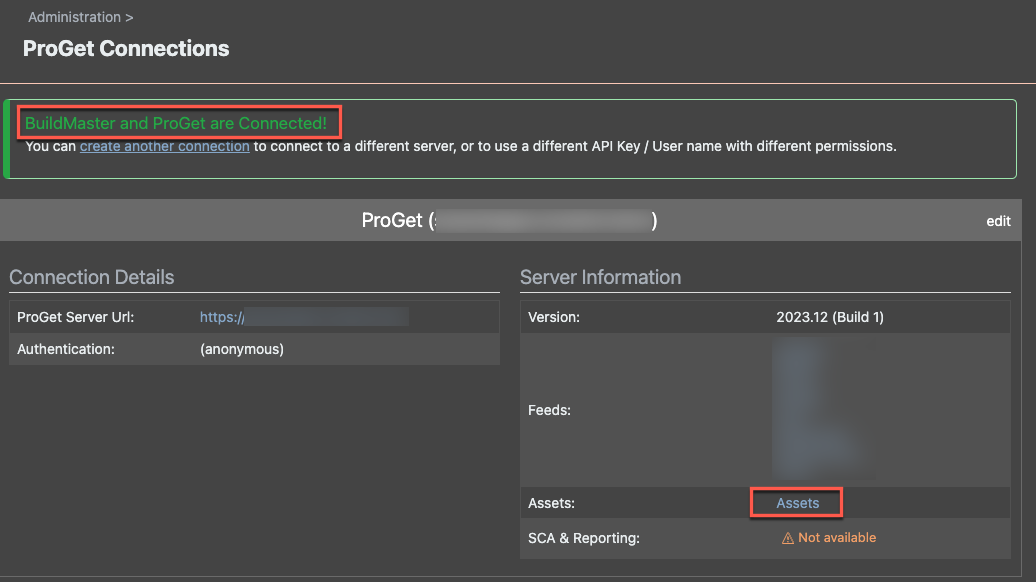
When I just use your step, I get the following error:

Here is my package in assets on proget:

And here is my Otter Script as you suggested
ProGet::Download-Asset content/xxxx_temp/TestEnvVariables_Win.zip
(
Source: directory::Assets,
To: C:\temp\TestEnvVariables_Win.zip
);I tried with and without
content/at front of asset path with no success. Get the same error:EndpointUrl must be specified in either the operation or the referenced secure resource.We also tried it with your deprecated "Proget Asset Directory" resource type.. and it is also not working.
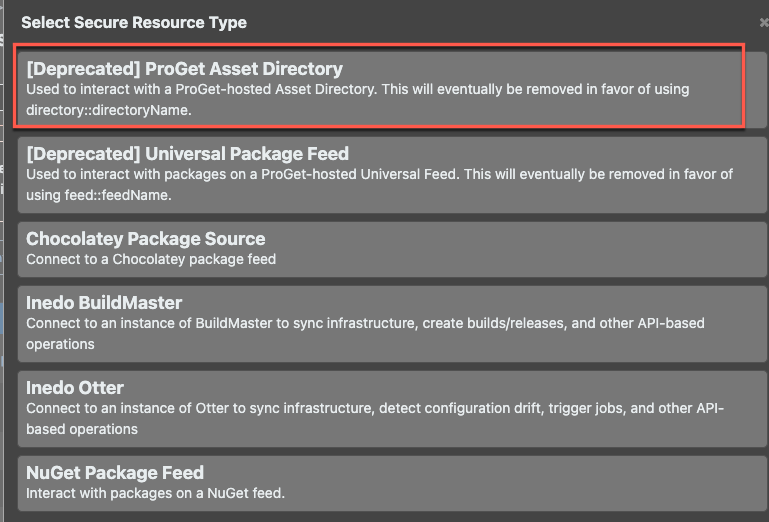
I really don't know if any of your customers are having so much of a trouble.. but with Buildmaster, I have struggle every step of my evaluation. It is really frustrating.
I am really hopeful that we can continue evaluating buioldmaster further but there are lot of road blocks.
-
Hi @andy222,
Very sorry for the frustrations here - it's frustrating for all of us too (me especially) when it doesn't work

Just to give some context here --- we made a huge investment in BuildMaster 2022/23, and one of the areas was a major improvement for how we integrate with ProGet. The
feed::FeedNameanddirectory::AssetDirNameconvention is brand new, and it's an improvement/simplification on the "Secure Resource" convention that you discovered. However, both conventions -- as well as directly specifying those values on the operation -- are still supported. There's a lot (too much?) flexibility.Unfortunately this particular scenario / use case (downloading assets from ProGet) was simply not one that we focused on:
- Uploading assets is uncommon, but still happen
- Downloading assets is rare... and not something I've seen done in BuildMaster much
NuGet packages are not uncommon when coming from TeamCity/Octopus model. Regardless, we didn't focus on this use case. We felt most new users are seeking Git, .NET, Maven, Build, CI Import, and Docker, so that's where most of our effort was focused..
That said.... I would love to make your scenario / use case something really easy to set-up, so hopefully that will give you the confidence to continue!
In this case, it's a "trivial problem" where something just didn't get "wired" up the right way. I can clearly see from the code that the
ApiUrlparameter is not being wired-up as it should be.We'll get this fixed ASAP, just an extension fix. We just need to set up the scenario and make sure it works on our end first.
Cheers,
Alex -
@apxltd,
Thanks for the response. We tried Git scenario first but Buildmaster couldn't clone our repository as well. Please refer to BM-3921
It couldn't parse Github's auth schemes. There is a problem with LibGitSharp v0.27.2 that you guys have packaged with Buildmaster. You need to update it to 0.29 before even we can clone our github repositories.That was the reason, we decided to push our packages to Proget from TeamCity and then consume that package in Buildmaster and deploy it from there onward.
Since now both scenarios are not working, there is no way we can continue either with CI or CD, unfortunately.
-
Hi @andy222 ,
The Git issue should be resolved; that was related to some authentication issues with newer versions of GitHub Enterprise. It broke a lot of tools across the board, apparently. Anyway, I see it just got fixed today. Check out BuildMaster 2023.10-rc.5 if you can
How about pushing a NuGet package instead? That's a much more common scenario (folks migrating from Octopus), and it's one we're going to add some good first-class support for in BuildMaster 2024.
Thanks,
Alex


Hello! It looks like you're interested in this conversation, but you don't have an account yet.
Getting fed up of having to scroll through the same posts each visit? When you register for an account, you'll always come back to exactly where you were before, and choose to be notified of new replies (either via email, or push notification). You'll also be able to save bookmarks and upvote posts to show your appreciation to other community members.
With your input, this post could be even better 💗
Register Login