Welcome to the Inedo Forums! Check out the Forums Guide for help getting started.
If you are experiencing any issues with the forum software, please visit the Contact Form on our website and let us know!
SQL Timeout When Starting Agent Service
-
Hello,
We are running into an issue where we are trying to start the agent service, and we get a very vague error message before the Agent times out. We've checked all permissions on the SQL Server side, and we have tried restarting the server, as well as the SQL Server. There isn't anything clear to our team that indicates any particular issue. Any help would be greatly appreciated.
Here's the error:Stack trace: at System.Data.SqlClient.SqlConnection.OnError(SqlException exception, Boolean breakConnection, Action
1 wrapCloseInAction) at System.Data.SqlClient.TdsParser.ThrowExceptionAndWarning(TdsParserStateObject stateObj, Boolean callerHasConnectionLock, Boolean asyncClose) at System.Data.SqlClient.TdsParser.TryRun(RunBehavior runBehavior, SqlCommand cmdHandler, SqlDataReader dataStream, BulkCopySimpleResultSet bulkCopyHandler, TdsParserStateObject stateObj, Boolean& dataReady) at System.Data.SqlClient.SqlDataReader.TryConsumeMetaData() at System.Data.SqlClient.SqlDataReader.get_MetaData() at System.Data.SqlClient.SqlCommand.FinishExecuteReader(SqlDataReader ds, RunBehavior runBehavior, String resetOptionsString, Boolean isInternal, Boolean forDescribeParameterEncryption, Boolean shouldCacheForAlwaysEncrypted) at System.Data.SqlClient.SqlCommand.RunExecuteReaderTds(CommandBehavior cmdBehavior, RunBehavior runBehavior, Boolean returnStream, Boolean async, Int32 timeout, Task& task, Boolean asyncWrite, Boolean inRetry, SqlDataReader ds, Boolean describeParameterEncryptionRequest) at System.Data.SqlClient.SqlCommand.RunExecuteReader(CommandBehavior cmdBehavior, RunBehavior runBehavior, Boolean returnStream, String method, TaskCompletionSource1 completion, Int32 timeout, Task& task, Boolean& usedCache, Boolean asyncWrite, Boolean inRetry)
at System.Data.SqlClient.SqlCommand.RunExecuteReader(CommandBehavior cmdBehavior, RunBehavior runBehavior, Boolean returnStream, String method)
at System.Data.SqlClient.SqlCommand.ExecuteReader(CommandBehavior behavior, String method)
at Inedo.Data.DatabaseContext.ExecuteInternal(String storedProcName, GenericDbParameter[] parameters)
at Inedo.Data.SqlServerDatabaseContext.ExecuteInternal(String storedProcName, GenericDbParameter[] parameters)
at Inedo.Data.StrongDataReader.<Read>d__61.MoveNext() at System.Linq.Enumerable.FirstOrDefault[TSource](IEnumerable1 source)
at Inedo.Otter.Data.DB.Context.LogMessages_GetMessage(Nullable`1 LogMessage_Id)
at Inedo.Otter.WebApplication.Pages.Administration.ErrorLogs.ViewErrorLogEntryPage.CreateChildControls()
at Inedo.Otter.WebApplication.Pages.OtterSimplePageBase.<InitializeAsync>d__2.MoveNext()
--- End of stack trace from previous location where exception was thrown ---
at System.Runtime.ExceptionServices.ExceptionDispatchInfo.Throw()
at System.Runtime.CompilerServices.TaskAwaiter.HandleNonSuccessAndDebuggerNotification(Task task)
at Inedo.Web.PageFree.SimplePageBase.<ProcessRequestAsync>d__47.MoveNext()
--- End of stack trace from previous location where exception was thrown ---
at System.Runtime.ExceptionServices.ExceptionDispatchInfo.Throw()
at System.Runtime.CompilerServices.TaskAwaiter.HandleNonSuccessAndDebuggerNotification(Task task)
at System.Web.TaskAsyncHelper.EndTask(IAsyncResult ar)
at System.Web.HttpApplication.CallHandlerExecutionStep.System.Web.HttpApplication.IExecutionStep.Execute()
at System.Web.HttpApplication.ExecuteStepImpl(IExecutionStep step)
at System.Web.HttpApplication.ExecuteStep(IExecutionStep step, Boolean& completedSynchronously) -
Hi Justin,
The Inedo Agent Service is generally something that you'd run on a remote server; if it's crashing on start-up, then the error message would be in the Windows Event Log. The most likely reason is not sufficient permissions or invalid configuration.
The error message that you're sharing is from the Otter Web application, and it's happening while trying to view the "Admin > Diagnostic Center". That's an unrelated problem... but it's also a bit unusual, as there shouldn't be more than 1000 entries in that table.
The first thing I would investigate is the data the underlying table. You can just run
SELECT * FROM [LogMessages] ORDER BY [LogMessage_Id] DESC, and peek at what's there.That won't help with the agent, but it will help troubleshoot other issues. There definitely shouldnt' be atime out there.
Cheers,
Steve -
@stevedennis Thanks a lot for your feedback. I ran that query, and here are some results from today's failure:
"An error occurred in the web application: Execution Timeout Expired. The timeout period elapsed prior to completion of the operation or the server is not responding."
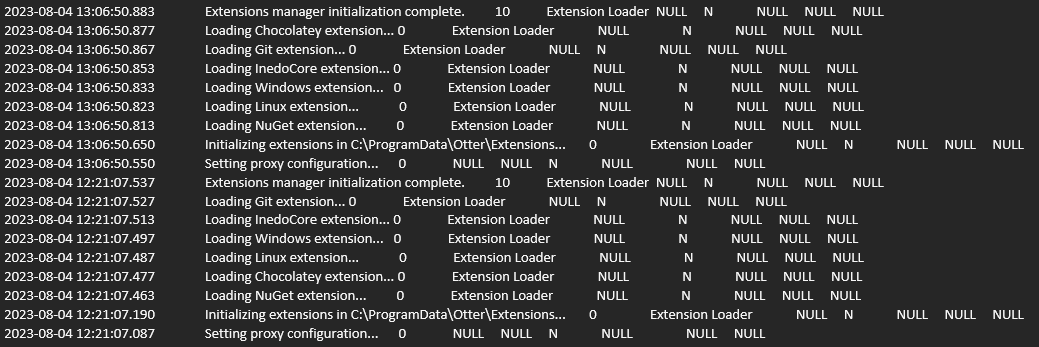
Briefly, I wanted to provide you with a history of this issue. We've been running the tool for a few years now, and out of no-where about 6 months ago, this happened. But somehow after around 2 weeks, it suddenly allowed us to start the service on Windows. Now we've been having this problem for about 4 weeks.
Here's the error we see when trying to run the Otter service EXE via the command line:
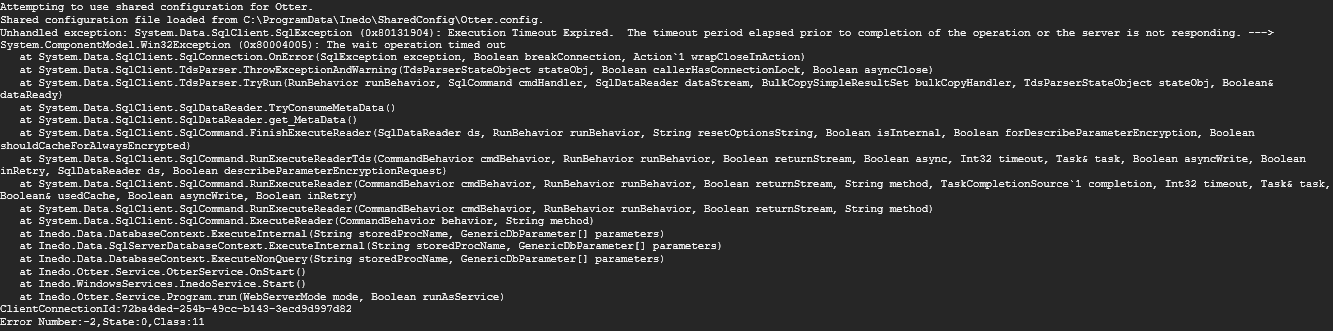
Thanks a lot for your time and help looking at this. I've spent hours on this so far haha.
Thanks - Justin
-
Hi @justin-zollar_1098 ,
At first, it looks like debug-level logging is enabled, so I would definitely disable that under Admin > Advanced Settings > Diagnostics.MinimumLogLevel. It should be 20.
The most common reason for a SQL Timeout (i.e. if you google the problem) is a SQL query that is taking too long. That shouldn't happen in Otter, but it sometimes does, especially when there is a lot of data and some non-optimzed queries.
A SQL Timeout when starting the Otter Service is unusual, and it may not be related to SQL queries.
The first thing I would check... are these queries actually taking that long to run in the database? You can use a tool like SQL Server Profiler or resource monitor, which will show you what's going on. You can then try running those queries directly against the database, and see if they're also taking an eternity.
It's very possible that SQL Server isn't the issue at all. It could be network related - and we've even seen some bad Windows updates trigger some strange side-effects to the Windows wait handles.
Best,
Steve

Hello! It looks like you're interested in this conversation, but you don't have an account yet.
Getting fed up of having to scroll through the same posts each visit? When you register for an account, you'll always come back to exactly where you were before, and choose to be notified of new replies (either via email, or push notification). You'll also be able to save bookmarks and upvote posts to show your appreciation to other community members.
With your input, this post could be even better 💗
Register Login