Welcome to the Inedo Forums! Check out the Forums Guide for help getting started.
If you are experiencing any issues with the forum software, please visit the Contact Form on our website and let us know!
ProGet 2023 Data Migration fails with database timeout
-
We recently upgraded to ProGet Version 2023.13 (Build 14) but are having issues migrating out NPM and Nuget feed. It will iterate through all ~16000 versions but always ends up with a timeout:
DEBUG: Read 16196 rows into 1658 packages.
ERROR: Error importing data: Microsoft.Data.SqlClient.SqlException (0x80131904): Execution Timeout Expired.  The timeout period elapsed prior to completion of the operation or the server is not responding.
 ---> System.ComponentModel.Win32Exception (258): The wait operation timed out.
   at Microsoft.Data.SqlClient.SqlCommand.<>c.<ExecuteDbDataReaderAsync>b__209_0(Task`1 result)
   at System.Threading.Tasks.ContinuationResultTaskFromResultTask`2.InnerInvoke()
   at System.Threading.ExecutionContext.RunInternal(ExecutionContext executionContext, ContextCallback callback, Object state)
--- End of stack trace from previous location ---
   at System.Threading.Tasks.Task.ExecuteWithThreadLocal(Task& currentTaskSlot, Thread threadPoolThread)
--- End of stack trace from previous location ---
   at Inedo.Data.DatabaseContext.DbResult.CreateAsync(DbCommand command, DatabaseContext context, DateTimeOffset startTime, Stopwatch stopwatch)
   at Inedo.Data.DatabaseContext.ExecuteInternalAsync(String storedProcName, GenericDbParameter[] parameters)
   at Inedo.Data.SqlServerDatabaseContext.ExecuteInternalAsync(String storedProcName, GenericDbParameter[] parameters)
   at Inedo.Data.DatabaseContext.ExecuteNonQueryAsync(String storedProcName, GenericDbParameter[] parameters)
   at Inedo.ProGet.Feeds.StandardPackageFeed`3.ImportLegacyPackageDataAsync[TOldRow](ImportLegacyPackageDataContext context, IEnumerable`1 oldRows, Func`2 importAsync, CancellationToken cancellationToken)
   at Inedo.ProGet.Feeds.Npm.NpmFeed.Inedo.ProGet.Feeds.ILegacyImportableFeed.ImportLegacyPackageDataAsync(ImportLegacyPackageDataContext context, CancellationToken cancellationToken)
   at Inedo.ProGet.Executions.MigrateFeedsForProGet23Execution.ExecuteAsync(IManualExecutionContext context)
ClientConnectionId:739689f3-4403-494f-ac1d-d343740bf4ee
Error Number:-2,State:0,Class:11
Our server is running Windows Server 2016 with SQL Server 2016 (13.0.4604.0).
I've already tried the following:
- restarting the service
- restarting the server
- restarting SQL server
- clearing the feed's cache (which by the way didn't really do anything)
- set the SQL server's timeout to 1200 seconds (from the default 600)
I'm not sure what the query itself is trying to do, I feel like reading/inserting 16k rows should not be such a heavy operation.
Any help?
-
Hi @martijn_9956 ,
We've seen this happen in the field a few times, and it seems to be very specific to SQL Server version, the hardware, or something like that. It's a bit of a mystery, because when we import a database backup, the migration happens really quickly. We even tried same version of SQL Server. Another user restored the database to another SQL Server, and it worked fine.
In ProGet 2023.13 (which you're using), we increased the feed migration connection timeout to 1000 seconds (up from 30 seconds), so the fact this this is still happening is totally bizarre. I wonder if you could help troubleshoot, by seeing what's happening on the SQL Server side?
Based on the log messages, the timeout is happening on when executing
FeedPackages_UpdatePackageData; this procedure inputs a Table-valued parameter with 1658 rows (based on your data). Here is the C# code that invokes the query:await this.Db.FeedPackages_UpdatePackageDataAsync( Feed_Id: this.FeedId, Packages_Table: latestVersions.Select( p => new TableTypes.FeedPackageEntry { PackageName_Id = p.Key, Latest_Package_Version = p.Value.LatestVersion?.ToNormalizedUniqueString(), LatestStable_Package_Version = p.Value.LatestStableVersion?.ToNormalizedUniqueString(), Total_Download_Count = p.Value.TotalDownloads }), DeleteMissing_Indicator: false ).ConfigureAwait(false);You can peek in SQL Server to see the code, but it's really just doing a straight-forward "upsert" into the
FeedPackagestable.If you attach SQL Profiler, you should be able to see exactly what's going on. The only rough idea we have is that there's something "wrong" with the way we're doing the upsert in
FeedPackages_UpdatePackageDataAsyncand some version of the query analyzer is tripping over it (but not reporting a deadlock?)Any insight would be appreciated, this one's a mystery for now

Thanks,
Alana -
Hi @atripp
I'm profiling the migration right now to see if I can figure out what it's timing out on. Meanwhile, I noticed that the SP
Executions_AddLogEntryis rather slow, between 10ms and 130ms. Is this expected or should I just empty part of myScopedExecutionLogEntriestable, since I have logs going back to 2018?I'll post again once the migration has failed again with my findings.
-
@martijn_9956 thanks, let us know what you find! That is really slow for
Executions_AddLogEntry; it's just an insert I think.Can you check... what is the database recovery model for ProGet configured to? It should be
SIMPLE. Not sure if that would make a difference or not, just a thought... -
The recovery model was set to
FULL.. I just changed it toSIMPLEand started a new run, but it doesn't really seem to have any impact, oh well.As for my profiling:

FeedPackages_UpdatePackageDataended up timing out right at the 10 minute mark, as expected. I did however pull the entire@p2temporary table from the profiler and used it to run some local tests.Running the SP on my much beefier Windows 11 Pro desktop on SQL Server 2022, using a database backup from last night, stills ends up with an execution time of a solid 2 minutes, so I'm starting to suspect it's something in the database itself. The columns seem properly indexed though, so that's kinda odd..
I'll try some adjustments to the SP and see if I can figure something out.
-
Thanks so much for the update @martijn_9956; even 2 minutes that is a surprising amount of time to take for what should be a really basic insert/update

But I'm glad you could repro it to the proc; we can also take a stab at playing around with the procedure as well if you us the script you're running.
And just to confirm -- you were seeing that @p2 temporary was only around 1658 rows, right? That's what I would expected based on the log messages. I know we tested this with 10k+ rows at least.
-
@atripp Yup, we get 1658 insert statements into @p2 that are then passed onto the SP.
-
Ended up getting rid of the
MERGEstatement and replacing it with a simpleUPDATE&INSERT:USE [ProGet] GO /****** Object: StoredProcedure [dbo].[FeedPackages_UpdatePackageData] Script Date: 25-07-2023 11:43:34 ******/ SET ANSI_NULLS ON GO SET QUOTED_IDENTIFIER ON GO ALTER PROCEDURE [dbo].[FeedPackages_UpdatePackageData] ( @Feed_Id INT, @Packages_Table dbo.[FeedPackageEntry] READONLY, @DeleteMissing_Indicator YNINDICATOR = 'N' ) AS BEGIN DECLARE @queryStart AS VARCHAR(max) = CONVERT(varchar, SYSDATETIME(), 121); PRINT @queryStart; BEGIN TRY BEGIN TRANSACTION; SELECT [PackageName_Id] INTO #existingPkgIds FROM [FeedPackages] WHERE [Feed_Id] = @Feed_Id; PRINT 'update'; UPDATE [FeedPackages] SET [FeedPackages].[Latest_Package_Version] = old.[Latest_Package_Version], [FeedPackages].[LatestStable_Package_Version] = old.[LatestStable_Package_Version] FROM @Packages_Table old WHERE [FeedPackages].PackageName_Id = old.PackageName_Id; PRINT 'insert' INSERT INTO [FeedPackages] SELECT @Feed_Id, [PackageName_Id], [Total_Download_Count], [Latest_Package_Version], [LatestStable_Package_Version] FROM @Packages_Table old WHERE [PackageName_Id] NOT IN (SELECT [PackageName_Id] FROM #existingPkgIds); -- insert all new packages not already in table COMMIT END TRY BEGIN CATCH IF XACT_STATE()<>0 ROLLBACK EXEC [HandleError] END CATCH DECLARE @queryEnd AS VARCHAR(max) = CONVERT(varchar, SYSDATETIME(), 121); PRINT @queryEnd; ENDMy SQL skills are a bit rusty but I make do.
This runs on my desktop in about 3 seconds.Note that this does not account for updating download statistics (I don't really care about those) or deleting orphaned packages, but I figure that's easy enough to add back later. I removed those from the
MERGEearlier today and it didn't have any impact so I don't think the issue lies there.I compared the resulting table from this SP with the resulting table of the original SP and they are identical, I'm going to replace the SP on the server with this and see how it goes!
-
@atripp Success!
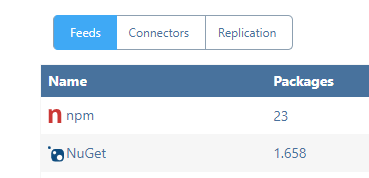
I'm now migrating the NPM feed which I expect will work just as well. -
And NPM completed succesfully as well :)
-
Thanks so much @martijn_9956; after researching the matter further, it seems that the
MERGEcan be a pretty buggy statement, and its behavior seems to vary based on the operating system, SQL Server SKU, patch version, and probably the phase of the moon.We will rewrite this procedure to use a more straight-forward UPDATE/INSERT/DELETE (like you did) via PG-2437, which will ship in next maintenance release.
-
I just encountered this on 2023.18. Any way to re-run this?
DEBUG: 2023-09-18 16:05:38Z - Deactivating feed... INFO : 2023-09-18 16:05:38Z - Importing legacy data for npm (Npm) feed... ERROR: 2023-09-18 16:06:46Z - Error importing data: Microsoft.Data.SqlClient.SqlException (0x80131904): Execution Timeout Expired. The timeout period elapsed prior to completion of the operation or the server is not responding. ---> System.ComponentModel.Win32Exception (258): The wait operation timed out. at Microsoft.Data.SqlClient.SqlCommand.<>c.<ExecuteDbDataReaderAsync>b__209_0(Task`1 result) at System.Threading.Tasks.ContinuationResultTaskFromResultTask`2.InnerInvoke() at System.Threading.ExecutionContext.RunInternal(ExecutionContext executionContext, ContextCallback callback, Object state) --- End of stack trace from previous location --- at System.Threading.Tasks.Task.ExecuteWithThreadLocal(Task& currentTaskSlot, Thread threadPoolThread) --- End of stack trace from previous location --- at Inedo.Data.DatabaseContext.DbResult.CreateAsync(DbCommand command, DatabaseContext context, DateTimeOffset startTime, Stopwatch stopwatch) at Inedo.Data.DatabaseContext.ExecuteInternalAsync(String storedProcName, GenericDbParameter[] parameters) at Inedo.Data.SqlServerDatabaseContext.ExecuteInternalAsync(String storedProcName, GenericDbParameter[] parameters) at Inedo.Data.DatabaseContext.ExecuteNonQueryAsync(String storedProcName, GenericDbParameter[] parameters) at Inedo.ProGet.Feeds.StandardPackageFeed`3.ImportLegacyPackageDataAsync[TOldRow](ImportLegacyPackageDataContext context, IEnumerable`1 oldRows, Func`2 importAsync, CancellationToken cancellationToken) at Inedo.ProGet.Feeds.Npm.NpmFeed.Inedo.ProGet.Feeds.ILegacyImportableFeed.ImportLegacyPackageDataAsync(ImportLegacyPackageDataContext context, CancellationToken cancellationToken) at Inedo.ProGet.Executions.MigrateFeedsForProGet23Execution.ExecuteAsync(IManualExecutionContext context) ClientConnectionId:58ed9c81-5e72-4dd3-808a-612492ad0b86 Error Number:-2,State:0,Class:11 DEBUG: 2023-09-18 16:06:46Z - Deactivating feed... INFO : 2023-09-18 16:06:46Z - Importing legacy data for nuget (NuGet) feed... INFO : 2023-09-18 16:06:47Z - Migrating legacy .snupkg tables... INFO : 2023-09-18 16:06:47Z - .snupkg migration complete. DEBUG: 2023-09-18 16:06:47Z - Reactivating feed... INFO : 2023-09-18 16:06:47Z - Import complete for nuget feed. -
In case anyone runs into this issue, stop the web app (i.e. stop the app pool) and create a new execution:
USE [ProGet] GO DECLARE @RC int DECLARE @Start_Date datetime DECLARE @ExecutionMode_Code char(1) = 'O' DECLARE @ExecutionRunState_Code char(1) DECLARE @ExecutionType_Name varchar(50) = 'ProGet 2023 Feed Data Migration' DECLARE @Execution_Configuration xml = (select Execution_Configuration from dbo.Executions where Execution_Id = <ID_OF_FAILED_EXECUTION>) DECLARE @ScheduledTask_Id int = NULL DECLARE @Feed_Id int = NULL DECLARE @Connector_Id int = NULL DECLARE @FeedReplication_Id int = NULL DECLARE @Execution_Id int EXECUTE @RC = [dbo].[Executions_CreateExecution] @Start_Date ,@ExecutionMode_Code ,@ExecutionRunState_Code ,@ExecutionType_Name ,@Execution_Configuration ,@ScheduledTask_Id ,@Feed_Id ,@Connector_Id ,@FeedReplication_Id ,@Execution_Id OUTPUT GO -
Hi @Evan_Mulawski_8840 ,
That particular bug may be resolved by running the patch script attached to this upcoming change: https://inedo.myjetbrains.com/youtrack/issue/PG-2484
As for retrying the migration; there will be a button on the ProGet root page if there is a failed/incomplete migration (/) that allows you to retry it. This will open to the
/retry-migrationURL, which I would recommend using instead of a database insert.Best,
Dean


Hello! It looks like you're interested in this conversation, but you don't have an account yet.
Getting fed up of having to scroll through the same posts each visit? When you register for an account, you'll always come back to exactly where you were before, and choose to be notified of new replies (either via email, or push notification). You'll also be able to save bookmarks and upvote posts to show your appreciation to other community members.
With your input, this post could be even better 💗
Register Login