Welcome to the Inedo Forums! Check out the Forums Guide for help getting started.
If you are experiencing any issues with the forum software, please visit the Contact Form on our website and let us know!
FTP Extension
-
Hi,
Im trying to deploy an artifact to a server, first I want to deploy the App_offline.htm file.
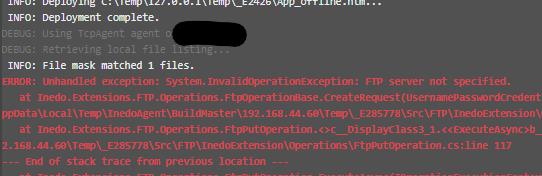
I have created a global resource and credentials, but my deploy script complains no FTP server is specified, the ftp server address/port and username/pwd are in the resources/credentials what could I be doing wrong?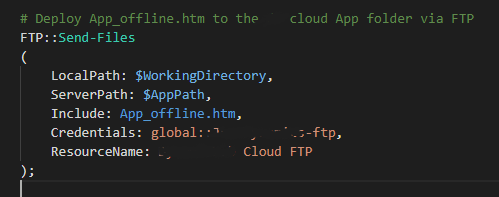
-
Hi @Justinvolved,
That error happens when HostName is not set:
https://github.com/Inedo/inedox-ftp/blob/master/FTP/InedoExtension/Operations/FtpOperationBase.cs#L120HostName should be mapped from the Resource, but unfortunately it doesn't look like we have validation code in there to indicate if there's an invalid Resource name; it just silently fails:
https://github.com/Inedo/inedox-ftp/blob/master/FTP/InedoExtension/Operations/FtpOperationBase.cs#L160So, I'm guessing that the resource isn't being retrieved properly; can you try putting
global::in front of the ResourceName? Since you mentioned it's global...Cheers,
Steve -
This post is deleted! -
Hey Steve,
Seems something was stuck somewhere, I re-created the resource and reset the service and now I can connect.
Cheers,
Justin

Hello! It looks like you're interested in this conversation, but you don't have an account yet.
Getting fed up of having to scroll through the same posts each visit? When you register for an account, you'll always come back to exactly where you were before, and choose to be notified of new replies (either via email, or push notification). You'll also be able to save bookmarks and upvote posts to show your appreciation to other community members.
With your input, this post could be even better 💗
Register Login