Welcome to the Inedo Forums! Check out the Forums Guide for help getting started.
If you are experiencing any issues with the forum software, please visit the Contact Form on our website and let us know!
Docker image pull through connector fails
-
Re: Can't pull docker image from remote connector
Is it possible that this issue has resurfaced? We're seeing the same symptoms with version 2023.7:
$ docker image pull proget.server/docker.io/bitnami/sealed-secrets-controller:v0.20.5
Error response from daemon: manifest for proget.server/docker.io/bitnami/sealed-secrets-controller:v0.20.5 not found: manifest unknown: manifest unknown
It works if I pull an already cached image, but new images fail.
Our ProGet is installed on Windows, and we have configured ProGet to use a squid proxy.
-
@guyk there were some changes to containers with the implicit
librarychanges in ProGet 2023, however we didn't encounter this error when testingcan you confirm that this works in ProGet 2022, but not 2022? What architecture are you using, sometimes it's related to so-called "fat manifests"?
-
@stevedennis we've upgraded ProGet multiple times, so it's a bit tricky to be sure in which version this stopped working. Looking at the published dates of the working container images, however, it might very well be when we upgraded from 2022.0.28 to 2023.0.3. We're using amd64 only, and the problem occurs also with our own images, which aren't multi-platform.
-
@stevedennis we've tried upgrading to 2023.8, as there is a relevant-ish fix in there (https://inedo.myjetbrains.com/youtrack/issue/PG-2388), but unfortunately, there was no change in the behavior.
-
Hi @guyk,
I have a few questions for you. Can you please share the connector URL you use for your Docker connector? Also, on one of the images that failed with this message, when you look at them in ProGet, do you see if the image is cached? If so, can you try to delete the cached image and pull it again?
Thanks,
Dan -
-
Hi @guyk,
Can you try using
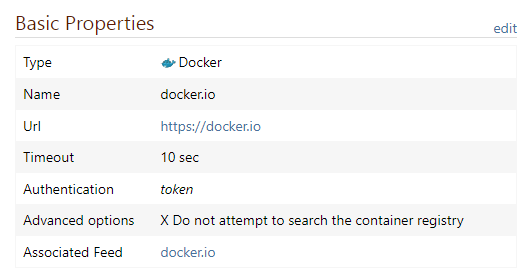
https://registry.hub.docker.comfor your connector URL and see if you have the same issue?Thanks,
Dan -
@Dan_Woolf yes, it seems like that did the trick, thanks. :)
Looking at the other sources we use, which include quay.io, public.ecr.aws, ghcr.io, registry.k8s.io and our own registry in Azure (which requires authentication), I got all of them working except our Azure registry. It also seems important to keep the "Attempt to search the container registry" checkbox cleared, by the way.
It looks like the "not found: manifest unknown: manifest unknown" error message will display no matter the reason for the failure, which might include wrong endpoint setting, the "Attempt to search..." being checked, registry redirects not being allowed through the proxy or maybe also authentication errors?
I wish I'd get some more detailed information on connector errors, as it's hard to get the Azure registry working as it is now.
-
Hi @guyk,
Glad to hear that fixed your issue with the Docker hub connector. When it comes to "Attempt to search", this options does work on Microsoft's container registry, GitLab's container registry, and Google Cloud (gcr/k8s). It only actually affects searching for images though. When it is unchecked, it just requires exact image name searches.
The manifest error is definitely annoying, unfortunately, Docker itself filters out all returned errors and just displays that "not found: manifest unknown: manifest unknown" message. Along with that, when it comes to querying other Docker registries, they throw a lot of errors instead of just returning an empty dataset when an image is not found. That makes it hard to produce meaningful entries into our logs.
As for the Azure container registry. Are you using a public or private registry? One thing we have noticed is the Azure container registry can have multiple package types mixed into it. When you mix package types, ProGet has a hard time using that registry. If you can provide us with an example, we can quickly debug it and let you know what is wrong with the connection.
Thanks,
Dan -
@Dan_Woolf Thanks for the info!
We're using a private Azure registry, and I've tried multiple repositories.
Fiddling around with
az acr manifest listI'm pretty sure I've ascertained that all of the images use the same format,application/vnd.docker.container.image.v1+json.We're using a squid proxy both between the clients and the proget server, and between the proget server and the Internet. Nothing in the squid logs indicate that they interfere with the traffic.
For authentication, we're using a scope mapped token with the scope
_repositories_pull, and I've verified that I'm able to login with such a token usingpodman loginandpodman image pull. -
Hi @guyk ,
Can you bypass the squid proxy and go directly to ACR? I saw a blog post long ago, where someone said something about proxies being an issue:
https://faultbucket.ca/2022/05/aks-image-pull-failed-from-proget/
Thanks,
Alana -
@atripp That's not so easy, I'm afraid. It would take a while to get someone to change the firewall config for me, and it sort of goes against the policy here anyway.
I might try to setup a proget instance on my laptop instead, just to test. But it does seem like a pretty long shot, the post you're referring to is talking about a different type of proxy. Also, as squid is tunnelling TLS traffic in our case (on both sides), I don't think it would be able to screw with the contents of HTTP headers tbh.
Is it by the way possible to disable the proxy for only the one connector or feed, isn't that a global setting?
-
Hi @guyk,
You are correct, the proxy settings are global, not at a feed level.
Would you be able to provide us with a URL and a scope-mapped token we can debug with? You can email these to support@inedo.com with the subject of
[QA-1148]. If so, we can easily debug this and see what is going on. Once we complete the fix, we can let you know and you can revoke access from us.Thanks,
Dan -
@Dan_Woolf Thank you, I have now sent an email as suggested.
-
Hi @guyk,
Thanks, I have it and I'm testing now. I'll reach out shortly and let you know what I find.
Thanks,
Dan -
Hi @guyk,
The error I'm getting is a 401 unauthorized exception. Can you confirm that the token you sent me is a token password? Following Micorosft's documentation https://learn.microsoft.com/en-us/azure/container-registry/container-registry-repository-scoped-permissions, you need to create a token password for the token. Then the docker login username is the name of the token and the password is the token password.
Thanks,
Dan -
This post is deleted! -
@Dan_Woolf It does look OK on our end, I've tried the following:
$ read -s pw
[pasted the token I sent you]
$ echo $pw | docker login -u tokenname --password-stdin registryname.azurecr.io
WARNING! Your password will be stored unencrypted in /home/x/.docker/config.json.
Configure a credential helper to remove this warning. See
https://docs.docker.com/engine/reference/commandline/login/#credentials-store

Login Succeeded
$
I was then able to pull images from the registry.
-
Hi @guyk,
Thanks for confirming that for me. On that same email you sent me, can you please send me a repository name that is available to that token?
Thanks,
Dan -
Hi @guyk,
After some research, it looks like scope-mapped tokens require a custom authentication procedure. It looks like if you use an Admin User, it will then use the standard Docker authentication procedure. Would you be able to try that and see if it works with ProGet?
Thanks,
Dan




Hello! It looks like you're interested in this conversation, but you don't have an account yet.
Getting fed up of having to scroll through the same posts each visit? When you register for an account, you'll always come back to exactly where you were before, and choose to be notified of new replies (either via email, or push notification). You'll also be able to save bookmarks and upvote posts to show your appreciation to other community members.
With your input, this post could be even better 💗
Register Login