Welcome to the Inedo Forums! Check out the Forums Guide for help getting started.
If you are experiencing any issues with the forum software, please visit the Contact Form on our website and let us know!
Extension Loading error
-
Hi Support,
I'm attempting to migrate our ProGet instance from Docker to a dedicated Windows 2019 Virtual Machine.
I've installed ProGet 6.0.13 (same as docker version) from InedoHub and backup/restored the database and updated the advanced settings with all the correct directories.
All is functioning correctly on the new VM apart from the extensions, I'm getting the following error when ProGet is trying to load them:
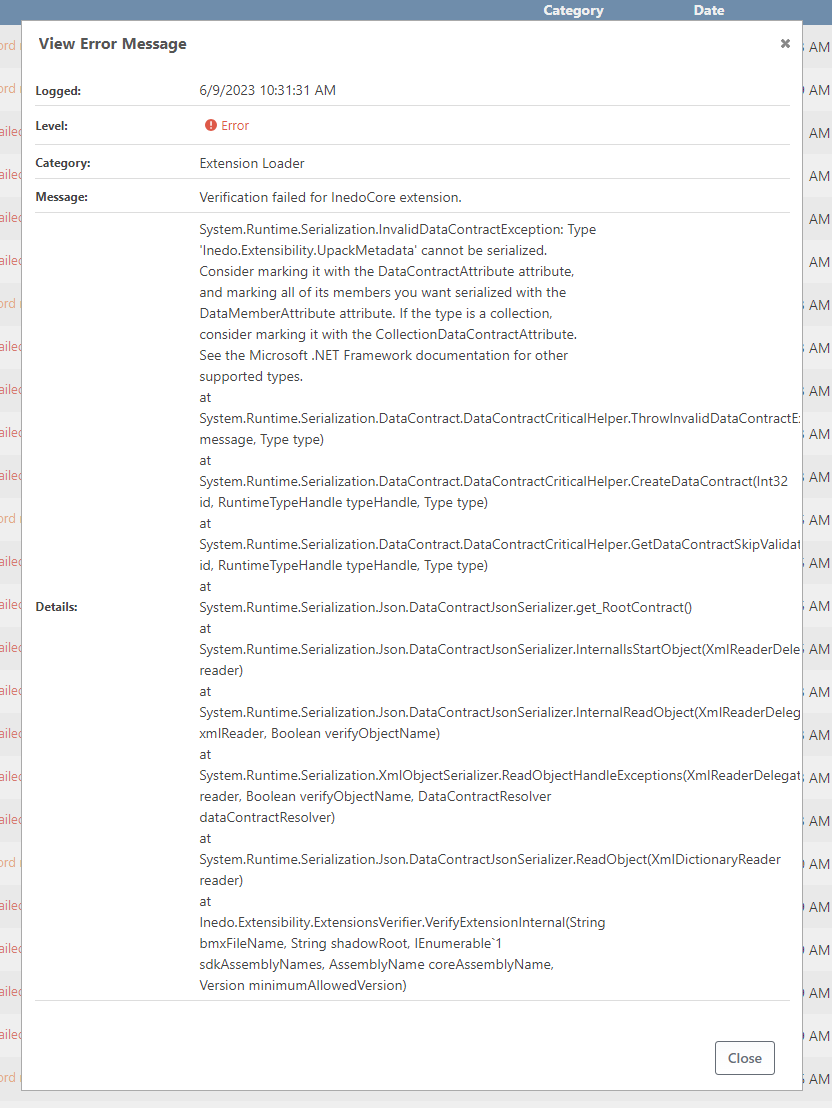
System.Runtime.Serialization.InvalidDataContractException: Type 'Inedo.Extensibility.UpackMetadata' cannot be serialized. Consider marking it with the DataContractAttribute attribute, and marking all of its members you want serialized with the DataMemberAttribute attribute. If the type is a collection, consider marking it with the CollectionDataContractAttribute. See the Microsoft .NET Framework documentation for other supported types. at System.Runtime.Serialization.DataContract.DataContractCriticalHelper.ThrowInvalidDataContractException(String message, Type type) at System.Runtime.Serialization.DataContract.DataContractCriticalHelper.CreateDataContract(Int32 id, RuntimeTypeHandle typeHandle, Type type) at System.Runtime.Serialization.DataContract.DataContractCriticalHelper.GetDataContractSkipValidation(Int32 id, RuntimeTypeHandle typeHandle, Type type) at System.Runtime.Serialization.Json.DataContractJsonSerializer.get_RootContract() at System.Runtime.Serialization.Json.DataContractJsonSerializer.InternalIsStartObject(XmlReaderDelegator reader) at System.Runtime.Serialization.Json.DataContractJsonSerializer.InternalReadObject(XmlReaderDelegator xmlReader, Boolean verifyObjectName) at System.Runtime.Serialization.XmlObjectSerializer.ReadObjectHandleExceptions(XmlReaderDelegator reader, Boolean verifyObjectName, DataContractResolver dataContractResolver) at System.Runtime.Serialization.Json.DataContractJsonSerializer.ReadObject(XmlDictionaryReader reader) at Inedo.Extensibility.ExtensionsVerifier.VerifyExtensionInternal(String bmxFileName, String shadowRoot, IEnumerable1 sdkAssemblyNames, AssemblyName coreAssemblyName, Version minimumAllowedVersion)`I've checked the file permissions and "NETWORK SERVICE" has full control permissions to the extensions directory
Thanks
Simon -
My extension page looks like this:
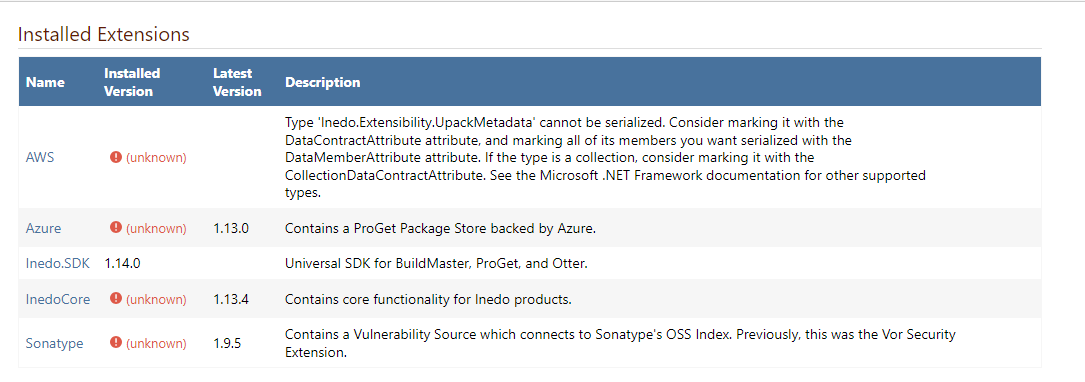
I've tried deleting the extensions from the Web UI (and I see the .upack file deleted on the file system) and re-adding it from the web UI however I still get this error.
Thanks
Simon
-
Hi @scroak_6473,
Have you tried restarting your container? Also, what version of InedoCore did you attempt to install?
Thanks,
Rich -
Its the Windows VM instance of ProGet that is the issue. Yes i've restarted both the ProGet Service and the IIS app pool.
When installing the InedoCore extension from the Web UI I don't get an option which version it installs. I presume 1.13.4 as that is the 'latest' version as shown in the screenshot above
-
Hi @scroak_6473 ,
I'm not sure what the issue is and the errors are very peculiar, I assume that everything works, until you restore the database?
Afte restoring database, there are a few paths I would check under Admin > Advanced Settings:
- Extensions.BuiltInExtensionsPath <--- should be
C:\Program Files\ProGet\Extensions - Extensions.ExtensionsPath <--- should be
C:\ProgramData\ProGet\Extensions - Extensions.CommonCachePath <-- should be
C:\ProgramData\ProGet\ExtensionsCache - Extensions.UseNewExtensionLoader <--- should be checked
And then after edting those, make sure to restart the web.
- Extensions.BuiltInExtensionsPath <--- should be


Hello! It looks like you're interested in this conversation, but you don't have an account yet.
Getting fed up of having to scroll through the same posts each visit? When you register for an account, you'll always come back to exactly where you were before, and choose to be notified of new replies (either via email, or push notification). You'll also be able to save bookmarks and upvote posts to show your appreciation to other community members.
With your input, this post could be even better 💗
Register Login