Welcome to the Inedo Forums! Check out the Forums Guide for help getting started.
If you are experiencing any issues with the forum software, please visit the Contact Form on our website and let us know!
Apply-Template adding unexpected CR newline chars
-
I am experiencing an unexpected bug in the following minimum-repro OtterScript:
set $literal = >-@>
    this is line 1
    this is line 2
    this is line 3
>-@>;

Apply-Template(
    Literal: $literal,
    OutputFile: $PathCombine($SpecialWindowsPath(CommonApplicationData), none.txt)
);

Apply-Template(
    Literal: $literal,
    NewLines: Auto,
    OutputFile: $PathCombine($SpecialWindowsPath(CommonApplicationData), auto.txt)
);

Apply-Template(
    Literal: $literal,
    NewLines: Windows,
    OutputFile: $PathCombine($SpecialWindowsPath(CommonApplicationData), windows.txt)
);

Apply-Template(
    Literal: $literal,
    NewLines: Linux,
    OutputFile: $PathCombine($SpecialWindowsPath(CommonApplicationData), linux.txt)
);
When run against localhost (a Windows server), the resulting files appear to be created with additonal
\rchars in between each line: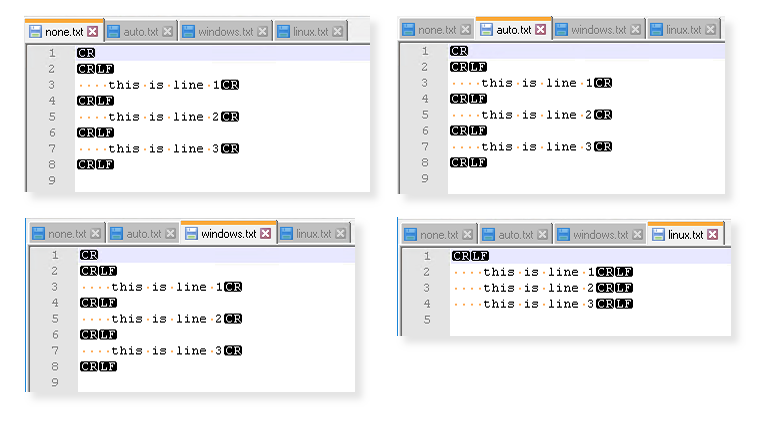
I was expecting that, for
NewLines: Windows, the byte-sequence for line-endings would be\r\nand forNewLines: Linux, the byte-sequence would be\n. Instead, I appear to have\r\r\nand\r\n.(I assume not specifying is the same as
Auto, and matches theWindowsbehaviour because of the target server's platform. I have not tried against a Linux target server.)Note that I am not referring to the ones at the top and bottom of the resulting files -- those are clearly because I have written newlines before and after my fish-quotes. Nor the spaces at the start of each line, those also exist in the fish-string.
The script was entered via the
/scripts/edit2text editor rather than/osve.Have I misunderstood some nuance of the
Apply-Templatefunction, or fish-strings in general, or is this a bug?PS: I thought I might work around this with...
Apply-Template
(
    OutputVariable => $out,
    Literal: $literal,
    NewLines: Windows
);

set $linux_out = $RegexReplace($out, "[\r]+\n", "`n");
Log-Debug $linux_out;

set $win_out = $RegexReplace($out, "[\r]+\n", "`r`n");
Log-Debug $win_out;

Create-File
(
    Name: $PathCombine($SpecialWindowsPath(CommonApplicationData), linux_pp.txt),
    Text: $linux_out,
    Overwrite: true
);

Create-File
(
    Name: $PathCombine($SpecialWindowsPath(CommonApplicationData), windows_pp.txt),
    Text: $win_out,
    Overwrite: true
);
...but it appears that
Create-Filehas its own nuance, and all were turned into\r\nnewlines. I assume, therefore, it is not possible to useCreate-Fileto create a raw file containing the exact content of a variable, with no pre-processing?Version 2022.10 (Build 1) -
Hi @jimbobmcgee
To be honest this is pretty old code and I'm not entirely sure how it works :)
I wonder if this is the issue in Apply-Template?
https://github.com/Inedo/inedox-inedocore/blob/master/InedoCore/InedoExtension/Operations/General/ApplyTemplateOperation.cs#L90I'm guessing the original string must have \r\n in it or something.
Here's the Create-File code, where there seems to be another replacement:
https://github.com/Inedo/inedox-inedocore/blob/master/InedoCore/InedoExtension/Operations/Files/CreateFileOperation.cs#L77
I didn't have much time tot look closely, but wanted to share the code and see if you spotted antyhing!Cheers,
Alana -
I wonder if this is the issue in Apply-Template?
https://github.com/Inedo/inedox-inedocore/blob/master/InedoCore/InedoExtension/Operations/General/ApplyTemplateOperation.cs#L90At first glance, it would certainly appear to be that line which creates the
\rcharacters I am seeing.I'm guessing the original string must have \r\n in it or something.
I assume that
>>swim strings>>which contain newlines persist them as\r\n, but that might be platform-specific. If I can therefore also assume that the only supported platforms are Windows and Linux (so\r\nor\n), then it might be enough to replace that line with:--- if (this.NewLineMode == TemplateNewLineMode.Windows) result = result.Replace("\n", "\r\n"); +++ string targetNewline; switch (this.NewLineMode) { case TemplateNewLineMode.Windows: targetNewline = "\r\n"; break; case TemplateNewLineMode.Linux: targetNewline = "\n"; break; case TemplateNewLineMode.Auto: auto: // jump here after warning, if not handled targetNewline = Environment.NewLine; // should this be fileOps.NewLine...? break; default: this.LogWarning($"unsupported NewLine value '{this.NewLineMode}'; Auto assumed"); goto auto; // jump to Auto case } // TODO: intern this in a singleton utility class? var newlineSearcher = new Regex(@" (?> # atomic capture and discard matched \r? # optional \r char \n) # definitive \n char ", RegexOptions.Multiline | RegexOptions.Compiled | RegexOptions.IgnorePatternWhitespace); result = newlineSearcher.Replace(result, targetNewline);There is another replacement happening at https://github.com/Inedo/inedox-inedocore/blob/master/InedoCore/InedoExtension/Operations/General/ApplyTemplateOperation.cs#L97 which I don't think would be needed, if the above is applied...
---
var fileOps = await context.Agent.GetServiceAsync<IFileOperationsExecuter>().ConfigureAwait(false);
if (this.NewLineMode == TemplateNewLineMode.Auto)
    result = result.Replace("\n", fileOps.NewLine);
...but it may be appropriate to hoist the instantiation of
fileOpsand usefileOps.NewLinein place ofEnvrionment.NewLinein theswitchabove (I assume thatfileOps.NewLineuses the platform of the currentfor server, rather than the platform on which Otter is running). -
Here's the Create-File code, where there seems to be another replacement:
https://github.com/Inedo/inedox-inedocore/blob/master/InedoCore/InedoExtension/Operations/Files/CreateFileOperation.cs#L77That appears to use the same Regex (or close-enough) as I have proposed for
Apply-Templateabove, but it always replaces withfileOps.NewLine, which I assume is server-specific.If someone genuinely needed to create a file which used a different line-ending than the platform's default, that logic falls short.
Perhaps, instead, you could ratify an additional property which controls this:
+++
[ScriptAlias("RawMode")]
[Description("If true, does not attempt to rewrite newlines")]
public bool RawMode { get; set; }
...then alter the line to gate that newline rewrite behind that property:
---
var text = Regex.Replace(this.Text ?? string.Empty, @"\r?\n", fileOps.NewLine);

+++
var text = this.Text ?? string.Empty;
// OPT: reuse the interned regex from Apply-Template above?
if (!this.RawMode) text = Regex.Replace(text, @"\r?\n", fileOps.NewLine);
You are then doing a further translation, further down at #L92, where you use
StreamWriterto explicitly set the newline for Linux operations.If
fileOps.NewLineis already abstracting this, it may not actually be necessary but, in any case, I don't think it does what you think it will, because you only callwriter.WriteAsync(text)and notwriter.WriteLineAsync(text).I think the
StreamWriter.NewLineproperty only applies whenWriteLine/WriteLineAsyncare called, and only to indicate the char added to the end of the string in each call -- it doesn't replace existing newlines in the supplied string.I suspect, therefore, the line at L92 can therefore become:
using var stream = await linuxFileOps.OpenFileAsync(path, FileMode.Create, FileAccess.Write, Extensions.PosixFileMode.FromDecimal(mode.Value).OctalValue); --- using var writer = new StreamWriter(stream, InedoLib.UTF8Encoding) { NewLine = linuxFileOps.NewLine }; +++ using var writer = new StreamWriter(stream, InedoLib.UTF8Encoding); await writer.WriteAsync(text); -
@jimbobmcgee thanks for all the help on this! While not a complicated fix, it might not be trivial - so put this on our internal BuildMaster 2023 board. We're in active development, and will review/fix this there, then look to backport to earlier versions of InedoCore.
You're more than welcome to give it a stab as well...
- relatively easy to modify/create extensions (https://docs.inedo.com/docs/creating-an-extension-for-v2022)
- Otter is currently on SDK 2.1 (see versions), so you'd want to branch from here
And feel free to submit a PR if you get something working; lot easier to review/test that way :)
Quick comments...
I assume that fileOps.NewLine uses the platform of the current for server, rather than the platform on which Otter is running
Correct -- it's related to the agent that server uses. For PowerShell Agent, Local Agent, and Inedo Agent,
NewLinereturnsEnvironment.NewLine. For SSH Agent, it's\n.However, this probably isn't accurate anymore; I suspect InedoAgent is incorrect if BuildMaster or Otter is running on Linux, and Inedo Agent is running on Windows. But I'm not sure.
public bool RawMode { get; set; }
Good point --- and to be honest I was a little surprised by the fact that these operations even rewrote new lines. Probably came from a support request... my guess is for when you're passing in literals or something :)
In any case, we should probably switch to an enumeration like template operat has (
TemplateNewLineMode) -- but a fourth option to the both (None).Anwyays -- we'll review a bit later if we don't hear back otherwise :)
-
@atripp
Thanks for looking.Without wanting to hold you to a particular date, what is the typical release timeframe?
I just need to work out whether to work around this issue for now, or wait it out until the next release...
-
@atripp said in Apply-Template adding unexpected CR newline chars:
In any case, we should probably switch to an enumeration like template operat has (TemplateNewLineMode) -- but a fourth option to the both (None).
Creating a
Nonevalue may be risky. It's just thatNoneis such a "default-sounding" word, that someone might one day try and make it the default, instead ofAuto, and everyone would have to update scripts that worked before.For
Create-File, I picked aboolto indicate that you can either attempt to transform the newlines file or not, and named it so that the default (i.e.false) would keep the current behaviour. That way, it becomes an opt-in parameter so, if anyone is relying on the wayCreate-Filecurrently handles newlines, they shouldn't have to change their scripts to retain the old behaviour.If you standardise the logic for both
Apply-TemplateandCreate-Fileto both support aNewLinesproperty in the same way, having the default value remainAutowould still mean that the current behaviour is retained without changing the scripts.Perhaps
Binarywould indicate both a non-default status, and that the source isn't transformed...(Of course, the term
Automight itself lead someone to expect that binary/non-text source files would not be subject to line-ending alteration -- I don't know how you get around that. Naming things is hard )
) -
@jimbobmcgee said in Apply-Template adding unexpected CR newline chars:
Without wanting to hold you to a particular date, what is the typical release timeframe?
We're targeting BuildMaster 2023 for Q3/Q4 and Otter for Q4. We don't have any dates beyond that at this point.
And it sounds like you understand quite well why we're not so keen to jump on making relatively easy changes - definitely a lot to consider. We have a lot of "product debt" like this and have learned to be a lot more cautious.
That said, I think as long as it's documented it's probably okay. That's the hard part of course (writing docs) - but there's a
Noteattributes that can be added to explain things as well.cheers!


Hello! It looks like you're interested in this conversation, but you don't have an account yet.
Getting fed up of having to scroll through the same posts each visit? When you register for an account, you'll always come back to exactly where you were before, and choose to be notified of new replies (either via email, or push notification). You'll also be able to save bookmarks and upvote posts to show your appreciation to other community members.
With your input, this post could be even better 💗
Register Login