Welcome to the Inedo Forums! Check out the Forums Guide for help getting started.
If you are experiencing any issues with the forum software, please visit the Contact Form on our website and let us know!
OT - SSH Secure Credentials Private Key ed25519
-
Hi,
Small bug for Private Key.
I created an ed25519 ssh key and added it as a secure credentials."Edit Secure Credential" is not working properly.
Public key is seen as ssh-rsa while it should be ssh-ed25519.
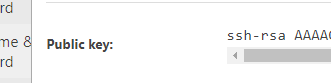
and if you "Show Secret Fileds", public key is not OK
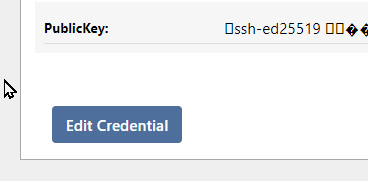
But ssh access is working fine

-
Hi @philippe-camelio_3885 ,
Just to confirm... is the issue just on the "Show Secret Fields" page?
SSH Keys are a little weird, in that they're stored in binary; so I think that page is mistakenly tryring to display that as a string (hence the block characters).
Cheers
Alana -
Hi
There are 2 bugs.
- when you display the secure cred, the public key is not properly written. it should be ssh-ed25519 instead ssh-rsa. The key itself is good.
- In the "Show secret" page, it should be a string.
But it is just visual, ssh connections are working fine.
Best regards
Philippe -
Thanks for clarifying @philippe-camelio_3885. I see the issue in the code now. I think it's been this way for quite a while

On the View Page, there seems to be some special handling for credentials;
return "ssh-rsa " + Convert.ToBase64String(cred.PublicKey);I'm just going to delete the
"ssh-rsa "bit, since apparently that can be incorrect. That's an SDK change actually, so it'll take a bit to be reflected in the products.On the View Secret Fields page, we're just coercing the value to a string:
return InedoLib.UTF8Encoding.GetString(bytes);That doesn't seem right either, but I'll just leave that as is. I know we redid that page in BuildMaster and eventually will bring to Otter.
There probably should really be a special page altogether for this type of credential, instead of using the generic "Edit credentials" page. Not a big priority but perhaps some day :)
-
@apxltd said in OT - SSH Secure Credentials Private Key ed25519:
Thanks for clarifying @philippe-camelio_3885. I see the issue in the code now. I think it's been this way for quite a while

Thanks for your reply


Hello! It looks like you're interested in this conversation, but you don't have an account yet.
Getting fed up of having to scroll through the same posts each visit? When you register for an account, you'll always come back to exactly where you were before, and choose to be notified of new replies (either via email, or push notification). You'll also be able to save bookmarks and upvote posts to show your appreciation to other community members.
With your input, this post could be even better 💗
Register Login