Welcome to the Inedo Forums! Check out the Forums Guide for help getting started.
If you are experiencing any issues with the forum software, please visit the Contact Form on our website and let us know!
[ProGet] Frontend resources for Proget GUI are not working
-
Hello,
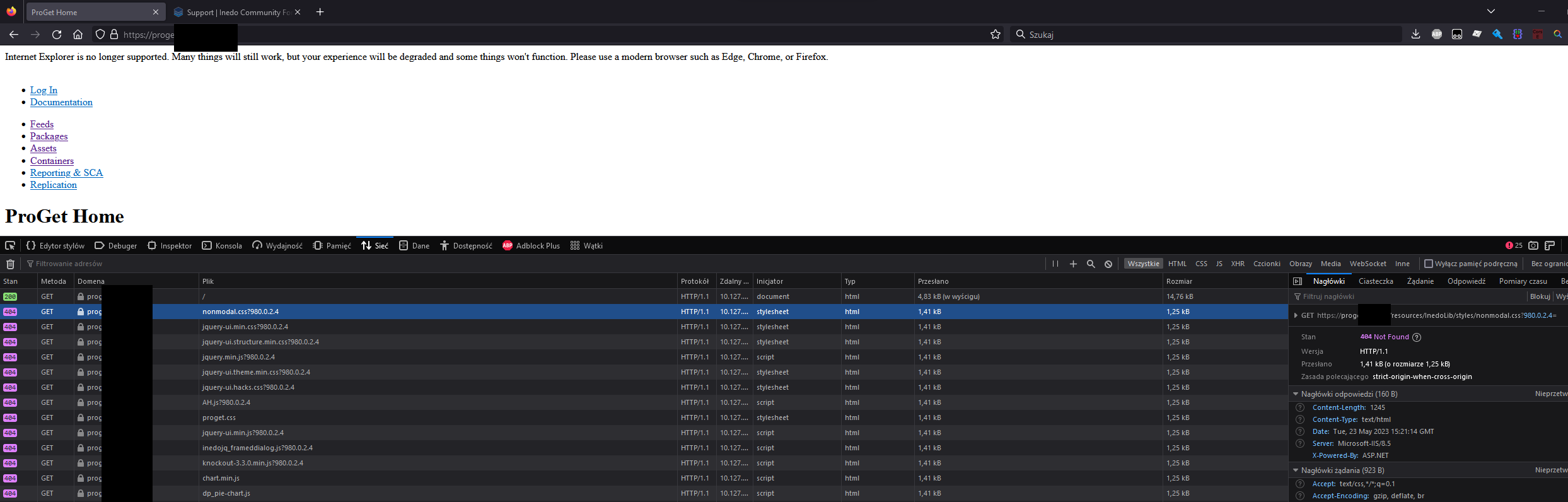
i was running ProGet 6.0.20 on my Windows Server 2012 R2 and IIS 8. Today I've upgraded to ProGet 2023.5 using Inedo Hub. Installation went smoothly without any errors. But right now js/css on ProGet GUI doesn't work. Rest of the application seems to function normally.
If you need any additional information feel free to ask.
Regards
KG -
hI @k-gosciniak_5741 ,
That's weird; I would try to restart the application pool. Then, try switching from "Classic" to "Integrated" (or vice versa) on the application pool. Both should work... but "Integrated" seems to work best.
Cheers,
Alana -
@atripp I've restarted application pool multiple times, restarted IIS, tried reinstalling Hosting Bundle, changed Classis and Integrated but nothing helped.
I've background in application development so I've also tried to changing order of IIS Modules and HTTP Handlers but there wasn't any difference. I've run ProGet with stdout enabled and it seems that requests for resources are not going through into the application. After digging around with Failed Request Tracing I was not able to pinpoint why it doesn't pass those request into the application.
Also in IIS Logs you can clearly see that there is 404
2023-05-23 16:47:58 10.127.38.22 GET /resources/InedoLib/jquery-ui-1.11.4/jquery-ui.structure.min.css 980.0.2.4 443 - 192.168.199.84 Mozilla/5.0+(Windows+NT+10.0;+Win64;+x64;+rv:109.0)+Gecko/20100101+Firefox/113.0 https://proget.####.pl/ 404 0 2 47 2023-05-23 16:47:58 10.127.38.22 GET /resources/InedoLib/jquery-ui-1.11.4/jquery-ui.theme.min.css 980.0.2.4 443 - 192.168.199.84 Mozilla/5.0+(Windows+NT+10.0;+Win64;+x64;+rv:109.0)+Gecko/20100101+Firefox/113.0 https://proget.####.pl/ 404 0 2 47 2023-05-23 16:47:58 10.127.38.22 GET /resources/InedoLib/jquery-ui-1.11.4/jquery-ui.hacks.css 980.0.2.4 443 - 192.168.199.84 Mozilla/5.0+(Windows+NT+10.0;+Win64;+x64;+rv:109.0)+Gecko/20100101+Firefox/113.0 https://proget.####.pl/ 404 0 2 47 -
Hi @k-gosciniak_5741,
Can you please try downgrading to a previous version of v2023 and then upgrading to the latest version again? Also, can you please verify that web site in IIS is pointing to
C:\Program Files\ProGet\Service?Thanks,
Rich -
@rhessinger yes, Application folder is set properly. Html is served correctly, there are only problem with assets like css/js.
I've tried downgrading and upgrading but that didn't help either. -
Hi @k-gosciniak_5741 ,
We've got no clue what's causing that, but definitely some kind of IIS configuration. Ultimately I don't think the request for that file is being passed into ProGet, but IIS is trying to find the file on disk instead (which it obviously won't be).
I would guess if you put a file on disk that file would be served via that URL. IT's just a guess.
Other things to look at ... MIME mappings, I've seen those do strange things. Maybe there's other IIS modules. It's really hard to guess.
It might just be easiest to switch to the Integrated Web Server; you can just uninstall / reinstall ProGet. That won't use IIS then.
Cheers,
Alana


Hello! It looks like you're interested in this conversation, but you don't have an account yet.
Getting fed up of having to scroll through the same posts each visit? When you register for an account, you'll always come back to exactly where you were before, and choose to be notified of new replies (either via email, or push notification). You'll also be able to save bookmarks and upvote posts to show your appreciation to other community members.
With your input, this post could be even better 💗
Register Login