Welcome to the Inedo Forums! Check out the Forums Guide for help getting started.
If you are experiencing any issues with the forum software, please visit the Contact Form on our website and let us know!
Basic arithmetic in OtterScript
-
Does OtterScript have any rudimentary arithmetic, beyond
$Incrementand$Decrement, or is it reserved only for specific statements?I was trying what I thought was a basic array lookup:
set @parts = $Split($FullPath, "/");
set @basename = $ListItem(@parts, $ListCount(@parts) - 1);
...and was told
Cannot convert property "Index" value "3 - 1" to Int32 type..I assume that means
$ListCount(@parts)was resolved to3and3 - 1could not be used as the second parameter to$ListItem.Subsequently...
set @basename = $ListItem(@parts, $Decrement($ListCount(@parts)));...did seem to work, but what if my arithmetic operation was more complex?
Do I really need to invoke PowerShell to do basic maths? It seems like overkill, especially in the context of a remote server connection.
If that really is the case, could an
$Expr(...)function be considered for the next version of the language, akin to TCL'sexpr{}function? e.g. allowing for$Expr((5 + 3) * 4 / 3^0.5)or$Expr($ListCount(@path) - 1)If it's not the case, and I've just missed something, could you advise the correct form?
-
Hi @jimbobmcgee,
OtterScript is a DSL and doesn't have a lot of "general purpose" things like maths, as you've noticed. This is by design.
But you can just use PowerShell for that; for example,
set $MyResult = $PSEval((5 + 3) * 4 / 3^0.5);There isn't any noticeable overhead.
PowerShell is probably also more suitable for string manipulation as well, especially when you're working with diskpaths and the like.
Cheers,
Alana -
@atripp said in Basic arithmetic in OtterScript:
There isn't any noticeable overhead.
This assumes I am orchestrating a system which can run PowerShell.
As it stands, to perform the
$PSEval, I'd first have tofor serverto a utility server (e.g. localhost) to run the PowerShell, thenfor serverback to the server I was actually orchestrating.Or I'd have to
$SHEvala call to something which can do maths, which is guaranteed to be on the target device (possiblybc, if POSIX) and capture stdout to get the result of the calculation.Rudimentary support for basic expressions would avoid that rather complex call, hence the feature request.
-
Hi @jimbobmcgee ,
You're right, you would have to switch to
localhost; however, you wouldn't have to "switch back". In other words, this would work fine:for server MyLinuxServer { set $MyResult = ""; for server localhost { $MyResult = $PSEval((5 + 3) * 4 / 3^0.5); } }You could wrap it in a Module, so you could do this:
call MyMaths ( compute: (5 + 3) * 4 / 3^0.5, results => $MyResults);Otherwise, if you were so inclined, you could create a variable functions in C# that could handle this as you'd expect. But that's quite complex (parsing it, finding a parsing library, etc.), and we're hesitant to explore this any further as a result.
Cheers,
Alana -
@atripp said in Basic arithmetic in OtterScript:
You're right, you would have to switch to localhost; however, you wouldn't have to "switch back"
But anytime I try to switch anywhere with
for server, I am met with:Server context switching is not allowed on this plan execution.I can only get
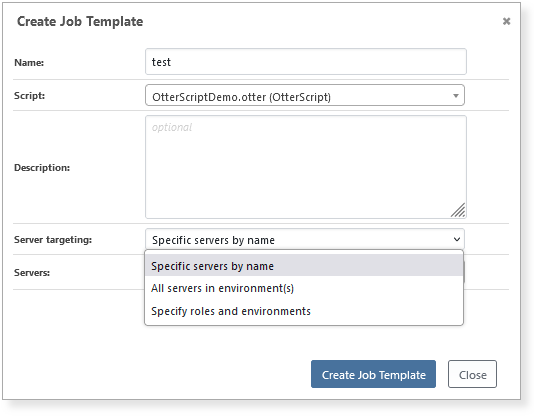
for serverto work if I run an ad-hoc job with Custom server targeting, but if I use ad-hoc jobs, I can't prompt for variables.I can only prompt for variables with a job template, but the option for Custom server targeting is not available in job templates.
So switching is indeed a pain, regardless of direction.
-
@jimbobmcgee said in Basic arithmetic in OtterScript:
I can only prompt for variables with a job template, but the option for Custom server targeting is not available in job templates.
That doesn't seem right! I'll investigate and report back :)
-
It didn't seem right to me either, so I assumed I was missing something obvious.
Am I right in saying that
for serveris only expected to work for Custom server targeting, though?And
for servercan take a scalar variable argument, such as...for server localhost { Log-Debug "some arbitrary stuff on the Otter server" set $serverIWantToConfigure = "TheServerIChoseInMyProperty"; for server $serverIWantToConfigure { Log-Debug "some arbitrary stuff on the server I want to configure" } } ...? -
Hi @jimbobmcgee,
I fixed this via OT-493 FIX; Custom Server Targeting should be selectable if the script type is OtterScript. It was a regression in the job template editor.
Am I right in saying that for server is only expected to work for Custom server targeting, though?
Correct; as of Otter v3 it's no longer supported in other scenarios.
And for server can take a scalar variable argument, such as...
Also correct, so the code you shared should work!

Hello! It looks like you're interested in this conversation, but you don't have an account yet.
Getting fed up of having to scroll through the same posts each visit? When you register for an account, you'll always come back to exactly where you were before, and choose to be notified of new replies (either via email, or push notification). You'll also be able to save bookmarks and upvote posts to show your appreciation to other community members.
With your input, this post could be even better 💗
Register Login