Welcome to the Inedo Forums! Check out the Forums Guide for help getting started.
If you are experiencing any issues with the forum software, please visit the Contact Form on our website and let us know!
Two PowerShell Gallery packages shown in all feeds
-
When I create a PowerShell feed with a PSGallery connector it always shows two packages.
0004-New-AzureRmVmAvailabilitySetPsg and 0install.There doesn't appear to be anyway to remove these packages.
Is there a way to fix this?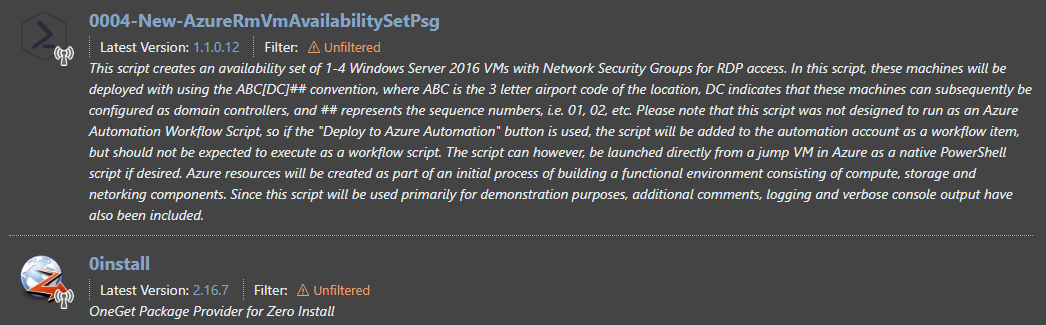
-
Hi @richard-carpenter_9650 ,
When you add a connector to your feed, it will display the packages from those connectors. There's no way to "remove" these packages, since they're on the PowerShell Gallery. But you can always add "connector filters" to show a subset of packages (by name).
The PowerShell recently changed the API sort order to show packages alphabetically (instead of by download count), which is why you see those packages first.
Cheers,
Steve -
@stevedennis Thanks for the reply. I understand that these packages aren't in my feed and are displayed from PSGallery.
PSGallery contains thousands of packages. Why are just these two packages displayed?
Neither package has been downloaded and caching is disabled. I would expect to only see the packages I have added to the feed. This was true in previous versions of ProGet.
This just seems odd to me.I'll take a look at filtering.
Thanks for the suggestion. -
Hi @richard-carpenter_9650 ,
Thanks for confirming that; that is really strange. I just tried it msyefl and got the same result.
The technical answer is that PowerShell gallery is sorting the feed alphabetically, and is only returning the top 100 entries. Of those entries, all but two are unlisted. So that's all you see.
Not a great UX, so hopefully it goes away (i.e. they return the default sort order by downloads), or maybe we can sort differently ourselves. We're not too keen to change this, since it's the "very sensitive" legacy NuGet v2 API, but perhaps in v2023 we can alter this.
Cheers,
Steve

Hello! It looks like you're interested in this conversation, but you don't have an account yet.
Getting fed up of having to scroll through the same posts each visit? When you register for an account, you'll always come back to exactly where you were before, and choose to be notified of new replies (either via email, or push notification). You'll also be able to save bookmarks and upvote posts to show your appreciation to other community members.
With your input, this post could be even better 💗
Register Login