Welcome to the Inedo Forums! Check out the Forums Guide for help getting started.
If you are experiencing any issues with the forum software, please visit the Contact Form on our website and let us know!
Docker image arguments AWS
-
Hello, i am trying to run ProGet on AWS Fargate using the latest image:
proget.inedo.com/productimages/inedo/proget:latesti want to pass arguments to the service but it seems the docker image does not accept the documented ones:
/usr/local/proget/service/ProGet.Service,run,-e SQL_CONNECTION_STRING='Data Source=xxxxxx.d.ap-southeast-2.rds.amazonaws.com; Initial Catalog=ProGet; User ID=admin;Password=xxxxxxxxx'
whats are the correct arguments to pass to the docker image in aws?
Cheers.
-
Hi @Chester0 ,
I'm really not familiar with AWS Fargate, but it looks like this is how you're supposed to pass environment variables: https://docs.aws.amazon.com/AmazonECS/latest/developerguide/taskdef-envfiles.html
It's likely you'll need to specify other configuration differently. Our documentation breaks down what each of the configuration parameters are: https://docs.inedo.com/docs/installation-linux-docker-guide
Once you get up and running, we'd love to hear you got things set up :)
Cheers,
Alana -
Trying to replicate the documentation:
docker run -d --name=inedo --restart=unless-stopped
-v proget-packages:/var/proget/packages -p 80:80 --net=proget
-e SQL_CONNECTION_STRING='Data Source=inedo-sql; Initial Catalog=ProGet; User ID=sa; Password=«YourStrong!Passw0rd»'
proget.inedo.com/productimages/inedo/proget:latest
with environment variables, seems to have no effect
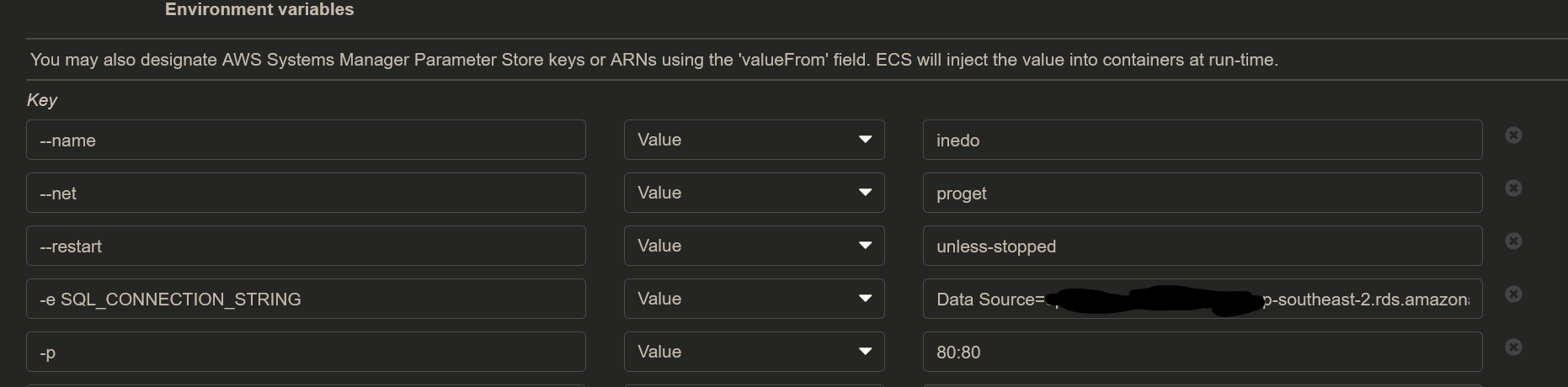
and still using the default connection string looks like:

-
Hi @Chester0 ,
That screenshot appears to be the place where you configure environment variables? There's just one environment variable, and it's
SQL_CONNECTION_STRING. The-eindicates to docker client that it's an environment variable, and isn't part of the environment variable name.The rest are other configuration options that instruct the docker client to work in one way or another. They're not environment variables. This is kind of complex to configure use unless you really know Docker inside-and-out, and know how to apply concepts to another engine.
You may wish to use Lightsail and Windows. The costs are about the same, and the Inedo Hub is much easier to work with:
https://docs.inedo.com/docs/proget-how-to-install-on-aws-lightsailCheers,
Alana -
@atripp got it working without the -e, just using SQL_CONNECTION_STRING for the variable.
Thanks for your help!

Hello! It looks like you're interested in this conversation, but you don't have an account yet.
Getting fed up of having to scroll through the same posts each visit? When you register for an account, you'll always come back to exactly where you were before, and choose to be notified of new replies (either via email, or push notification). You'll also be able to save bookmarks and upvote posts to show your appreciation to other community members.
With your input, this post could be even better 💗
Register Login