Welcome to the Inedo Forums! Check out the Forums Guide for help getting started.
If you are experiencing any issues with the forum software, please visit the Contact Form on our website and let us know!
Git repo raft showing as empty
-
Hi
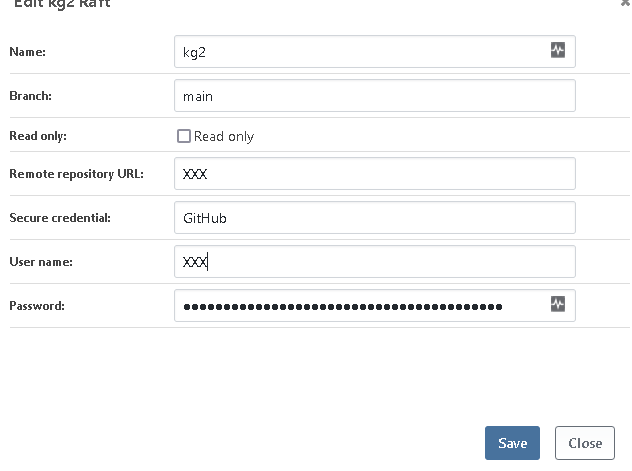
I installed Otter 2022 and it looks good, but back to square one with the git raft not showing contents. Attached is the configuration but I hace x'd out sensitive details. The repo is the Git repo one of the engineers linked to in my other thread, and has a /scripts folder.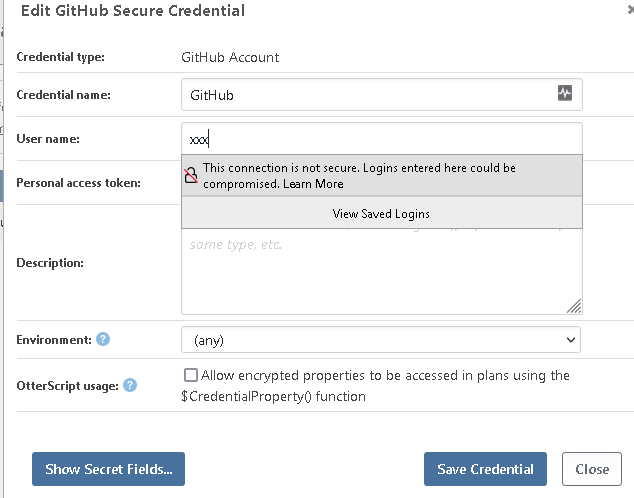
-
Hi @gurdip-sira_1271 ,
We don't think anything changed with regards to Git Rafts & Otter v2022, and don't have any issues on our end with them.
Is this a new instance with them or something?
Cheers,
Alana -
New instance yup, completely fresh install. Could you provide end-to-end instructions on how to do this? As when I got this working previousy it was after trying many things so wasn't clear what fixed it.
-
Hi @gurdip-sira_1271,
If you navigate to Administration -> Raft Repositories, then click "browse" to the right of your Git repository, does your raft load or do you get an error?
Also a couple of notes:
- You should not enter a user name and password if you are using a Secure Credential. These may be conflicting.
- Git rafts use the generic git extension, so you will need to use a Username & Password credential instead of a GitHub Credential
- Just enter your PAT as the password
- You may need to recreate your raft repository because clearing the password field normally just marks it as unchanged
Please give these a try (including browsing in your git raft) and see if that works for you.
Thanks,
Rich -
@rhessinger said in Git repo raft showing as empty:
Git rafts use the generic git extension, so you will need to use a Username & Password credential instead of a GitHub Credential
Git rafts use the generic git extension, so you will need to use a Username & Password credential instead of a GitHub Credential
This is actually what fixed it! Just before your post, I tried this. The textbox text for the password says from a username/password so that was a clue!
However, my problem now is that in my raft (in the scripts folder), I have ps1 scripts but when I have an otter file, in the GUI, I can't see these scripts?
Remember, the git repo is a copy of the Otter example one that was posted in the other thread I made.
-
Ok so I can see the files in my raft, in the scipts page now, and in general in the otter script options. I think there must be a scheduled job for them to show? However, when i select one I get this error:
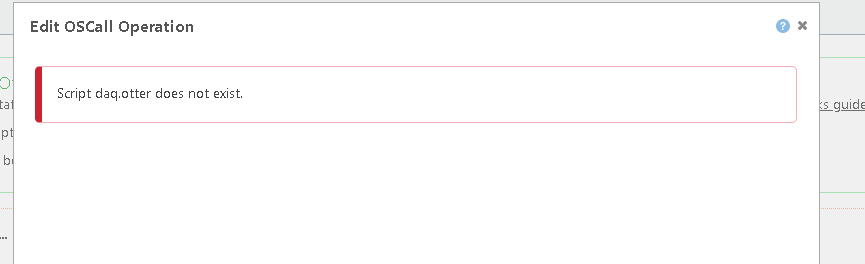
Any ideas?
-
Hi @gurdip-sira_1271,
Can you share your OtterScript for that operation? Or does this happen when you try to add that OtterScript script as an operation?
Thanks,
Rich -
Happens with vany file in the raft, eg any Powershell script and any blank Otterscript.
-
Hi @gurdip-sira_1271,
Thanks for sending over the information. I have identified the issue, OT-472, and we plan to release a fix in Otter 2022.3 that is due out next Friday. I'll let you know if anything changes.
Thanks,
Rich -
Hi guys is this release still scheduled?
-
Hi @gurdip-sira_1271,
Yes, this will be released with Otter later today.
Thanks,
Rich


Hello! It looks like you're interested in this conversation, but you don't have an account yet.
Getting fed up of having to scroll through the same posts each visit? When you register for an account, you'll always come back to exactly where you were before, and choose to be notified of new replies (either via email, or push notification). You'll also be able to save bookmarks and upvote posts to show your appreciation to other community members.
With your input, this post could be even better 💗
Register Login