Welcome to the Inedo Forums! Check out the Forums Guide for help getting started.
If you are experiencing any issues with the forum software, please visit the Contact Form on our website and let us know!
Unable to read data from the transport connection
-
Hi,
I want to replace our existing ProGet server (version 5.1.7 (build 2)) with a new ProGet server (version 6.0.11(build 25)). The two servers are installed in a DMZ.
When I try to download a package from our Nexus server (repository server) via the new ProGet server, I keep getting "network error" errors. Downloading via the old server works.
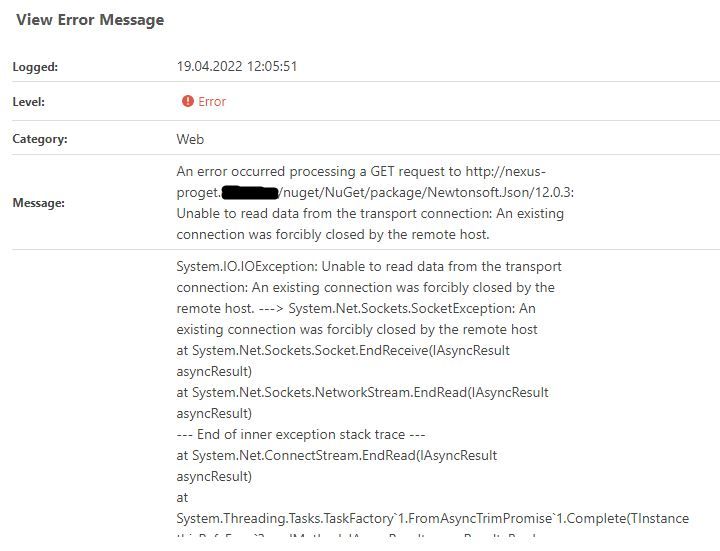
I have made the proxy settings via manual mode. Via the test button I get a "success" for a valid URL. If I set the proxy to "Windows proxy settings", I only get errors. The Windows proxy settings are set with "netsh winhttp set proxy" and additionally via the Windows interface. I got a message from our network team that I could not get through the proxy. However, I can surf through an internet browser without any problems.
Do I have a missing setting regarding proxy or have I forgotten to configure something. I hope you can give me a hint.
thanks
Gert -
Hi @g-koessler_0127 ,
This is a networking error, and it basically means that the remote server (
http://nexus-proget.???) abruptly disconnected. There is no additional information provided by the remote server, so the networking stack (Windows/.NET) provides only this information.This is almost always related to server-level security settings (HTTPS required, TLS settings on the ProGet server, certificate trust, etc.), but it also might be related to network-level settings like url restrictions, proxy servers, etc.
Ultimately I'm afraid it's not easy to troubleshoot - this is typically something that the network operations needs to help with, as they have tools and are familiar with restrictions placed on servers, and they can resolve them.
I'm hoping this at least points you in the right direction?
-
Hello dean-houston,
thank you very much for your answer. I have been able to solve the problem with our network team. The networkers had to make one more setting in the proxy.
thx

Hello! It looks like you're interested in this conversation, but you don't have an account yet.
Getting fed up of having to scroll through the same posts each visit? When you register for an account, you'll always come back to exactly where you were before, and choose to be notified of new replies (either via email, or push notification). You'll also be able to save bookmarks and upvote posts to show your appreciation to other community members.
With your input, this post could be even better 💗
Register Login