Welcome to the Inedo Forums! Check out the Forums Guide for help getting started.
If you are experiencing any issues with the forum software, please visit the Contact Form on our website and let us know!
Create a BuildMaster cluster of two odes on OpenShift
-
Hi,
I've managed to create a BuildMaster cluster of two nodes on OpenShift.
It seems to work correctly except that there is a issue configuring the service messenger. Only one is working.
I mean that on the cluster management window, I see one node with:
- Service messenger: tcp://buildmaster-0:4242
and the other with:
- Cannot connect to service messenger: tcp://buildmaster-1:4242
The value for Service.MessengerEndpoint is:
- Service.MessengerEndpoint=tcp://buildmaster-0:4242
What is wrong?
What I did is to create a StatefulSet, just to have fixed pod names. Here is the yaml:
apiVersion: apps/v1 kind: StatefulSet metadata: annotations: openshift.io/generated-by: OpenShiftNewApp labels: app: buildmaster name: buildmaster namespace: gcloud-services-prod-infra-adc spec: replicas: 2 selector: matchLabels: app: buildmaster serviceName: buildmaster template: metadata: labels: app: buildmaster spec: containers: - image: gcloud-docker-release.repo.gcloud.KRAMERICA.COM/inedo/buildmaster:7.0.17 imagePullPolicy: IfNotPresent name: buildmaster env: - name: BUILDMASTER_SQL_CONNECTION_STRING value: "Data Source=dbtest.services.gcloud.KRAMERICA.COM,50000; Initial Catalog=BM01; User ID=sa; Password=hunter42" - name: ASPNETCORE_URLS value: "http://0.0.0.0:8080" ports: - containerPort: 8080 protocol: TCP volumeMounts: #- mountPath: /var/buildmaster/artifacts # name: buildmaster-volume-1 #- mountPath: /var/buildmaster/extensions # name: buildmaster-volume-2 - mountPath: /var/buildmaster name: buildmaster-volume-nfs dnsPolicy: ClusterFirst restartPolicy: Always schedulerName: default-scheduler securityContext: {} terminationGracePeriodSeconds: 30 volumes: - name: buildmaster-volume-nfs nfs: server: maaalab-001.services.gcloud.KRAMERICA.COM path: /var/opt/nfs/buildmaster #- emptyDir: {} # name: buildmaster-volume-1 #- emptyDir: {} # name: buildmaster-volume-2 triggers: - type: ConfigChange </pre> -
Hi @marc-ledent_9164 , sorry on the slow reply, I wasn't so familiar with OpenShift so I wanted to research a little.
First, I think your
Service.MessengerEndpointshould betcp://*:4242, because you don't know which node will be active. It might bebuildmaster-0, but it might not.What also isn't clear, do you need to "open" or otherwise map port
4242? I'm thinking the service messager is working on the node that can connect to itself, but the nodes aren't communicating over the internal network.Cheers,
Alana -
I have to admit that I don't understand clearly the communication scheme between the different components of BuildMaster.
However, I changed the messenger endpoint to tcp://*:4242 and things are working better.
However, I still have the red banner indicating that :
More than half of the servers are in an error state, consider restarting the BuildMaster service.But when I click to the ling, everything looks OK
-
Hi @marc-ledent_9164,
The high-availability / cluster configuration can be a little tricky... but glad that changing it worked.
The message "More than half of the servers are in an error state, consider restarting the BuildMaster service." must be a cached error message? We try to detect if there's a major problem with the service / agents, and then trigger that message.
Can you try to restart the BuildMaster service on each of the nodes, and see if it goes away?
Cheers,
Alana -
Hi Alana,
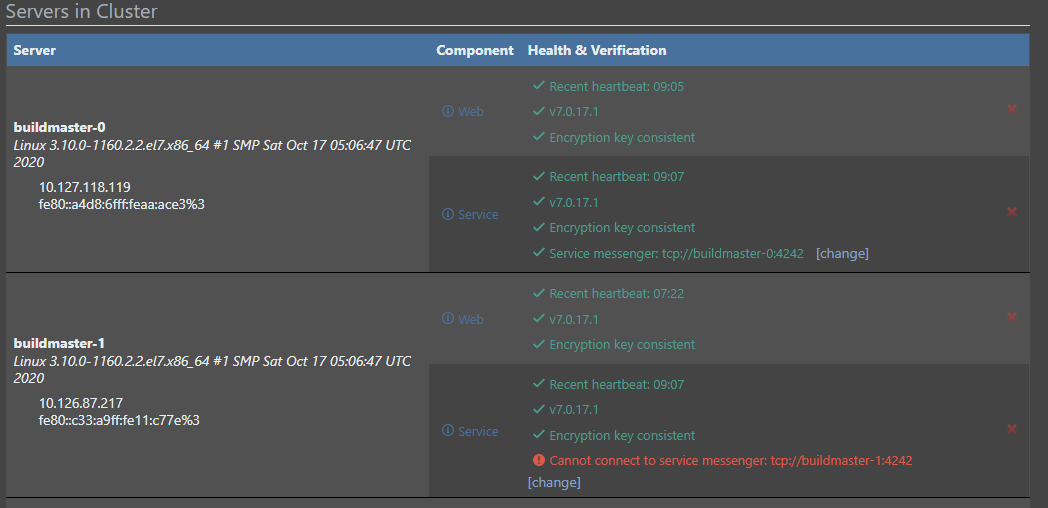
On the BuildMaster Cluster overview page, I see for buildmaster-0 pod:
Service messenger: tcp://buildmaster-0:4242which is OK, but for buildmaster-1 pod:
Cannot connect to service messenger: tcp://buildmaster-1:4242So there is a 'connection' from buildmaster-0 (web?) to 'buildmaster-0' service on port 4242 , but the buildmaster-1 (web?) tries to connect to buildmaster-1 service on port 4242 which of course fails. This is really confusing.
The question is: what is running in each pod/container?
-
Hi @marc-ledent_9164,
Each container will run a service and web server. The web application will connect to the service over tcp on that port specified (in this case 4242). We call this the Service Messenger. The container will also communicate to the other container's services in the cluster via that that port as well (4242 in your case). When you have BuildMaster configured as a cluster, it will not only provide high availability that way, but it also will distribute the background processes (like deployment plans) amongst all the services to orchestrate the communication to the Inedo Agents.
You can customize the connection on each container's service by clicking the [change] button on each service. Once that has been changed, it will then use the specific configuration instead of the global configuration.
With all of that being said, we have fond that certain rootless container systems (lik podman) will run into port conflicts if you have two containers trying to share the same port on the same server. I'm not sure if open shift has the same restriction, but that may be the reason you are seeing the communication error.
Hope this helps!
Thanks,
Dan -
@Dan_Woolf Thanks for the explanation. I'll try it as soon as I can re-activate my trial license...


Hello! It looks like you're interested in this conversation, but you don't have an account yet.
Getting fed up of having to scroll through the same posts each visit? When you register for an account, you'll always come back to exactly where you were before, and choose to be notified of new replies (either via email, or push notification). You'll also be able to save bookmarks and upvote posts to show your appreciation to other community members.
With your input, this post could be even better 💗
Register Login